Skip to content

Feedback

Got an idea for Lay Theme? I might include it in a new update or code an addon.
489 Topics 2.1k Posts
  • Feature request: Link entire text box

    4
    2
    0 Votes
    4 Posts
    307 Views
    RichardR
    Dear @danny Have replied via your other Thread if this is all good šŸŒ http://laythemeforum.com/topic/7628/link-entire-text-box/2 Best Richard
  • Ankerpoints

    1
    0 Votes
    1 Posts
    32 Views
    No one has replied
  • User posting / disable gridder for specifict posts or categories?

    11
    0 Votes
    11 Posts
    719 Views
    RichardR
    Dear @jbcd2022 Great, i'm happy i cant provide some solution and we can test and see if this works for you šŸŒ Send me an email via licensekeys@laytheme.com with reference to this thread and i'll set up the download links for you. It should be noted that the Carousel Addon works only within Lay Theme and not within Lay Gridder. Have a wonderful day & talk soon Richard

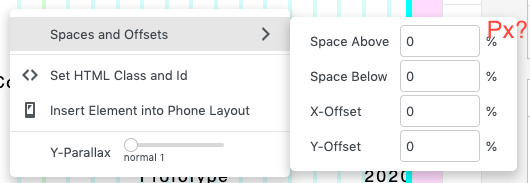
  • Offset objects via pixels

    3
    1
    1 Votes
    3 Posts
    147 Views
    RichardR
    Thanks @fabiandraxl ! šŸ‘
  • Move rows together

    2
    1 Votes
    2 Posts
    72 Views
    RichardR
    Dear @dmncn Thanks for your feedback, added to the development notes and forwarded āœ… Thank you for supporting Lay Theme & have a wonderful day ✨ Richard
  • Project Index Year

    2
    0 Votes
    2 Posts
    391 Views
    RichardR
    Dear Antonia @ton Even though your project's were uploaded recently so they all say 2021 etc. You can change the upload date manually via > Published > edit: [image: 1641758592722-screen-shot-2022-01-10-at-9.01.34-am-resized.png] Now this project will appear under 2019 in my project index. Hope this helps and have a wonderful day 🌻 Richard
  • Media Library Assistant Bulk actions Edit missing

    4
    2
    0 Votes
    4 Posts
    145 Views
    RichardR
    Thanks for the update @ibuybuy best wishes 🌻
  • Background image in carousel

    2
    0 Votes
    2 Posts
    112 Views
    RichardR
    Dear @kyrill Its in the development notes now for future consideration āœ… Best wishes ✨ Richard
  • Tag Filter filtering criteria

    2
    1 Votes
    2 Posts
    113 Views
    RichardR
    Dear @Warul-Kawa Very Valid suggestion! i have emailed Armin directly with your message, I will keep you updated 🌻 Best wishes Richard
  • Option to use the same image caption for lightbox and 'non lightbox'

    5
    2 Votes
    5 Posts
    360 Views
    D
    Hey @mariusjopen , has the missing hover on mobile somehow been solved yet?
  • Phone Gridder - almost imposible to work with when fonts are not adapted

    6
    0 Votes
    6 Posts
    233 Views
    arminunruhA
    hey @Richard this should have been a "please send login info to armin" kind of case. @treh16 can you send your website address, /wp-admin/ username and password and a link to this topic to info@laytheme.com?
  • Font Sampler plugin

    9
    0 Votes
    9 Posts
    1k Views
    RichardR
    Thanks @gunesmu good to know!!! šŸŒ
  • 0 Votes
    6 Posts
    296 Views
    RichardR
    @contact No worries Patrick! have an amazing day, thank you for supporting Lay Theme šŸŒ
  • Fullscreen Slider, Mobile Navigation

    navigation mobile fullscreenslide swipe
    3
    0 Votes
    3 Posts
    329 Views
    arminunruhA
    but swiping works right? yeah i think its a good idea
  • Scroll-responsive title/logo and header ?

    4
    0 Votes
    4 Posts
    189 Views
    RichardR
    Best of luck Thomas šŸ’„ @thomasmaier
  • Suggestion: vertical stripes

    2
    0 Votes
    2 Posts
    53 Views
    RichardR
    Dear Hayo @Hayo-Gebauer Its now saved in the development notes! šŸŒ Best wishes Richard
  • Hide the Subpage for project thumbnails?

    2
    0 Votes
    2 Posts
    59 Views
    RichardR
    Dear @BUR_STEFF This is possible šŸŒ Because the project thumbnail is a 'link' (wrapped around an image) , by disabling the link you wont be able to reach/click the subpage. You will see online many people advise against disabling links as 'good web practice' but for your reason i think its fine. Adding the following code into > Lay Options > Custom CSS & HTML > CSS Should do the trick! . .thumbnail-wrap a{ pointer-events: none; cursor: default; } https://laytheme.com/documentation.html#custom-css-styling When you are ready to have the links functioning again, you can just remove the code. Let me know how you go & best wishes šŸ– Richard
  • ::NEED HELP:: why is my website with a viewport of 768px not visible?

    5
    0 Votes
    5 Posts
    151 Views
    RichardR
    Great to hear @dominik , best wishes and have a great day! šŸŒ
  • Row Height Options

    13
    0 Votes
    13 Posts
    1k Views
    RichardR
    Dear @Lucas-G Looking into Viewport Units would likely be very helpful šŸŒ You can calculate dimensions based on your browsers screen size = VH & VW ( Viewport Heights & Viewport Width ). https://www.w3schools.com/cssref/css_units.asp Also this should help when needing to apply this CSS to Lay Theme Elements: https://laytheme.com/documentation.html#custom-css-styling Hope this helps and have a wonderful day Lucas šŸŒ Sincerely Richard
  • This topic is deleted!

    1
    0 Votes
    1 Posts
    5 Views
    No one has replied

I also code custom websites or custom Lay features.
šŸ’æ Email me here: šŸ’æ
info@laytheme.com

Our Web Development company: 100k.studio

Want to tip me? https://www.paypal.com/paypalme/arminunruh

Before you post:
  1. When using a WordPress Cache plugin, disable it or clear your cache.
  2. Update Lay Theme and all Lay Theme Addons
  3. Disable all Plugins
  4. Go to Lay Options → Custom CSS & HTML, click "Turn Off All Custom Code", click "Save Changes"

This often solves issues you might run into

When you post:
  1. Post a link to where the problem is
  2. Does the problem happen on Chrome, Firefox, Safari or iPhone or Android?
  3. If the problem is difficult to explain, post screenshots / link to a video to explain it
Online Users
Forgot your key, lost your files, need a previous Lay Theme or Addon version? Go to www.laykeymanager.com