Skip to content

Bug Reports

Something is not working? Please provide a screenshot, your browser name and browser version and your operating system.
3.2k Topics 14.9k Posts
  • Footer issue (showing up twice or loosing elements)

    2
    3
    0 Votes
    2 Posts
    94 Views
    arminunruhA
    oh yea that shouldn't happen can you send your website address, /wp-admin/ username and password and a link to this topic to info@laytheme.com?
  • php error uninitialized string

    2
    0 Votes
    2 Posts
    192 Views
    arminunruhA
    ok probably there is a color somewhere that was deleted and doesnt contain anything. will release an update later today that fixes this
  • This topic is deleted!

    1
    0 Votes
    1 Posts
    6 Views
    No one has replied
  • carousel content (webp) extrem slow at first load on mobile

    4
    0 Votes
    4 Posts
    249 Views
    albrechtA
    @arminunruh no all carousel item oin the frontpage. but its working fine now! dont now why it was like this.
  • Overlay feature

    2
    0 Votes
    2 Posts
    160 Views
    arminunruhA
    ah sure will release an update today that will suppress these warnings everything is fine its just this one php function i use is very strict about how the html is formed and then spawns lots of warnings
  • This topic is deleted!

    1
    1
    0 Votes
    1 Posts
    2 Views
    No one has replied
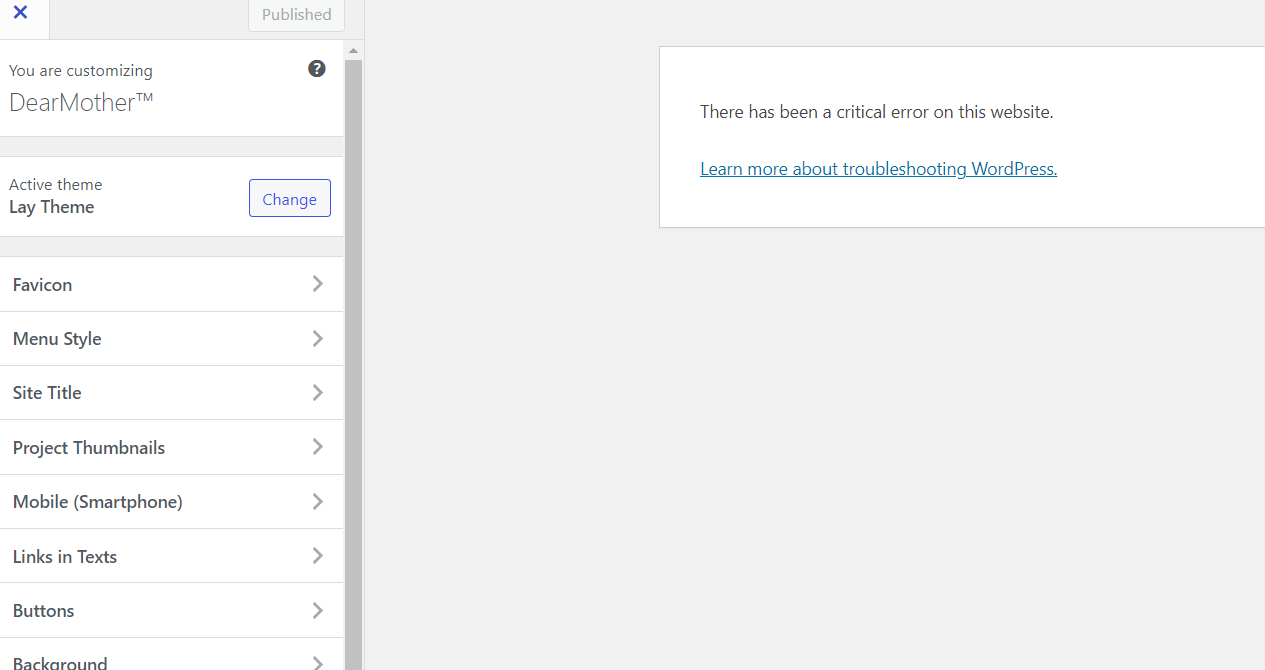
  • help: critical error on website after tweaking font size

    8
    0 Votes
    8 Posts
    512 Views
    A
    @arminunruh I've just sent you the log in credentials. Unfortunately the Wordpress recovery mode log in link is only active for 24 hours. After that you'd need a new one. Thanks so much in advance for your time and help with this! It's much appreciated.
  • front page missing from customize menu

    2
    1
    0 Votes
    2 Posts
    75 Views
    arminunruhA
    i see! can you go to settings → reading [image: 1694075874973-screenshot-2023-09-07-at-10.37.50.png] then click "your latest posts" try that, lmk if it worked
  • GRIDDER IS NOT SHOWING ON CERTAIN PAGES

    2
    1
    0 Votes
    2 Posts
    72 Views
    arminunruhA
    oh can you send your website address, /wp-admin/ username and password and a link to this topic to info@laytheme.com?
  • Footer randomise

    3
    0 Votes
    3 Posts
    268 Views
    S
    @arminunruh Hey, thanks for the quick reply!
  • News posts not loading

    7
    0 Votes
    7 Posts
    220 Views
    W
    No worries. I just disabled the fullscreen slider plugin since I didn't see a new update + I don't use it on the website anyways and that seems to have worked!
  • images don’t show

    5
    2
    0 Votes
    5 Posts
    333 Views
    peterwolffP
    @arminunruh thank you so much!
  • Carousel in overlay is not visible until first click

    9
    0 Votes
    9 Posts
    612 Views
    J
    @arminunruh Great!! Now it works just fine. Thank you for fixing it <3
  • Overylay background bug

    5
    0 Votes
    5 Posts
    474 Views
    arminunruhA
    #lay-overlays #grid{ background-color: transparent!important; } .lay-overlay > .lay-content{ background-color: transparent!important; } sure just on chrome, right click the overlay, inspect element and get the appropriate css selector [image: 1693899662788-screenshot-2023-09-05-at-09.39.39.png] the css u used is this: #lay-overlays #grid.id-37 { background-color: transparent!important; } .lay-overlay > .lay-content { background-color: transparent!important; } however, you need to use #grid.id-18: #lay-overlays #grid.id-18 { background-color: transparent!important; } .lay-overlay > .lay-content { background-color: transparent!important; }
  • URL - rewriting for offloaded images is breaking the images

    3
    0 Votes
    3 Posts
    162 Views
    arminunruhA
    sure i just installed the plugin myself and fixed it will release the update later today
  • Arrows - Full screen slider, Overlay menu, image hover

    3
    0 Votes
    3 Posts
    244 Views
    arminunruhA
    ah i see why it might be the case can you install the plugin "really simple ssl"? you changed your url from http to https by activating SSL now some things cant load cause they're trying to get loaded over http still
  • News element: showing only one news on phone, full list on desktop

    4
    2
    0 Votes
    4 Posts
    159 Views
    arminunruhA
    glad you fixed it is not set in stone do you mean when it was not saved?
  • page links not 'clickable' on mobile safari & chrome? only on one page...

    2
    0 Votes
    2 Posts
    176 Views
    arminunruhA
    i see! at the moment ios safari seems to be quite stubborn first i'd try disable all plugins and turn off all custom code: Disable all Plugins Go to Lay Options → Custom CSS & HTML, click "Turn Off All Custom Code ", click "Save Changes" if that didn't do the trick: can you send your website address, /wp-admin/ username and password and a link to this topic to info@laytheme.com?
  • Google Chrome

    9
    1
    0 Votes
    9 Posts
    473 Views
    CKC
    @arminunruh Yes, it was like that :)
  • 9:16 Video thumbnails cropped square

    6
    1
    0 Votes
    6 Posts
    410 Views
    arminunruhA
    @yelmarb said in 9:16 Video thumbnails cropped square: Just one thing though, and that is that the gridder will not allow the video thumbnail to be anything but square (when it's a 9:16 video). Is that a WordPress issue? Would be great if they can sort that out if so. yes yea thats just a fix for the frontend

For paid 1-on-1 Lay Theme Coaching, contact Audrey (audrey@cyberslayers.work) or me (info@laytheme.com).

We also code custom websites or bespoke Lay features. Drop me a line at info@laytheme.com or check out my work at arminunruh.com.

Want to support my work? paypal.me/arminunruh

Before you post:
  1. When using a WordPress Cache plugin, disable it or clear your cache.
  2. Update Lay Theme and all Lay Theme Addons
  3. Disable all Plugins
  4. Go to Lay Options → Custom CSS & HTML, click "Turn Off All Custom Code", click "Save Changes"

This often solves issues you might run into

When you post:
  1. Post a link to where the problem is
  2. Does the problem happen on Chrome, Firefox, Safari or iPhone or Android?
  3. If the problem is difficult to explain, post screenshots / link to a video to explain it
Online Users
Forgot your key, lost your files, need a previous Lay Theme or Addon version? Go to www.laykeymanager.com