Skip to content

General Discussion

A place to talk about anything Lay Theme related
5.0k Topics 21.6k Posts
  • Mouseover images on project thumbnails not visible on mobile

    9
    0 Votes
    9 Posts
    1k Views
    arminunruhA
    hey there! sry so i looked at it now. and it seems to work correctly. which browser do u use on your phone and which phone?
  • Multilanguage problem with home page (Polylang)

    32
    1 Votes
    32 Posts
    8k Views
    arminunruhA
    actually yea this is a bug. i just fixed it, will be released with the next update. sorry this wasn't fixed for so long, this is actually a pretty bad/important bug :O :O
  • Element Grid image captions

    2
    1
    0 Votes
    2 Posts
    291 Views
    arminunruhA
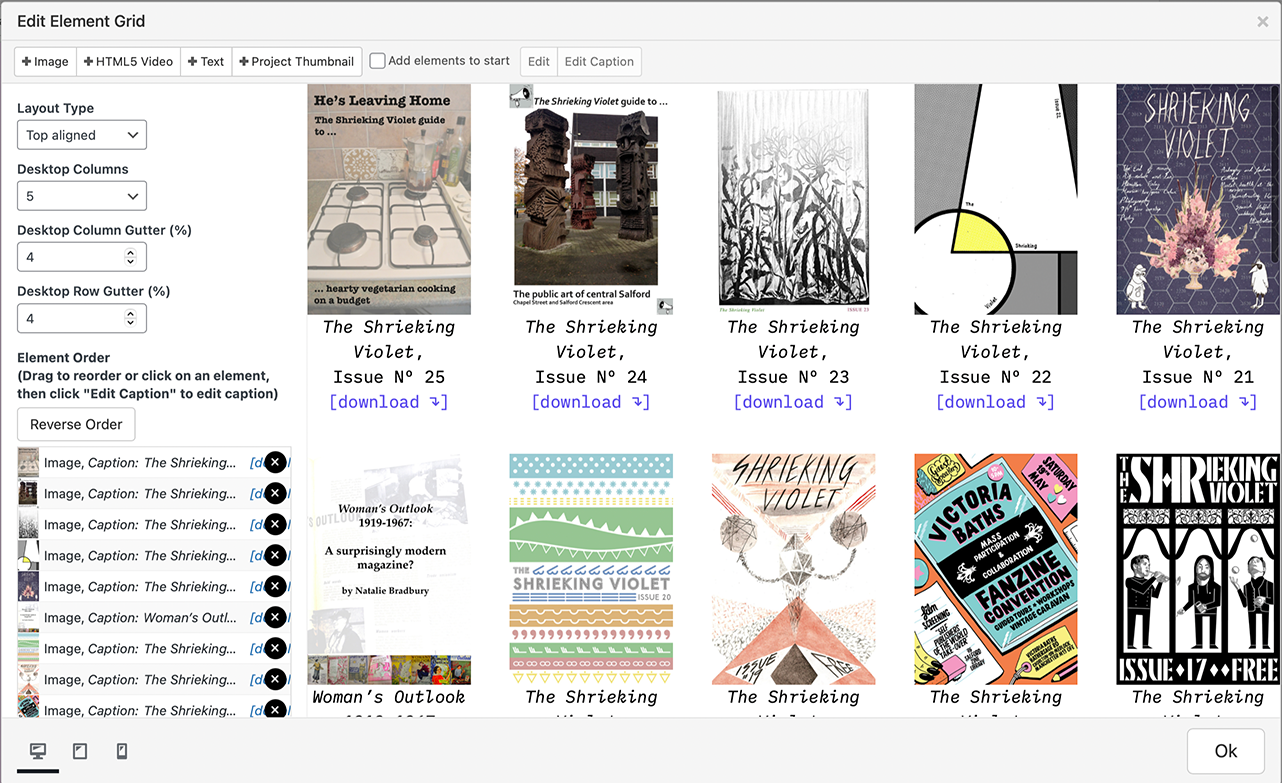
    u need to click on one image on the left like here: [image: 1655742123051-screenshot-2022-06-20-at-18.21.35.png]
  • SEO Tools for Lay Theme

    2
    0 Votes
    2 Posts
    202 Views
    arminunruhA
    its not an error, yoast just cant read the text elements of lay theme cause yoast wasn't coded to like read the texts of lay theme other than that you can still use yoast maybe read a seo book to find out what seo is about. its a lot about content i think
  • CHANGE COLOR OF FULL SCREEN SLIDER ARROWS FOR BLACK ROWS

    3
    0 Votes
    3 Posts
    302 Views
    G
    hi. thanks for your reply. i don‘t want to target the row — i want to target the arrows in order to apply the »filter: invert(100%)« code. … like i managed for the header elements. any hints? would be great. all best. gregor
  • Carousel / position of images

    3
    0 Votes
    3 Posts
    106 Views
    B
    :) THANK YOU! I've looked through its but did not find it at first...
  • On Scroll Site Title Image Change

    6
    0 Votes
    6 Posts
    440 Views
    arminunruhA
    maybe try: $blackRows.each(function(){ var rect = this.getBoundingClientRect(); var style = this.currentStyle || window.getComputedStyle(this); var marginBottom = parseInt(style.marginBottom, 0) if(rect.top - offset < 0 && rect.bottom + marginBottom - offset > 0){ $nav.addClass("white"); jQuery(".sitetitle img").attr("src", "https://alicjaboss.com/wp-content/uploads/2022/06/logo_hell.png"); return false; }else{ $nav.removeClass("white"); jQuery(".sitetitle img").attr("src", "https://alicjaboss.com/wp-content/uploads/2022/06/logo_dark.png"); } });

  • POSITION FIXED FOR TEXTLEMENTS CSS

    7
    0 Votes
    7 Posts
    1k Views
    G
    hi richard. all good — thanks. i just placed and styled the elements in Custom HTML at top. … that worked. best! gregor
  • Layers / z-index

    3
    1 Votes
    3 Posts
    297 Views
    B
    When positioning e.g. two images, or text and image, and change the x- and-y-coordinates so two elements overlap, I want to be in charge of what layer is above or beyond the other – did I make it clear? :)
  • lay theme update issues

    16
    3 Votes
    16 Posts
    2k Views
    K
    @arminunruh thanks dude!!
  • Site Title Image, Image Change Mousover?

    3
    2
    0 Votes
    3 Posts
    280 Views
    L
    @Richard thank you! i tried to change a png-title on mouseover. now i figured out a CSS solution working fine: .sitetitle:hover { content: url("https://www.mypage.de/wp-content/uploads/2022/logo_v2.png");width:16vw; }
  • Anchorscroll Speed

    2
    0 Votes
    2 Posts
    192 Views
    arminunruhA
    no sorry theres no way to do that! :/
  • Plugin AJAX Clash

    6
    0 Votes
    6 Posts
    827 Views
    arminunruhA
    hey paul, there needs to be a hard refresh for the plugin to work on that page. sorry about that! and the custom coding for a fade effect for when you have a hard refresh, sorry i dont have time for that :OO
  • Multilanguage

    3
    0 Votes
    3 Posts
    360 Views
    S
    @arminunruh said in Multilanguage: qtranslate xt thank you!
  • Filter behavior: instead of hide thumbnails, change their opacity

    3
    0 Votes
    3 Posts
    204 Views
    M
    ok! that's a clear answer. Thank you for the quick response! :) all the best
  • This topic is deleted!

    1
    0 Votes
    1 Posts
    8 Views
    No one has replied
  • Random project thumbnail order? Possible?

    3
    0 Votes
    3 Posts
    239 Views
    C
    Hi Marius, Is it possible to do it now? Best, Camille
  • Variable Font can be used?

    11
    0 Votes
    11 Posts
    2k Views
    M
    @Richard Thanks Richard. Took a bit of playing around but starting to get there. Your first suggestion referencing the Text formats was the key. Still got some finessing to do but really pleased with how it's taking shape. Much appreciated. M https://www.markevans.design/typography/
  • Video Thumbnails disappear on mobile

    2
    1
    0 Votes
    2 Posts
    94 Views
    RichardR
    Dear @Warul-Kawa Is this still an issue? When testing on Chrome, Safari & True Mobile: [image: 1654046024481-screen-shot-2022-06-01-at-1.10.47-pm-resized.png] [image: 1654046043494-screen-shot-2022-06-01-at-1.12.25-pm.png] [image: 1654046061279-screen-shot-2022-06-01-at-1.12.47-pm-resized.png] Best Richard
  • Carousel random start image

    carousel random
    6
    0 Votes
    6 Posts
    1k Views
    RichardR
    Dear @brogr Thank you for the feedback it has been noted ✅ Feature suggestion: It would be nice to have another event exposed that runs once the carousel (or all addons) are initialized. That way we wouldn't have to rely on setTimeout to access swiper. In the case of Swiper, it could use https://swiperjs.com/swiper-api#event-init. Have a great day 🌝 Richard
Online Users
Forgot your key, lost your files, need a previous Lay Theme or Addon version? Go to www.laykeymanager.com