Shop Navigation active
-
-
Dear @dingdong
Thanks for the update, i can confirm this and will let Armin know.

Best wishes 🌝
Richard
-
-
-
Dear @dingdong
Unfortunately not but i have updated Armin.
If needed urgently - the following JS can be added into:
Lay Options > Custom CSS & HTML > Custom <head> Content >
<script>
window.laytheme.on("newpageshown", function(layoutObj, type, obj){

	if(obj.slug == 'product'){
	    jQuery('.menu-item-101').addClass('current-menu-item');
	}
});
</script>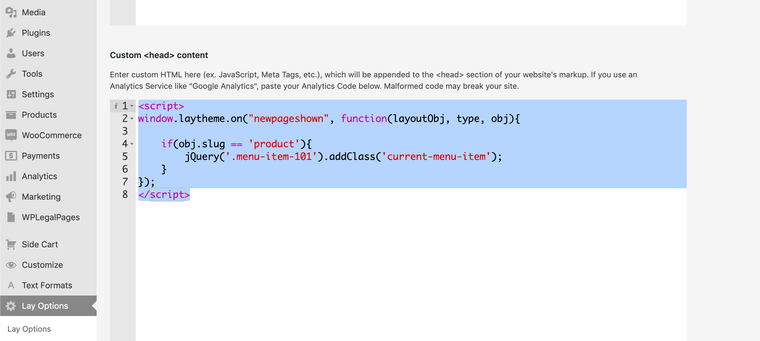
You may have a different 'menu-item' number e.g ```menu-item-195' that you need to insert into the above code. You can always 'inspect' the Shop menu item to find out:
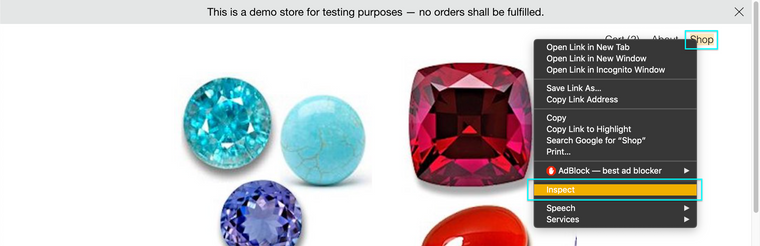
Then look at the 'classes' of the shop menu item:
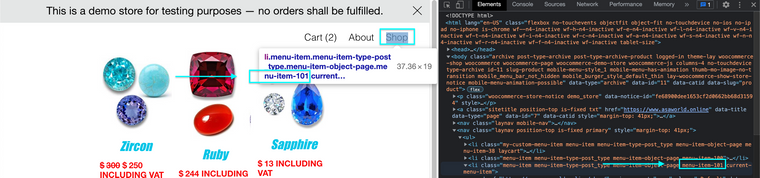
If for example your menu-item is
.menu-item-123the above code would change to:<script> window.laytheme.on("newpageshown", function(layoutObj, type, obj){ if(obj.slug == 'product'){ jQuery('.menu-item-123').addClass('current-menu-item'); } }); </script>
Hope this helps @dingdong & have a wonderful day 🏖
Richard
-
-
-
-
-
If needed I will start a new thread about this problem with Short term fixes.
Have a great day & thank you for using Lay Theme 🌞
Richard
-
sorry everybody!
im releasing an update later today that fixes this


Hello! It looks like you're interested in this conversation, but you don't have an account yet.
Getting fed up of having to scroll through the same posts each visit? When you register for an account, you'll always come back to exactly where you were before, and choose to be notified of new replies (either via email, or push notification). You'll also be able to save bookmarks and upvote posts to show your appreciation to other community members.
With your input, this post could be even better 💗
Register Login