double ways of change quantety
-
Hello, thanks for a great job with Lay Theme and for the possibility to use WooCommerce! However I'm stuck with this small annoying detail, that I can't figure out how to solve. In my webshop that I just created there's two ways of changing the quantity of the product. Would be fantastic if someone could help me get rid of the "up and down" arrows.
All the best
/Emanuel (Here's the site: https://emanuelcederqvist.se/produkt/photobook/)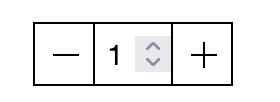
-
which browser are u using?
can you add this css to lay options -> custom css & html?
/* Chrome, Safari, Edge, Opera */
input::-webkit-outer-spin-button,
input::-webkit-inner-spin-button {
-webkit-appearance: none;
margin: 0;
}/* Firefox */
input[type=number] {
-moz-appearance: textfield;
} -
which browser are u using?
can you add this css to lay options -> custom css & html?
/* Chrome, Safari, Edge, Opera */
input::-webkit-outer-spin-button,
input::-webkit-inner-spin-button {
-webkit-appearance: none;
margin: 0;
}/* Firefox */
input[type=number] {
-moz-appearance: textfield;
}@arminunruh said in double ways of change quantety:
/* Chrome, Safari, Edge, Opera /
input::-webkit-outer-spin-button,
input::-webkit-inner-spin-button {
-webkit-appearance: none;
margin: 0;
}
/ Firefox */
input[type=number] {
-moz-appearance: textfield;
}Thank you! I will try that.

Hello! It looks like you're interested in this conversation, but you don't have an account yet.
Getting fed up of having to scroll through the same posts each visit? When you register for an account, you'll always come back to exactly where you were before, and choose to be notified of new replies (either via email, or push notification). You'll also be able to save bookmarks and upvote posts to show your appreciation to other community members.
With your input, this post could be even better 💗
Register Login