Shop Category pages are blank

-
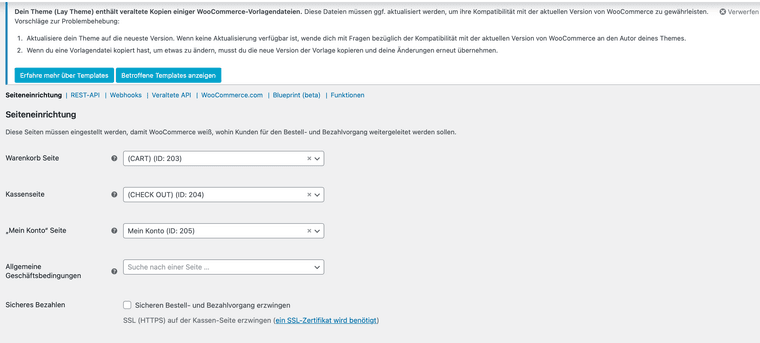
All of a sudden the products are not showing when the category in the menu bar is selected. I also, have the following message in my wooCommerce

However the LayTheme does not show up in the list of items I can update. I am not sure if the two issues are related, but updating typically helps resolve issues
-
sorry, both things will be fixed with the next version
-
Dear @arminunruh
It seems the issue is appearing again. Could you take a quick look at it again?Thank you so much for your support in advance.

-
ah do u have a link?
the templates getting outdated again and again over time is normal.
99% of the time that has no effect :O -
Sure, here’s the link:
https://theweldingclub.com/shop/shop-start/The shop isn’t officially online yet, but everything was working perfectly fine earlier this week, so I was a bit surprised. (Not sure if the Amazon crash affected it?)
The issue is most noticeable when adding items to the cart: the WooCommerce cart interface no longer appears.
I can still access the checkout page directly via this link, and the previously added items do show up there:
https://theweldingclub.com/kasse/So it’s probably not exactly the same issue as before, but I’m seeing the same error message.
I also checked if the pages are linked properly, but everything seems correct here as well. (Screenshot)
Thanks a lot for your help!
-
can you send your website address, /wp-admin/ username and password and a link to this topic to info@laytheme.com?
i will try and find some time this evening to take a look. now i need to go to this university and give a lay theme workshop :O

Hello! It looks like you're interested in this conversation, but you don't have an account yet.
Getting fed up of having to scroll through the same posts each visit? When you register for an account, you'll always come back to exactly where you were before, and choose to be notified of new replies (either via email, or push notification). You'll also be able to save bookmarks and upvote posts to show your appreciation to other community members.
With your input, this post could be even better 💗
Register Login