Skip to content
  • Recent
  • Tags
  • Popular
  • Users
  • Search
Skins
  • Light
  • Brite
  • Cerulean
  • Cosmo
  • Flatly
  • Journal
  • Litera
  • Lumen
  • Lux
  • Materia
  • Minty
  • Morph
  • Pulse
  • Sandstone
  • Simplex
  • Sketchy
  • Spacelab
  • United
  • Yeti
  • Zephyr
  • Dark
  • Cyborg
  • Darkly
  • Quartz
  • Slate
  • Solar
  • Superhero
  • Vapor

  • Default (No Skin)
  • No Skin
Collapse

Lay Theme Forum

  1. Home
  2. Feedback
  3. Ability to lock elements

Ability to lock elements

Scheduled Pinned Locked Moved Feedback
17 Posts 3 Posters 1.2k Views 2 Watching
  • Oldest to Newest
  • Newest to Oldest
  • Most Votes
Reply
  • Reply as topic
Log in to reply
This topic has been deleted. Only users with topic management privileges can see it.
  • M Offline
    M Offline
    michael_vvc
    wrote on last edited by
    #3

    I think thatโ€™s a great idea! Iโ€™ve often had the same experience: clients start moving elements around in the gridder when they should only be updating content. Being able to lock an element โ€” or even just lock its position while still allowing text edits โ€” would be super helpful.

    1 Reply Last reply
    0
    • arminunruhA Offline
      arminunruhA Offline
      arminunruh
      Global Moderator
      wrote on last edited by
      #4

      yes i will work on it!
      im just working on the new table element now

      1 Reply Last reply
      1
      • arminunruhA Offline
        arminunruhA Offline
        arminunruh
        Global Moderator
        wrote on last edited by
        #5

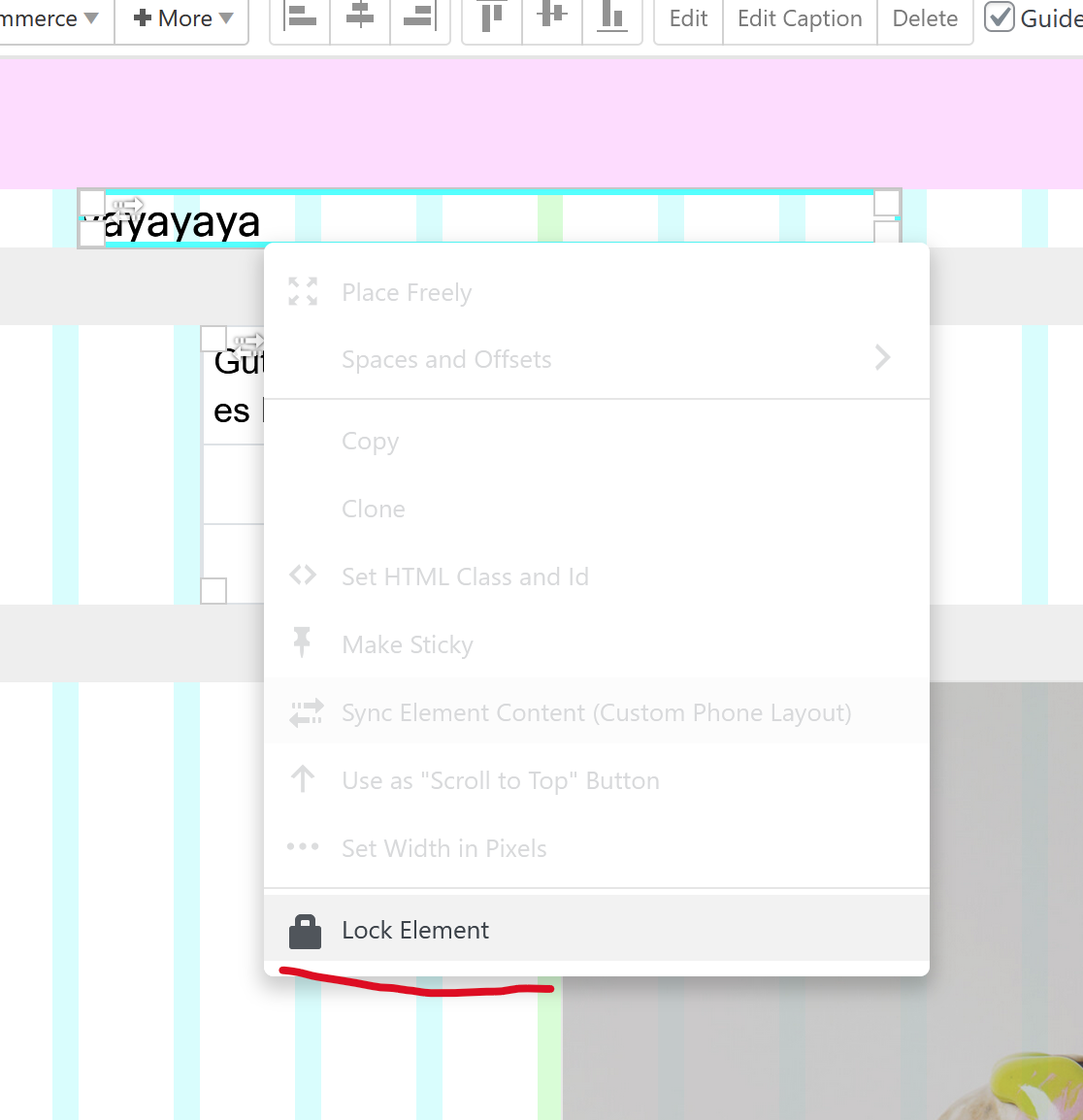
        image.png

        next update will have this!

        1 Reply Last reply
        0
        • M Offline
          M Offline
          michael_vvc
          wrote on last edited by
          #6

          great @arminunruh ๐Ÿ’ซ

          1 Reply Last reply
          1
          • G Offline
            G Offline
            Glyph
            wrote on last edited by
            #7

            Amazing @arminunruh , will this allow the item to still be edited while its position is only locked? That's the ideal scenario as @michael_vvc mentioned

            1 Reply Last reply
            0
            • arminunruhA Offline
              arminunruhA Offline
              arminunruh
              Global Moderator
              wrote on last edited by
              #8

              ah you wanted only the position to be locked? i misread that :DD.
              yea that makes sense mmh

              ok i will change it so its still editable.
              we dont really need a locked element, where you cant edit it at all anymore no?

              1 Reply Last reply
              0
              • G Offline
                G Offline
                Glyph
                wrote on last edited by
                #9

                I think both options are actually really useful. Locking it entirely prevents accidental editing/deleting which is a risk. While locking position only allows editing and prevents accidental movement/repositioning. Both would be great features. Could you have "Lock Position" and "Lock Element"?

                1 Reply Last reply
                0
                • arminunruhA Offline
                  arminunruhA Offline
                  arminunruh
                  Global Moderator
                  wrote on last edited by
                  #10

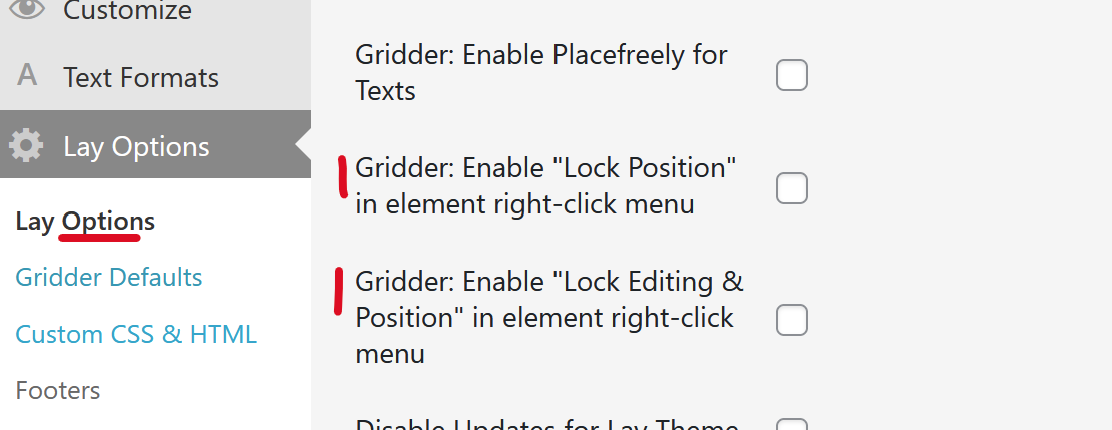
                  image.png

                  so i will do it like this. in lay options in the "other" section
                  we will have these 2 settings. enabling them will show these buttons in the gridder:
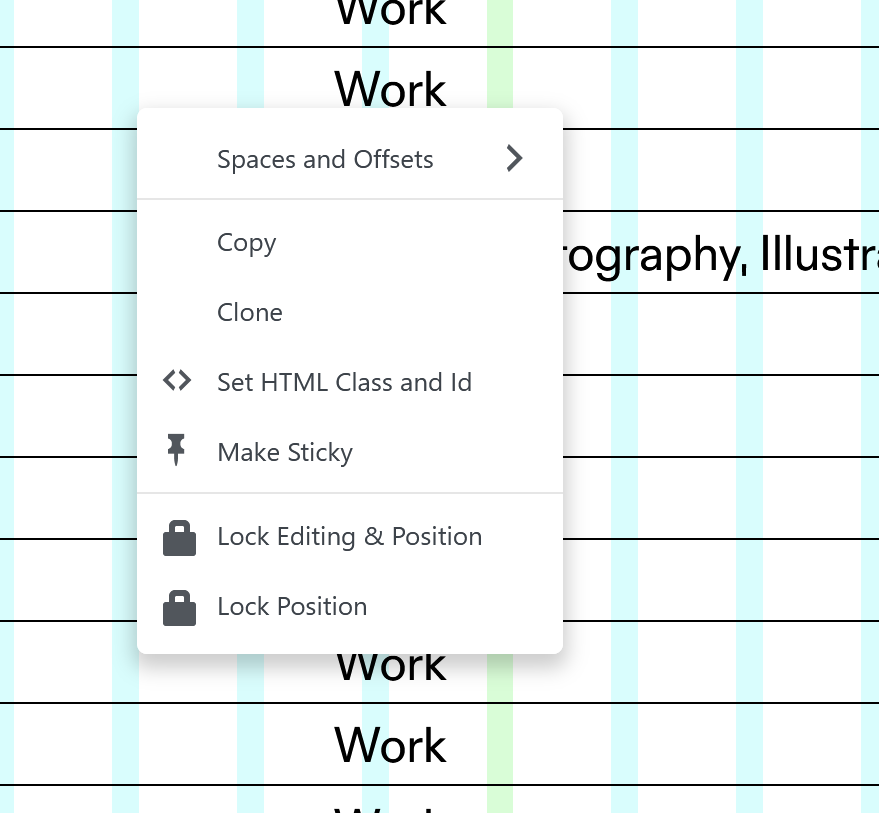
                  image.png

                  1 Reply Last reply
                  0
                  • M Offline
                    M Offline
                    michael_vvc
                    wrote on last edited by michael_vvc
                    #11

                    that's a great solution! thanks @arminunruh

                    1 Reply Last reply
                    0
                    • G Offline
                      G Offline
                      Glyph
                      wrote on last edited by
                      #12

                      Yeah this is great @arminunruh. A really nice feature addition. Thanks for taking that on board.

                      1 Reply Last reply
                      1
                      • arminunruhA Offline
                        arminunruhA Offline
                        arminunruh
                        Global Moderator
                        wrote on last edited by
                        #13

                        sure! the update is released now

                        1 Reply Last reply
                        0
                        • G Offline
                          G Offline
                          Glyph
                          wrote on last edited by
                          #14

                          @arminunruh This is working well. Would it be possible to add a little icon to those elements that are locked, so they can easily be seen on the page. Like a little padlock in the top right corner? Currently the only way to know is to manually try and move things which is time consuming if you have a page with a number of locked elements you are trying to manage.

                          1 Reply Last reply
                          0
                          • arminunruhA Offline
                            arminunruhA Offline
                            arminunruh
                            Global Moderator
                            wrote on last edited by
                            #15

                            sure its a great idea:
                            will be included with the next update
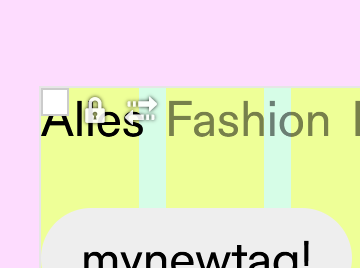
                            image.png

                            1 Reply Last reply
                            0
                            • G Offline
                              G Offline
                              Glyph
                              wrote last edited by Glyph
                              #16

                              @arminunruh Just a little bug/annoyance with this. Once an element is locked, and you go back to the menu, the label should change to 'Unlock'. Right now it just shows a subtle tinted background to suggest it's locked, but remains labeled as 'Lock', as if it's not locked. It would make much more sense if the menu option changed to 'Unlock'.

                              1 Reply Last reply
                              0
                              • arminunruhA Offline
                                arminunruhA Offline
                                arminunruh
                                Global Moderator
                                wrote last edited by
                                #17

                                yeah fair, the label should toggle to "Unlock" when the element is already locked.
                                and get the unlock icon!

                                ill fix that in the next release โ€” the tinted bg is too subtle on its own.

                                1 Reply Last reply
                                0
                                Reply
                                • Reply as topic
                                Log in to reply
                                • Oldest to Newest
                                • Newest to Oldest
                                • Most Votes


                                For 1on1 paid Lay Theme Coaching, contact: audrey@cyberslayers.work.

                                We also code custom websites or custom Lay features.
                                ๐Ÿ’ฟ Email us here: ๐Ÿ’ฟ
                                info@laytheme.com

                                Our Web Development company: 100k.studio

                                Want to tip me? https://www.paypal.com/paypalme/arminunruh

                                Before you post:
                                1. When using a WordPress Cache plugin, disable it or clear your cache.
                                2. Update Lay Theme and all Lay Theme Addons
                                3. Disable all Plugins
                                4. Go to Lay Options โ†’ Custom CSS & HTML, click "Turn Off All Custom Code", click "Save Changes"

                                This often solves issues you might run into

                                When you post:
                                1. Post a link to where the problem is
                                2. Does the problem happen on Chrome, Firefox, Safari or iPhone or Android?
                                3. If the problem is difficult to explain, post screenshots / link to a video to explain it
                                Online Users
                                Forgot your key, lost your files, need a previous Lay Theme or Addon version? Go to www.laykeymanager.com
                                laytheme.com
                                • Login

                                • Don't have an account? Register

                                • Login or register to search.
                                • First post
                                  Last post
                                0
                                • Recent
                                • Tags
                                • Popular
                                • Users
                                • Search