Skip to content
  • Recent
  • Tags
  • Popular
  • Users
  • Search
Skins
  • Light
  • Brite
  • Cerulean
  • Cosmo
  • Flatly
  • Journal
  • Litera
  • Lumen
  • Lux
  • Materia
  • Minty
  • Morph
  • Pulse
  • Sandstone
  • Simplex
  • Sketchy
  • Spacelab
  • United
  • Yeti
  • Zephyr
  • Dark
  • Cyborg
  • Darkly
  • Quartz
  • Slate
  • Solar
  • Superhero
  • Vapor

  • Default (No Skin)
  • No Skin
Collapse

Lay Theme Forum

  1. Home
  2. Feedback
  3. Image as a link

Image as a link

Scheduled Pinned Locked Moved Feedback
11 Posts 3 Posters 3.8k Views 2 Watching
  • Oldest to Newest
  • Newest to Oldest
  • Most Votes
Reply
  • Reply as topic
Log in to reply
This topic has been deleted. Only users with topic management privileges can see it.
  • ?
    ?
    A Former User
    wrote on last edited by
    #1

    At the moment it is only possible to add an image with the +Image button.
    Unfortunately no custom changes can be made.
    Is it possible to make an image as a link after/while adding?

    Or make it possible to include images in the text field again...

    A website without clickable images is very limited. 😔

    1 Reply Last reply
    0
    • arminunruhA
      arminunruhA
      arminunruh
      Global Moderator
      wrote on last edited by
      #2

      Ok! That would be useful if you had a picture of a website and then you can click on the picture to link somewhere. Is that what you want to use it for?

      1 Reply Last reply
      0
      • ?
        ?
        A Former User
        wrote on last edited by [[global:former-user]]
        #3

        Yes, thats exactly what I want :)

        1 Reply Last reply
        0
        • arminunruhA
          arminunruhA
          arminunruh
          Global Moderator
          wrote on last edited by
          #4

          Hey Hannes!
          Now in version 1.022 when you hover over an image there's a "link" button. There you can add a link to your image!
          Cheers :innocent:

          1 Reply Last reply
          0
          • ?
            ?
            A Former User
            wrote on last edited by
            #5

            Love it. Thanks!

            Just wondering: Is it possible to use the same dialog as in the text frame?

            Instead of
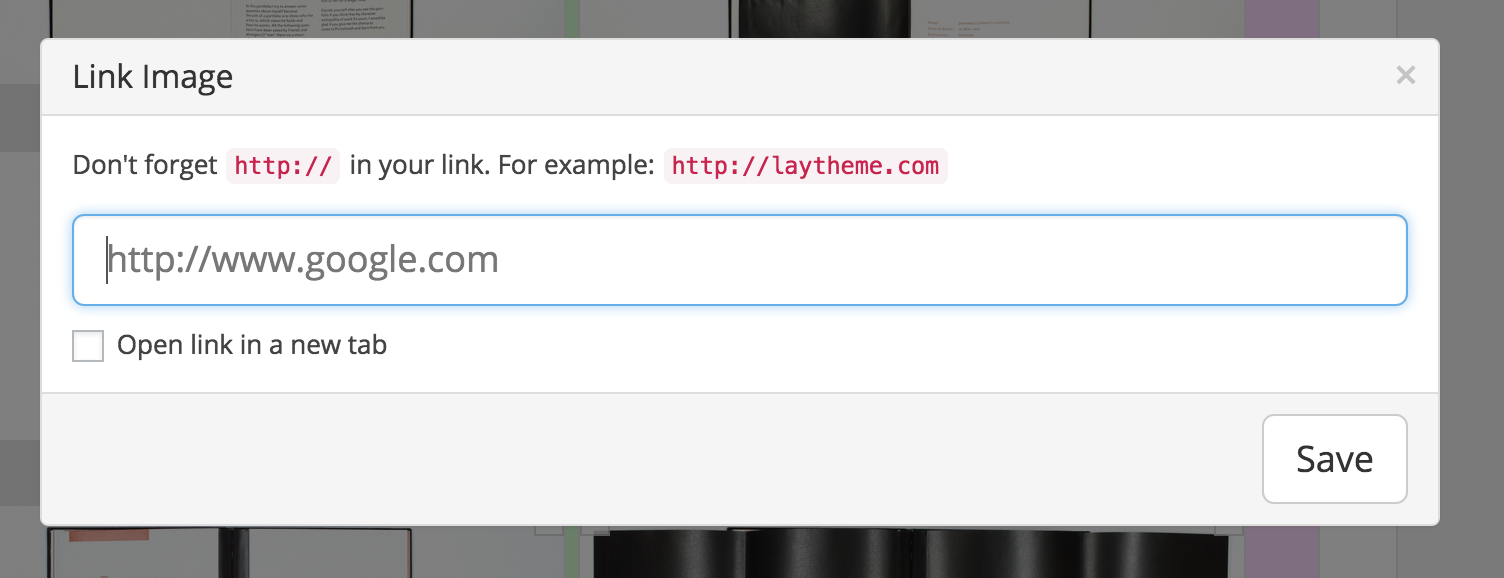
            Screen Shot 2015-05-17 at 01.19.29.png
            this one:
            Screen Shot 2015-05-17 at 01.20.13.png

            Linking to Pages and Projects would be way easier. :)

            1 Reply Last reply
            0
            • arminunruhA
              arminunruhA
              arminunruh
              Global Moderator
              wrote on last edited by arminunruh
              #6

              No, right now it's not possible. I need to add that feature to the "Link Image" modal one day.

              1 Reply Last reply
              0
              • arminunruhA
                arminunruhA
                arminunruh
                Global Moderator
                wrote on last edited by
                #7

                I'm wondering: Did you want images to link to other projects to have some kind of "related projects image links"?

                1 Reply Last reply
                0
                • J
                  J
                  janxyz
                  wrote on last edited by
                  #8

                  When I hover over an image I only get the class and clone buttons. How can I use an image as a link (a partner logo linking to my partner's website for example)?

                  1 Reply Last reply
                  0
                  • arminunruhA
                    arminunruhA
                    arminunruh
                    Global Moderator
                    wrote on last edited by arminunruh
                    #9

                    hey jaxyz, the clone button should only be available for a text element. Can you please, as a test, insert an image using "+image" and then hover over it?
                    And, do you have a recent lay theme version like 1.8.8?

                    1 Reply Last reply
                    0
                    • J
                      J
                      janxyz
                      wrote on last edited by janxyz
                      #10

                      Thanks for the quick answer. Problem solved: I had the row gutter at 0 %, that is why the options available for images when rovering over them were not displayed. Instead the options of the text element above were shown.

                      1 Reply Last reply
                      0
                      • arminunruhA
                        arminunruhA
                        arminunruh
                        Global Moderator
                        wrote on last edited by
                        #11

                        Ok, yea maybe I should put these options into the context-menu when you right click an element

                        1 Reply Last reply
                        0

                        Hello! It looks like you're interested in this conversation, but you don't have an account yet.

                        Getting fed up of having to scroll through the same posts each visit? When you register for an account, you'll always come back to exactly where you were before, and choose to be notified of new replies (either via email, or push notification). You'll also be able to save bookmarks and upvote posts to show your appreciation to other community members.

                        With your input, this post could be even better 💗

                        Register Login
                        Reply
                        • Reply as topic
                        Log in to reply
                        • Oldest to Newest
                        • Newest to Oldest
                        • Most Votes


                        Online Users
                        Forgot your key, lost your files, need a previous Lay Theme or Addon version? Go to www.laykeymanager.com
                        laytheme.com
                        • Login

                        • Don't have an account? Register

                        • Login or register to search.
                        • First post
                          Last post
                        0
                        • Recent
                        • Tags
                        • Popular
                        • Users
                        • Search