Skip to content
  • Recent
  • Tags
  • Popular
  • Users
  • Search
Skins
  • Light
  • Brite
  • Cerulean
  • Cosmo
  • Flatly
  • Journal
  • Litera
  • Lumen
  • Lux
  • Materia
  • Minty
  • Morph
  • Pulse
  • Sandstone
  • Simplex
  • Sketchy
  • Spacelab
  • United
  • Yeti
  • Zephyr
  • Dark
  • Cyborg
  • Darkly
  • Quartz
  • Slate
  • Solar
  • Superhero
  • Vapor

  • Default (No Skin)
  • No Skin
Collapse

Lay Theme Forum

  1. Home
  2. Shop / WooCommerce
  3. "Product Thumbnail Grid" Element not showing
"Product Thumbnail Grid" Element not showing

Scheduled Pinned Locked Moved Shop / WooCommerce
9 Posts 4 Posters 1.4k Views
  • Oldest to Newest
  • Newest to Oldest
  • Most Votes
Reply
  • Reply as topic
Log in to reply
This topic has been deleted. Only users with topic management privileges can see it.
  • D
    D
    defrost
    wrote on last edited by
    #1

    Hello,

    And thanks for your work on Lay Theme.

    I'm setting up a store for a client and I'm using WooCommerce + LayTheme for the first time.
    I'm in local and I've been just having a tour with it but I realised that the "Product Thumbnail Grid" Element is not showing on the grid.
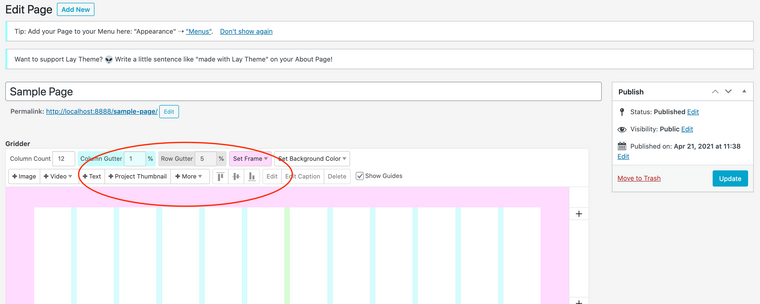
    Screenshot 2021-04-21 at 13.47.04.png

    I have setup a simple test product but yet not completed the WooCommerce installation and connection. And I also still have to activate the LayTheme license. So I was just wondering if the "Product Thumbnail Grid" Element shows up only after having activated everything or you think I might have some issues.

    Thank you very much for your help!

    Best,
    Marco

    1 Reply Last reply
    0
    • RichardR
      RichardR
      Richard
      Global Moderator
      wrote on last edited by
      #2

      Dear Marco

      @defrost

      Please make sure Wordpress, Lay Theme & Woocommerce are all up to date.

      No Third-party plugins activated that may cause issue with Laytheme.

      No custom code </> that may interfere.

      Here on a Fresh Woo-commerce installation:
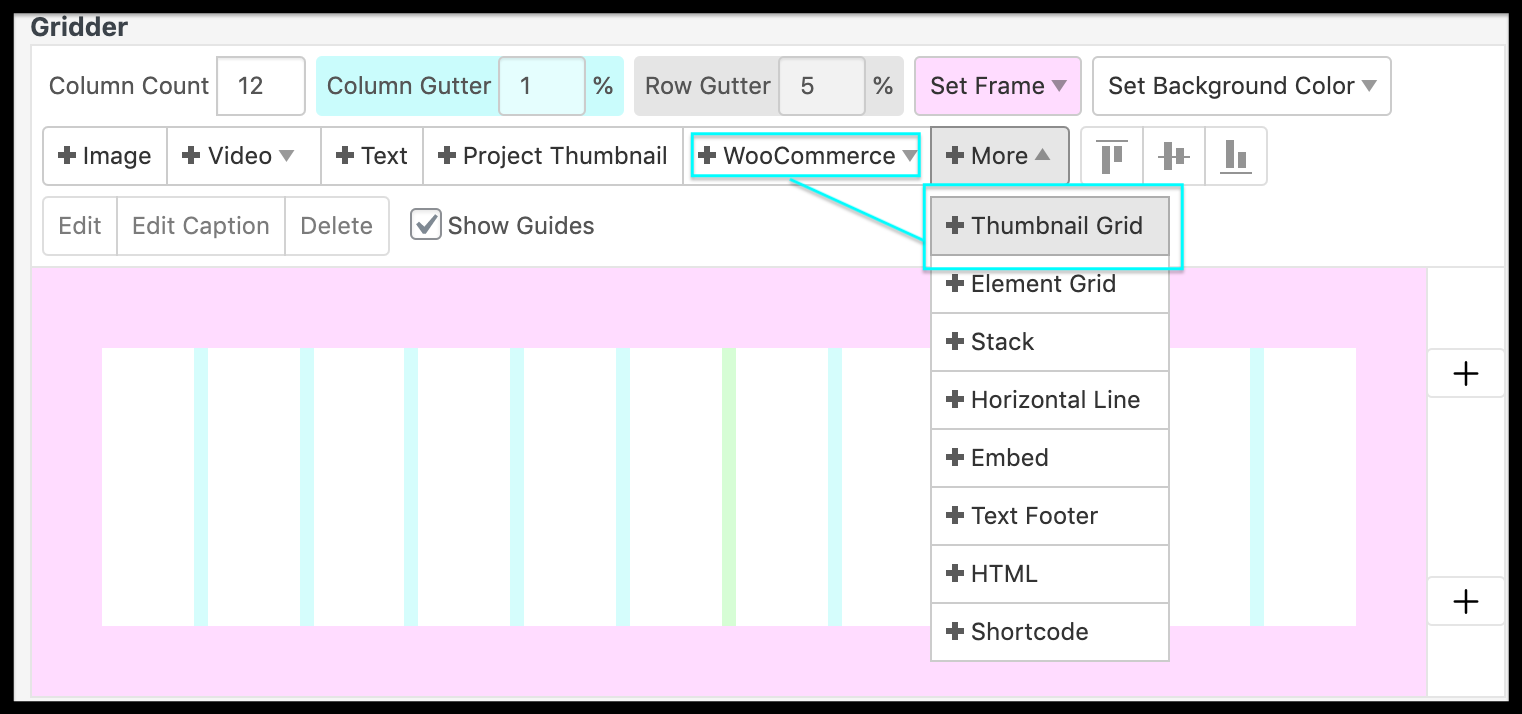
      Screen Shot 2021-04-24 at 10.28.11 PM.png


      Talk soon & have a wonderful day 🌞

      Sincerely
      Richard
      1 Reply Last reply
      1
      • L
        L
        lotte
        wrote on last edited by
        #3

        I've got this problem too!

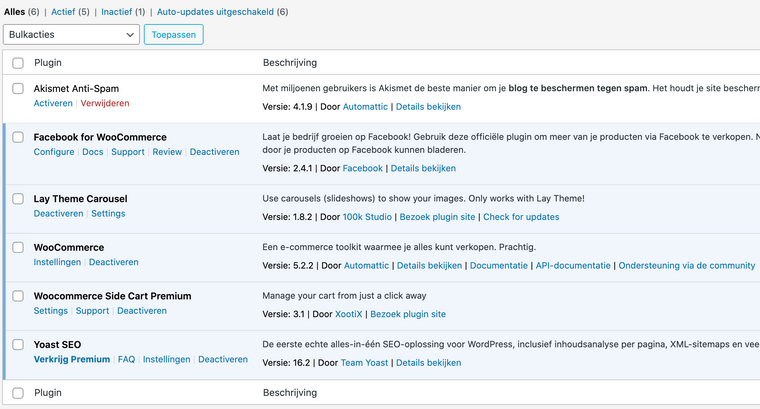
        These are the plugins i have...

        Schermafbeelding 2021-05-07 om 21.45.09.png

        How to get this +WooCommerce button in the Gridder?

        Thanks in advance!

        1 Reply Last reply
        0
        • RichardR
          RichardR
          Richard
          Global Moderator
          wrote on last edited by Richard
          #4

          Dear @lotte

          Try deactivating 'YOAST SEO' it is known to frequently cause issue with Laytheme.

          https://laytheme.com/troubleshooting.html


          Apologies for the inconvenience & best wishes 🌼

          Richard
          L 1 Reply Last reply
          0
          • RichardR Richard

            Dear @lotte

            Try deactivating 'YOAST SEO' it is known to frequently cause issue with Laytheme.

            https://laytheme.com/troubleshooting.html


            Apologies for the inconvenience & best wishes 🌼

            Richard
            L
            L
            lotte
            wrote on last edited by
            #5

            @Richard Thanks for responding, Richard. I deactivated Yoast.. The option is still not showing.

            By the way, I also uploaded two products now, but the productpages stay empty.. for some weird reason

            1 Reply Last reply
            0
            • RichardR
              RichardR
              Richard
              Global Moderator
              wrote on last edited by
              #6

              Dear Lotte

              @lotte

              In these cases it's difficult to know exactly without a closer look.

              Could you please send your website address, /wp-admin/ username and password and a link to this topic, to me via 'chats'

              (Note: do not disclose personal information on this thread 🌝)


              Talk soon Lotte & best wishes

              Sincerely
              Richard
              1 Reply Last reply
              0
              • S
                S
                shelterpress
                wrote on last edited by
                #7

                Hi!
                First, thank you so much for adding woocommerce to laytheme.

                Have the exact same issue, without any unusual plugin installed too.
                Any chance you found the issue here and managed to resolved it?

                Thank you!

                1 Reply Last reply
                1
                • RichardR
                  RichardR
                  Richard
                  Global Moderator
                  wrote on last edited by
                  #8

                  Dear @shelterpress

                  If i remember correctly in this case, the solution was found when updating Lay Theme and WooCommerce.


                  Sometimes this isn't prompted unfortunately, so to be sure please go to:

                  Left Admin panel > Dashboard > Updates >

                  Screen Shot 2021-05-31 at 5.24.02 PM.png


                  Let me know how you go and talk soon 🌝

                  Sincerely
                  Richard
                  S 1 Reply Last reply
                  0
                  • RichardR Richard

                    Dear @shelterpress

                    If i remember correctly in this case, the solution was found when updating Lay Theme and WooCommerce.


                    Sometimes this isn't prompted unfortunately, so to be sure please go to:

                    Left Admin panel > Dashboard > Updates >

                    Screen Shot 2021-05-31 at 5.24.02 PM.png


                    Let me know how you go and talk soon 🌝

                    Sincerely
                    Richard
                    S
                    S
                    shelterpress
                    wrote on last edited by
                    #9

                    @Richard Yes this was actually the issue, laytheme not up the date... Everything works fine now, thank you very much for your help!

                    1 Reply Last reply
                    1

                    Hello! It looks like you're interested in this conversation, but you don't have an account yet.

                    Getting fed up of having to scroll through the same posts each visit? When you register for an account, you'll always come back to exactly where you were before, and choose to be notified of new replies (either via email, or push notification). You'll also be able to save bookmarks and upvote posts to show your appreciation to other community members.

                    With your input, this post could be even better 💗

                    Register Login
                    Reply
                    • Reply as topic
                    Log in to reply
                    • Oldest to Newest
                    • Newest to Oldest
                    • Most Votes


                    Online Users
                    Forgot your key, lost your files, need a previous Lay Theme or Addon version? Go to www.laykeymanager.com
                    laytheme.com
                    • Login

                    • Don't have an account? Register

                    • Login or register to search.
                    • First post
                      Last post
                    0
                    • Recent
                    • Tags
                    • Popular
                    • Users
                    • Search