Skip to content
  • Recent
  • Tags
  • Popular
  • Users
  • Search
Skins
  • Light
  • Brite
  • Cerulean
  • Cosmo
  • Flatly
  • Journal
  • Litera
  • Lumen
  • Lux
  • Materia
  • Minty
  • Morph
  • Pulse
  • Sandstone
  • Simplex
  • Sketchy
  • Spacelab
  • United
  • Yeti
  • Zephyr
  • Dark
  • Cyborg
  • Darkly
  • Quartz
  • Slate
  • Solar
  • Superhero
  • Vapor

  • Default (No Skin)
  • No Skin
Collapse

Lay Theme Forum

  1. Home
  2. Shop / WooCommerce
  3. Online shop and product thumbnail grid element not showing

Online shop and product thumbnail grid element not showing

Scheduled Pinned Locked Moved Shop / WooCommerce
13 Posts 5 Posters 1.4k Views 1 Watching
  • Oldest to Newest
  • Newest to Oldest
  • Most Votes
Reply
  • Reply as topic
Log in to reply
This topic has been deleted. Only users with topic management privileges can see it.
  • RichardR Offline
    RichardR Offline
    Richard
    Global Moderator
    wrote on last edited by Richard
    #4

    Dear @kerstin_cool

    Thanks for the update, the Google Analytics is likely in:

    Lay Options > Custom CSS & HTML > Custom <Head> Content Screen Shot 2021-09-01 at 10.54.51 AM.png
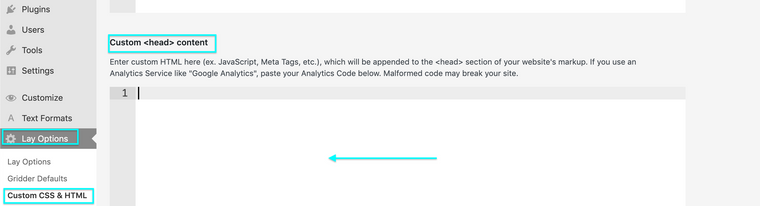
    Worth checking out if there is anything suspect there. 🔍


    In your screenshot "PayPal checkout is almost ready".

    Do you have the PayPal payments installed? These threads may help, Armin references issue with PayPal:

    http://laythemeforum.com/topic/6983/fatal-error-after-update-woocommerce-paypal-payments/3

    http://laythemeforum.com/topic/7078/woo-commerce-payments-gridder-disappears/7


    Talk soon & best wishes
    Richard
    1 Reply Last reply
    0
    • K Offline
      K Offline
      kerstin_cool
      wrote on last edited by
      #5

      I don't want to use Paypal. I didn't activate it, only bank transfer.

      1 Reply Last reply
      0
      • K Offline
        K Offline
        kerstin_cool
        wrote on last edited by
        #6

        Google Anaytics wasn't a problem before...

        1 Reply Last reply
        0
        • RichardR Offline
          RichardR Offline
          Richard
          Global Moderator
          wrote on last edited by
          #7

          Dear @kerstin_cool

          Have sent you a message via Chats ✨


          Thank you for supporting Lay Theme
          Richard
          1 Reply Last reply
          0
          • P Offline
            P Offline
            pascal
            wrote on last edited by
            #8

            Hey there,
            I have the same problem. How did you solve it?

            Shop, Cart page etc not working (white page). When Twenty Twenty-one theme is activated everything works fine.

            No plugins, no custom code. Only custom font.

            http://s882631967.online.de/shop/

            1 Reply Last reply
            0
            • RichardR Offline
              RichardR Offline
              Richard
              Global Moderator
              wrote on last edited by
              #9

              Dear @pascal

              Hard to say from the initial page - i may have to login to get a better idea of whats going on (Note: do not disclose your personal details on the thread- only via 'Chats' 🌝)

              Could you also make sure your carousel plugin is up to date as well as Lay Theme - you may need to go into > appearance > themes > lay theme to check for the update if it is not prompted.


              Talk soon Pascal & have a wonderful day 🏖
              Richard
              1 Reply Last reply
              0
              • P Offline
                P Offline
                pascal
                wrote on last edited by
                #10

                Turning off "Cover for pages" option in Lay Options fixed this for me.

                oof...this took a while... :)

                1 Reply Last reply
                0
                • RichardR Offline
                  RichardR Offline
                  Richard
                  Global Moderator
                  wrote on last edited by
                  #11

                  Amazing! thanks for the update @pascal this is great for others in the future, will keep this in mind, as well as letting Armin know 🌝


                  Best wishes
                  Richard
                  1 Reply Last reply
                  0
                  • N Offline
                    N Offline
                    nnscnc
                    wrote last edited by
                    #12

                    I have the same problem the gridder does not appear, even if I turned the cover mode off …

                    1 Reply Last reply
                    0
                    • arminunruhA Offline
                      arminunruhA Offline
                      arminunruh
                      Global Moderator
                      wrote last edited by
                      #13

                      hello do you have a link?
                      did you try all the steps in the blue box? here
                      https://laytheme.com/support.html

                      1 Reply Last reply
                      0
                      Reply
                      • Reply as topic
                      Log in to reply
                      • Oldest to Newest
                      • Newest to Oldest
                      • Most Votes


                      Online Users
                      Forgot your key, lost your files, need a previous Lay Theme or Addon version? Go to www.laykeymanager.com
                      laytheme.com
                      • Login

                      • Don't have an account? Register

                      • Login or register to search.
                      • First post
                        Last post
                      0
                      • Recent
                      • Tags
                      • Popular
                      • Users
                      • Search
