Skip to content
  • Recent
  • Tags
  • Popular
  • Users
  • Search
Skins
  • Light
  • Brite
  • Cerulean
  • Cosmo
  • Flatly
  • Journal
  • Litera
  • Lumen
  • Lux
  • Materia
  • Minty
  • Morph
  • Pulse
  • Sandstone
  • Simplex
  • Sketchy
  • Spacelab
  • United
  • Yeti
  • Zephyr
  • Dark
  • Cyborg
  • Darkly
  • Quartz
  • Slate
  • Solar
  • Superhero
  • Vapor

  • Default (No Skin)
  • No Skin
Collapse

Lay Theme Forum

  1. Home
  2. Feedback
  3. Phone Gridder - almost imposible to work with when fonts are not adapted

Phone Gridder - almost imposible to work with when fonts are not adapted

Scheduled Pinned Locked Moved Feedback
6 Posts 3 Posters 548 Views 1 Watching
  • Oldest to Newest
  • Newest to Oldest
  • Most Votes
Reply
  • Reply as topic
Log in to reply
This topic has been deleted. Only users with topic management privileges can see it.
  • T
    T
    treh16
    wrote on last edited by treh16
    #1

    Phone Gridder seems to be showing Desktop size of fonts making it almost imposible to work with when you have multiple elements next to each other.

    Because of that, elements often overlap and it's hard to work with the elements below as you can't select them. You need to shuffle everything around like Tetris.

    Perhaps also making it a bit wider would help?

    alt text

    1 Reply Last reply
    0
    • RichardR
      RichardR
      Richard
      Global Moderator
      wrote on last edited by
      #2

      Dear @treh16

      Thanks for the valid feedback, will forward to Armin as well as put into development notes ✅


      Best wishes ✨
      Richard
      1 Reply Last reply
      0
      • arminunruhA
        arminunruhA
        arminunruh
        Global Moderator
        wrote on last edited by arminunruh
        #3

        hey please use textformats for texts and set phone font sizes:
        https://laytheme.com/documentation.html#textformats
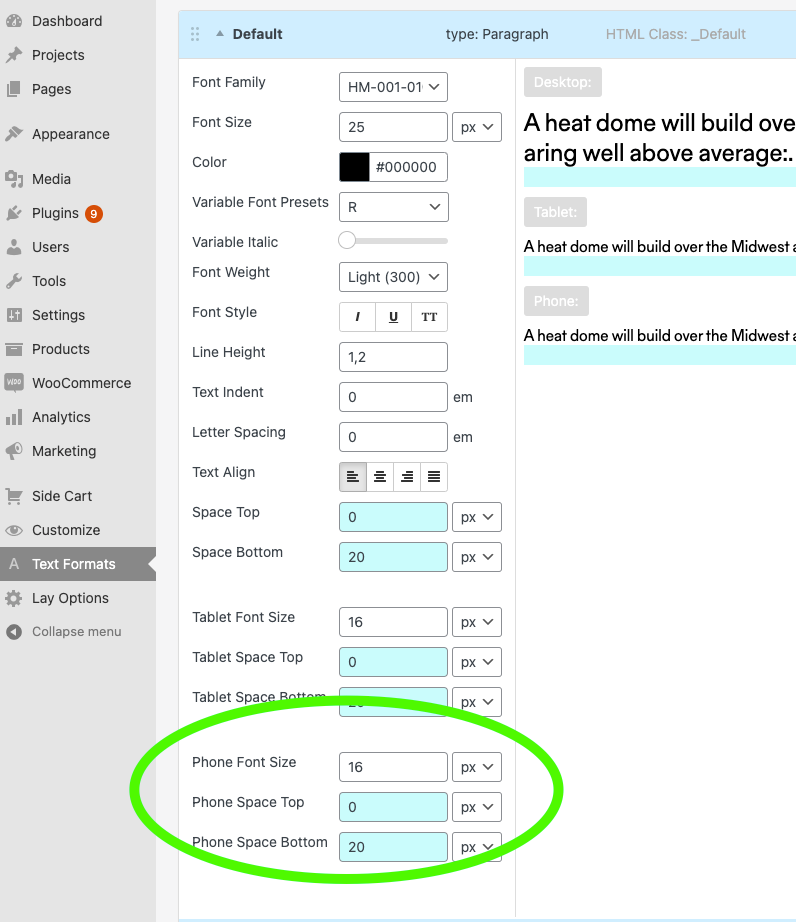
        Screenshot 2021-10-30 at 02.28.46.png

        T 1 Reply Last reply
        1
        • arminunruhA arminunruh

          hey please use textformats for texts and set phone font sizes:
          https://laytheme.com/documentation.html#textformats

          Screenshot 2021-10-30 at 02.28.46.png

          T
          T
          treh16
          wrote on last edited by
          #4

          @arminunruh I am using that. Despite it, the Text Formats in Gridder -> Phone layout are shown in Desktop sizes.

          1 Reply Last reply
          0
          • RichardR
            RichardR
            Richard
            Global Moderator
            wrote on last edited by Richard
            #5

            Dear @treh16

            Please confirm your setup, i am having trouble recreating the issue.


            A Text Format is created within Text Formats:
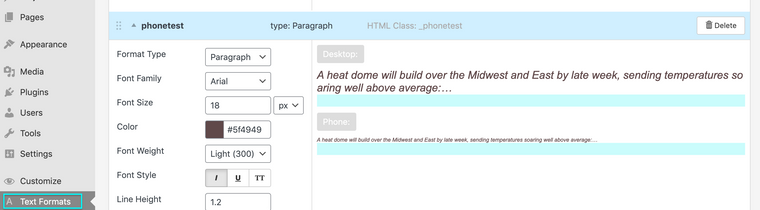
            Screen Shot 2021-11-02 at 8.58.30 AM.png
            The font size for Mobile has been defined:
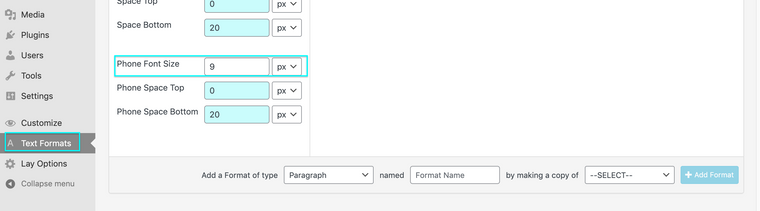
            Screen Shot 2021-11-02 at 8.58.38 AM.png

            Changes have been Saved before continuing. In your project or Page:
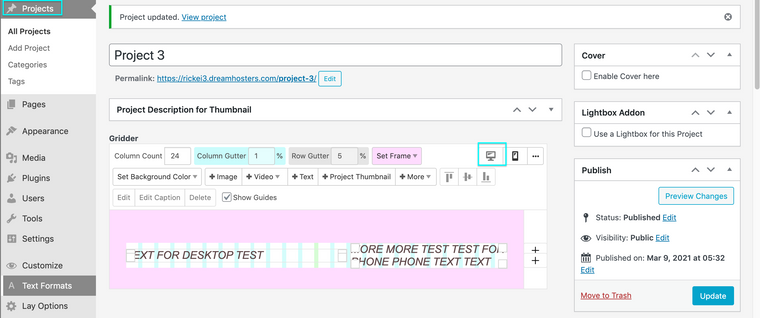
            Screen Shot 2021-11-02 at 8.58.53 AM.png
            A Custom Phone Layout has been added:
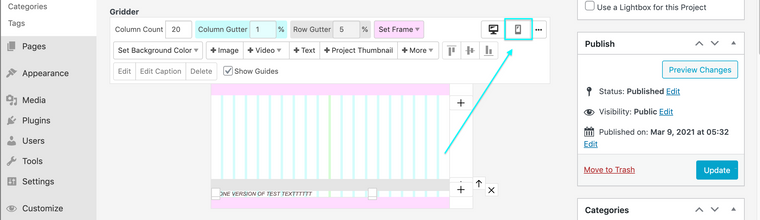
            Screen Shot 2021-11-02 at 8.59.02 AM.png
            The Text within your Mobile Layout has a "Text Format" applied properly:

            Screen Shot 2021-11-02 at 9.04.37 AM.png
            You can see in the image below that the Mobile text is easy to work with and navigate:
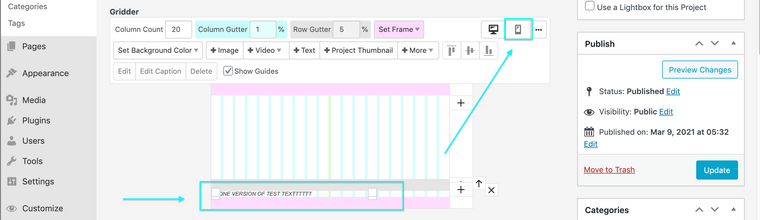
            Screen Shot 2021-11-02 at 8.59.02 AM.png


            If the above does not apply to you please make sure of the following:

            Wordpress, Lay Theme & Laytheme's Addons are all up to date ?


            Any custom CSS or JS that may interfere is temporarily removed.


            Any third-party plugins are de-activated to see if this resolves the issue.


            If using a WordPress Cache plugin, disable it or clear your cache.


            License key not activated - (in website blank situations or button not available)


            If your WordPress Dashboard shows a warning "PHP Update required”
 Please update your PHP version in your webhost control panel.


            Possibly your website is running PHP 8.0 this has been known in some cases to cause issue.


            Talk soon @treh16 & have a great day! 🌻
            Richard
            1 Reply Last reply
            0
            • arminunruhA
              arminunruhA
              arminunruh
              Global Moderator
              wrote on last edited by
              #6

              hey @Richard this should have been a "please send login info to armin" kind of case.

              @treh16

              can you send your website address, /wp-admin/ username and password and a link to this topic to info@laytheme.com?


              1 Reply Last reply
              1

              Hello! It looks like you're interested in this conversation, but you don't have an account yet.

              Getting fed up of having to scroll through the same posts each visit? When you register for an account, you'll always come back to exactly where you were before, and choose to be notified of new replies (either via email, or push notification). You'll also be able to save bookmarks and upvote posts to show your appreciation to other community members.

              With your input, this post could be even better 💗

              Register Login
              Reply
              • Reply as topic
              Log in to reply
              • Oldest to Newest
              • Newest to Oldest
              • Most Votes


              Online Users
              L
              lstark
              Forgot your key, lost your files, need a previous Lay Theme or Addon version? Go to www.laykeymanager.com
              laytheme.com
              • Login

              • Don't have an account? Register

              • Login or register to search.
              • First post
                Last post
              0
              • Recent
              • Tags
              • Popular
              • Users
              • Search