Skip to content
  • Recent
  • Tags
  • Popular
  • Users
  • Search
Skins
  • Light
  • Brite
  • Cerulean
  • Cosmo
  • Flatly
  • Journal
  • Litera
  • Lumen
  • Lux
  • Materia
  • Minty
  • Morph
  • Pulse
  • Sandstone
  • Simplex
  • Sketchy
  • Spacelab
  • United
  • Yeti
  • Zephyr
  • Dark
  • Cyborg
  • Darkly
  • Quartz
  • Slate
  • Solar
  • Superhero
  • Vapor

  • Default (No Skin)
  • No Skin
Collapse

Lay Theme Forum

  1. Home
  2. Feedback
  3. Tablet design

Tablet design

Scheduled Pinned Locked Moved Feedback
11 Posts 7 Posters 2.3k Views 2 Watching
  • Oldest to Newest
  • Newest to Oldest
  • Most Votes
Reply
  • Reply as topic
Log in to reply
This topic has been deleted. Only users with topic management privileges can see it.
  • arminunruhA Offline
    arminunruhA Offline
    arminunruh
    Global Moderator
    wrote on last edited by
    #2

    Hey kasper, no, there is no such option. There are tablet settings for textformats if you activate that in "lay options" and there is a tablet setting for the "thumbnailgrid" element.

    If the phone version of your website shows up on your tablet but you want the desktop version to show on your tablet, then set the option "Phone Breakpoint" in "Lay Options" maybe to 600 or 500.

    1 Reply Last reply
    0
    • Y Offline
      Y Offline
      YYY
      wrote on last edited by
      #3

      hi @arminunruh

      hope to have individually tablet design soon.
      it's still strange to see my website on tablet with either Desktop or Mobile version.
      If we can design the tablet version it will more cool.
      thank you.

      1 Reply Last reply
      1
      • arminunruhA Offline
        arminunruhA Offline
        arminunruh
        Global Moderator
        wrote on last edited by
        #4

        hey yyy, the only tablet layout options that you got right now is in the gridder with "+more" -> "Thumbnail Grid".

        What exactly would you like to change about your layout for your tablet?

        As I said in the previous post:

        If the phone version of your website shows up on your tablet but you want the desktop version to show on your tablet, then set the option "Phone Breakpoint" in "Lay Options" maybe to 600 or 500.

        1 Reply Last reply
        1
        • edgrbnzE Offline
          edgrbnzE Offline
          edgrbnz
          wrote on last edited by edgrbnz
          #5

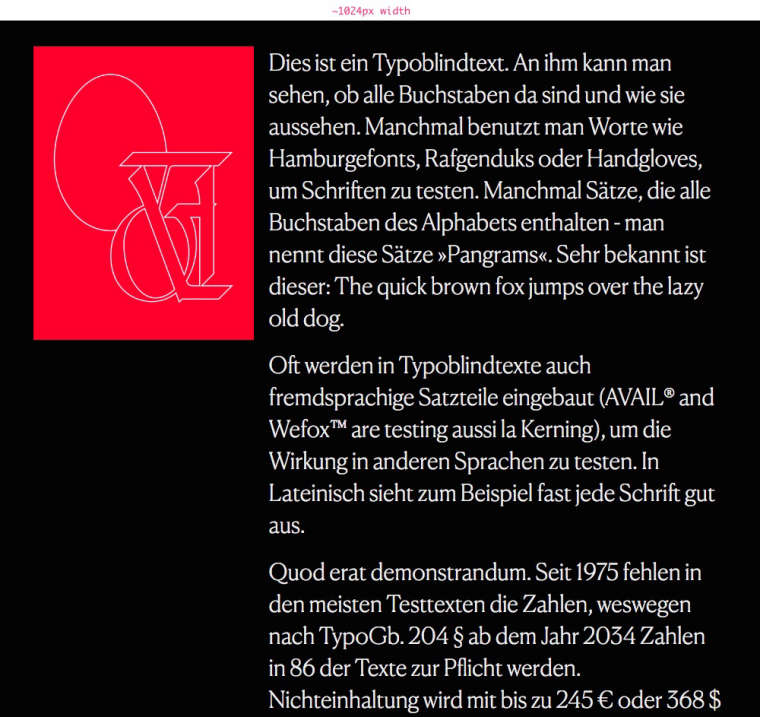
          I’ve been searching for a related solution lately. A custom tablet layout would be an option. The main part is how things align on the tight space of 768px.

          In my case it’s a two column layout that looks alright until around 1024px-ish.
          0_1535617825517_Window_and_Moritz_Welker_—_Info_Demo.jpg

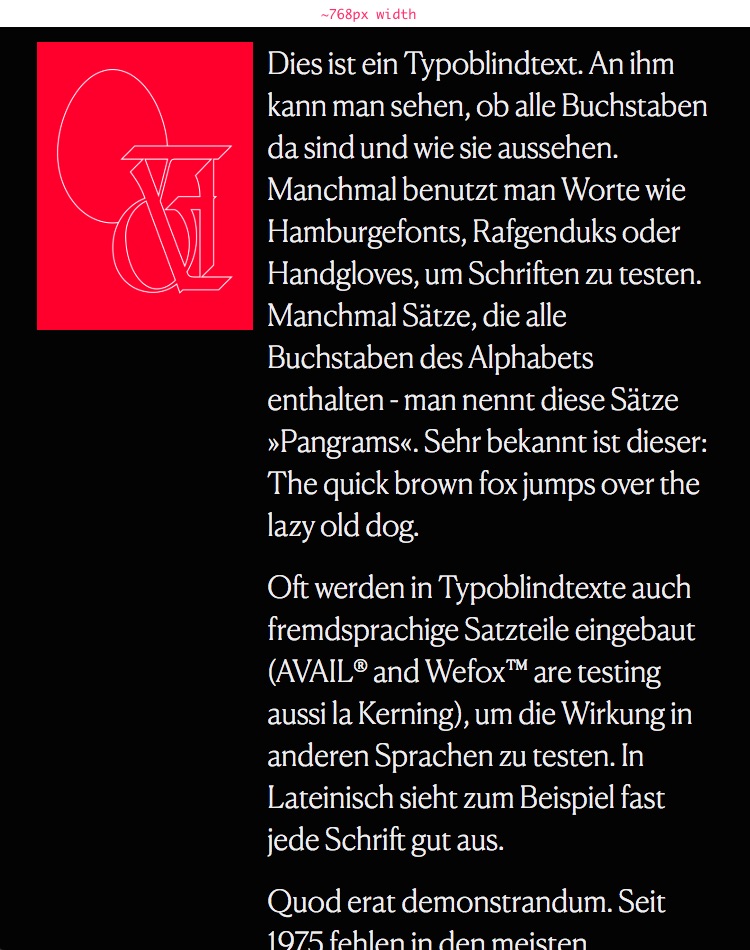
          The 768px view is all of it crammed side by side.
          0_1535617898850_Window_and_Moritz_Welker_—_Info_Demo.jpg

          All I’d like to do is to stack the elements on top of e.o. for resolutions below 1024 (aka small desktop). This doesn’t apply to all my pages, most of them look fine on 768px. But as soon as bigger text and images appear side by side it would be great to have a way of defining what happens below 1024 and before mobile ~600.

          ✦ ✦ ✦

          1 Reply Last reply
          0
          • mariusjopenM Offline
            mariusjopenM Offline
            mariusjopen
            Global Moderator
            wrote on last edited by
            #6

            Dear @edgrbnz

            a tablet option would be interesting. Until then you can use the CUSTOM CSS (media queries) to change font-sizes etc.

            Hope that helps!

            Best!

            Marius

            www.mariusjopen.world

            1 Reply Last reply
            1
            • edgrbnzE Offline
              edgrbnzE Offline
              edgrbnz
              wrote on last edited by
              #7

              Hi @mariusjopen

              Yes fontsize is an option,… but in my case it’s more about the layout of things. Is this also possible to do via media queries?

              Only thing I’d like to do with the page above is to align the elements as they would in the phone layout, but keep the font in desktop size. Any hint on how to do that via media query?

              Best!

              ✦ ✦ ✦

              1 Reply Last reply
              0
              • mariusjopenM Offline
                mariusjopenM Offline
                mariusjopen
                Global Moderator
                wrote on last edited by mariusjopen
                #8

                Dear @edgrbnz
                It is possible to use media queries. We added a new CUSTOM CSS field which is open to use for that.

                Are you talking about the Element grid? There you can select the tablet size.
                In a project that is not really possible.

                Best!

                Marius

                www.mariusjopen.world

                1 Reply Last reply
                0
                • H Offline
                  H Offline
                  hans
                  wrote on last edited by
                  #9

                  @edgrbnz I have used setting the breaking point of the phone layout to a small desktop size (or to tablet size) to get a layout change, and to have elements stacked on top of each other (I’m using a similar layout with image and text side by side). One might apply tablet text sizes via lay options.

                  1 Reply Last reply
                  1
                  • N Offline
                    N Offline
                    NAS
                    wrote on last edited by
                    #10

                    Hi i'm picking up this thread. I have a client who is insistent that the tablet works better. ANd for most part it is good.

                    But for some of the text isn't resizing. See screen grab. All the 'quill' is set as a text format and you see the paragraph has resized the second part. But not the first, and then the straplines on brown they haven't resized at all.

                    Screenshot 2025-11-01 at 13.33.21.png

                    1 Reply Last reply
                    0
                    • arminunruhA Offline
                      arminunruhA Offline
                      arminunruh
                      Global Moderator
                      wrote on last edited by
                      #11

                      Hello! Could you select the text in the text editor in the gridder?
                      Then make sure to click the clear formats button.

                      image.png

                      This will remove any inline styling of texts because inline styling of text will overwrite any text format settings, for example the tablet text format font size.

                      Now re-apply your text format to that part of the text.

                      And make sure this specific text format has a tablet-specific font size.
                      If that doesn't work, please post the link to where I can see the issue.

                      1 Reply Last reply
                      0
                      Reply
                      • Reply as topic
                      Log in to reply
                      • Oldest to Newest
                      • Newest to Oldest
                      • Most Votes


                      I also code custom websites or custom Lay features.
                      💿 Email me here: 💿
                      info@laytheme.com

                      Our Web Development company: 100k.studio

                      Want to tip me? https://www.paypal.com/paypalme/arminunruh

                      Before you post:
                      1. When using a WordPress Cache plugin, disable it or clear your cache.
                      2. Update Lay Theme and all Lay Theme Addons
                      3. Disable all Plugins
                      4. Go to Lay Options → Custom CSS & HTML, click "Turn Off All Custom Code", click "Save Changes"

                      This often solves issues you might run into

                      When you post:
                      1. Post a link to where the problem is
                      2. Does the problem happen on Chrome, Firefox, Safari or iPhone or Android?
                      3. If the problem is difficult to explain, post screenshots / link to a video to explain it
                      Online Users
                      S
                      strk
                      Forgot your key, lost your files, need a previous Lay Theme or Addon version? Go to www.laykeymanager.com
                      laytheme.com
                      • Login

                      • Don't have an account? Register

                      • Login or register to search.
                      • First post
                        Last post
                      0
                      • Recent
                      • Tags
                      • Popular
                      • Users
                      • Search

