Skip to content

Bug Reports

Something is not working? Please provide a screenshot, your browser name and browser version and your operating system.
3.1k Topics 14.4k Posts
  • 0 Votes
    4 Posts
    378 Views
    arminunruhA
    hey i think in your other post you said you created a new page and then it worked right
  • ERRORS in URLs and project status in the content manager

    4
    2
    0 Votes
    4 Posts
    129 Views
    arminunruhA
    oh yes very good @felix_rabe ! thanks! yes very good taste that website is nice
  • Carousel shows border on mobile

    4
    1
    0 Votes
    4 Posts
    161 Views
    arminunruhA
    oh thats weird i never saw this issue before! thanks @felix_rabe ! <3
  • Anchor scroll not working

    2
    0 Votes
    2 Posts
    64 Views
    arminunruhA
    can u do all the steps in the blue box to the right? "Before you post:" anchors should work mh
  • google maps link not secure

    4
    1
    0 Votes
    4 Posts
    133 Views
    arminunruhA
    ok great!
  • Vimeo embed api / unmute and mute not working - why? any workarounds?

    4
    0 Votes
    4 Posts
    790 Views
    arminunruhA
    2 things i think the vimeo player.js library might already be included in lay theme, so dont include the <script> tag for it maybe: <script src="https://player.vimeo.com/api/player.js"></script> also instead of this: document.addEventListener('DOMContentLoaded', function() { use: window.laytheme.on('newpageshown', function() { }) for click events read this: https://laytheme.com/documentation/custom-javascript.html#binding-click-events also when you write javascript and things dont work, you need to debug it by using console.log for example: const unmuteBtn = document.querySelector('.unmute-btn'); console.log(unmuteBtn) in your console you'd then maybe see oh that button couldn't be found or after unmuteBtn.addEventListener('click', function() { you could write console.log('hi') and when you click, you'd see in your console: oh there is no "hi", so maybe the click event handler doesn't work or sth like this
  • Overlay menu doesn't work on Safari

    6
    0 Votes
    6 Posts
    110 Views
    R
    super! it works with "really simple ssl". thanks!!
  • anchor link on Background with WEBGL-slideshow doesn't work

    7
    0 Votes
    7 Posts
    143 Views
    C
    Stark! Danke dir!
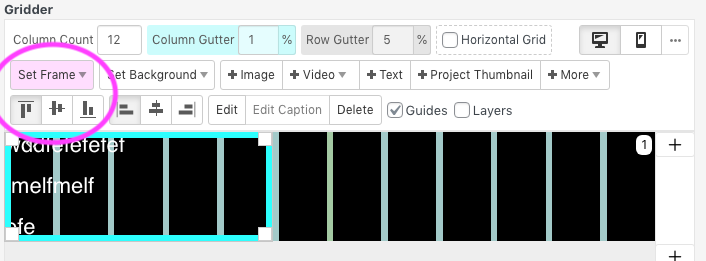
  • Gridder Defaults - frame Bug

    5
    1
    0 Votes
    5 Posts
    160 Views
    arminunruhA
    if you update now it should work
  • Disable zoom in on mobile for the search button

    4
    0 Votes
    4 Posts
    212 Views
    G
    it worked perfectly thanks you very much !
  • Burger Menu for desktop

    4
    0 Votes
    4 Posts
    135 Views
    arminunruhA
    do you use an overlay page? if so there is a setting for creating a close button: [image: 1721231229048-screenshot-2024-07-17-at-17.46.12.png] otherwise there is no such thing as a close button! is this what you mean: ? you are on an overview page. you go inside of a project, and then you want a X button that links back to your overview page?
  • YOAST SEO. Compatible or not?

    8
    0 Votes
    8 Posts
    376 Views
    arminunruhA
    yes its compatible
  • scroll position after clicking project thumbnail grid category filter

    3
    0 Votes
    3 Posts
    133 Views
    S
    @arminunruh ahhh yes i did not think about the default position for the filter being static at the top, that would explain why this function isn't included! lol my apologies, thank you for taking the time to look and for the script recommendation! i'm super excited about this one :)
  • 0 Votes
    8 Posts
    145 Views
    DDNSD
    Thanks @arminunruh Much appreciated!
  • Scroll position restoration not working as expected.

    11
    0 Votes
    11 Posts
    236 Views
    arminunruhA
    yea please always check the blue box "before you post" nice website!
  • SOme Custom css elements not working

    7
    1
    0 Votes
    7 Posts
    151 Views
    T
    Yes! Thanks
  • 0 Votes
    2 Posts
    237 Views
    arminunruhA
    must be a wordpress problem can you google this or ask your webhost support? its not a lay theme issue
  • Yoast SEO = 'page not found' homepage issue

    8
    1
    0 Votes
    8 Posts
    288 Views
    B
    Thank you, yes, it works now!
  • Overlay burger menu not showing on most pages

    3
    3
    0 Votes
    3 Posts
    115 Views
    arminunruhA
    ah ok very good! [image: 1719854729450-screenshot-2024-07-01-at-19.25.25.png] yea its always good to try these steps! have a great day
  • I can't add project description on my project Thumbnail

    2
    0 Votes
    2 Posts
    99 Views
    arminunruhA
    When I click on my project Thumbnail I doesn't allow me to add text below the image. hey! the way it works is this: [image: 1719840217627-screenshot-2024-07-01-at-15.23.34.png] when you are in a project, there should be a textfield. in here you can add the description also make sure when you click on "screen options" on the top right, the checkbox "project descriptions" is active [image: 1719840271613-screenshot-2024-07-01-at-15.24.09-resized.png]

I also code custom websites or custom Lay features.
💿 Email me here: 💿
info@laytheme.com

Our Web Development company: 100k.studio

Want to tip me? https://www.paypal.com/paypalme/arminunruh

Before you post:
  1. When using a WordPress Cache plugin, disable it or clear your cache.
  2. Update Lay Theme and all Lay Theme Addons
  3. Disable all Plugins
  4. Go to Lay Options → Custom CSS & HTML, click "Turn Off All Custom Code", click "Save Changes"

This often solves issues you might run into

When you post:
  1. Post a link to where the problem is
  2. Does the problem happen on Chrome, Firefox, Safari or iPhone or Android?
  3. If the problem is difficult to explain, post screenshots / link to a video to explain it
Online Users
Forgot your key, lost your files, need a previous Lay Theme or Addon version? Go to www.laykeymanager.com