Skip to content

Bug Reports

Something is not working? Please provide a screenshot, your browser name and browser version and your operating system.
3.1k Topics 14.4k Posts
  • text alignment is not working

    3
    2
    0 Votes
    3 Posts
    130 Views
    D
    thanks @arminunruh
  • Overlay subpages appear in google results

    2
    0 Votes
    2 Posts
    78 Views
    arminunruhA
    i see maybe u can try this https://stackoverflow.com/questions/3925696/google-how-to-prevent-subpages-from-appearing-in-results
  • project "update" button not available

    2
    1
    0 Votes
    2 Posts
    65 Views
    G
    Hello, you gotta put a thumbnail image. Perhaps you have deleted the thumbnail image in your media library
  • overlay + video audio | project thumbnail grid: videos vs. images

    7
    2
    0 Votes
    7 Posts
    388 Views
    arminunruhA
    [image: 1719234032621-screenshot-2024-06-24-at-15.00.28.png] hey so for your configuration with video and mouseover thumbnail both activated these settings didnt take effect but i changed my code so they do take effect so depending on what you choose here, image, video or both will be inside of the markup
  • lay theme is not visible after uploading my wordpress page

    2
    0 Votes
    2 Posts
    57 Views
    arminunruhA
    if you can still access /wp-admin/ you can just delete lay theme in appearance → themes. and then re-install it! you can go to laykeymanager.com to download lay.zip if you don't have it. all of your data/content and settings will stay the way they were before. if your website shows an error and you can't access /wp-admin/ u can try this: "First try this: Access your FTP server. When you login to your webhost control panel you can probably use WebFTP right in your control panel. Or you can get your FTP login data in your webhost control panel and use FileZilla to connect. Now find your website folder and inside go to: "wp-content" → "themes". In here find the "lay" folder. Rename it to something like "_lay". This will disable Lay Theme. Now see if you can access your website and /wp-admin/ again. If that didn't change anything, try the next fix: "If the issue is caused by a Plugin" If it worked, login to /wp-admin/ and go to "Appearance" → "Themes". In here click on "Lay Theme". Then click "Delete" at the bottom right. This will not delete any of your settings or content, as these are stored in the database and in your uploads folder, not in the theme folder. Now get your lay.zip file. If you don't have it on your computer search for an email by laytheme that contains a link to it. If that doesn't work write an email to lostfiles@laytheme.com with your key or tell us the email address you used to purchase lay theme. If your Lay Theme version is very old and that causes an issue, you can also get the latest version by emailing lostfiles@laytheme.com. Now in "Appearance" → "Themes" click "Upload" at the top and choose "lay.zip". Upload your zip file and activate Lay Theme." From: https://laytheme.com/troubleshooting.html#critical-error if it doesn't work you can also send your ftp login and website url and a link to this topic to info@laytheme.com sorry for the late response
  • This topic is deleted!

    1
    0 Votes
    1 Posts
    18 Views
    No one has replied
  • Reload Bug: Warning Division by Zero

    13
    1
    0 Votes
    13 Posts
    394 Views
    arminunruhA
    ok im glad you could resolve this
  • site titel on mobile version different

    3
    0 Votes
    3 Posts
    90 Views
    arminunruhA
    it may be better to not use a html code for this but just to use the normal lay theme settings in the customizer to set this up
  • Menu disappeared on Front page

    9
    1
    0 Votes
    9 Posts
    235 Views
    arminunruhA
    oh i think many people use borlands cookies oh i see! yea if u have an issue its often good to disable all plugins and see if that fixes it
  • Submenu disappears when clicked on

    3
    2
    0 Votes
    3 Posts
    111 Views
    S
    hey armin! thanks for the respond :) the setting in customize i already tried.. didnt worked. yes if i dont get any fix i think i will switch to a older version, if i get a solution i gonna post it here!
  • This topic is deleted!

    1
    2
    0 Votes
    1 Posts
    7 Views
    No one has replied
  • Marquee linked element is not working

    5
    0 Votes
    5 Posts
    125 Views
    N
    @arminunruh Yes! Massive thanks! :)
  • 0 Votes
    8 Posts
    193 Views
    arminunruhA
    but no there are is no other functionality to do what u did aha but its funny u found this workaround, i didnt expect this use case but yea it makes sense mmh
  • Desktop burger menu changes elements on the page

    2
    0 Votes
    2 Posts
    76 Views
    arminunruhA
    hey sorry it seems i haven't answered you but it seems you posted this again and i answered there and we resolved it the have a good day
  • collapsed rows won't open when there's a link in it (only on iphone)

    3
    1
    0 Votes
    3 Posts
    106 Views
    arminunruhA
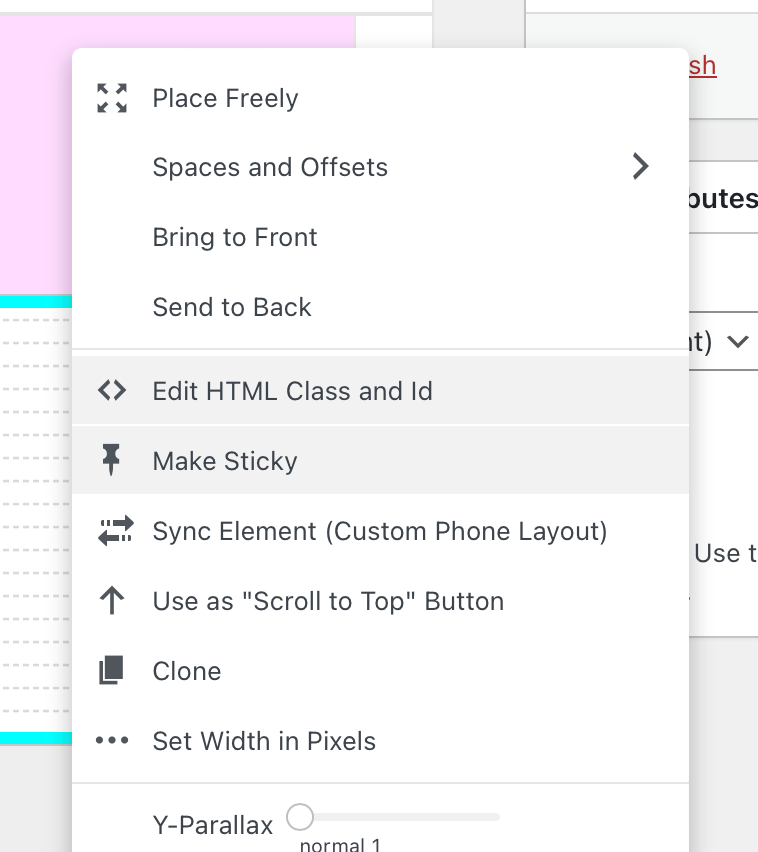
    hey so i think it seems that your links that should expand the row below are sometimes missing some data- attributes. this is what it should look like: [image: 1717431604305-screenshot-2024-06-03-at-18.20.00.png] but on phone some links look like this: [image: 1717431624487-screenshot-2024-06-03-at-18.20.19.png] so it has nothing to do with links being inside collapsed rows, but there is sth wrong with the links that expand the row can you try and re-link the links to make the rows underneath expand/collapse? before you do that, can you right click the text element that contains the link, and then make sure sync is off [image: 1717431766430-screenshot-2024-06-03-at-18.22.42.png] (here its on)
  • order of project items is getting mixed up

    8
    0 Votes
    8 Posts
    200 Views
    arminunruhA
    very nice :))
  • one particular Page generating problems only on mobile devices

    5
    1
    0 Votes
    5 Posts
    101 Views
    arminunruhA
    did you get it to work? for me it doesnt crash anymore
  • This topic is deleted!

    1
    0 Votes
    1 Posts
    8 Views
    No one has replied
  • This topic is deleted!

    1
    0 Votes
    1 Posts
    12 Views
    No one has replied
  • This topic is deleted!

    2
    1
    0 Votes
    2 Posts
    9 Views

I also code custom websites or custom Lay features.
šŸ’æ Email me here: šŸ’æ
info@laytheme.com

Our Web Development company: 100k.studio

Want to tip me? https://www.paypal.com/paypalme/arminunruh

Before you post:
  1. When using a WordPress Cache plugin, disable it or clear your cache.
  2. Update Lay Theme and all Lay Theme Addons
  3. Disable all Plugins
  4. Go to Lay Options → Custom CSS & HTML, click "Turn Off All Custom Code", click "Save Changes"

This often solves issues you might run into

When you post:
  1. Post a link to where the problem is
  2. Does the problem happen on Chrome, Firefox, Safari or iPhone or Android?
  3. If the problem is difficult to explain, post screenshots / link to a video to explain it
Online Users
Forgot your key, lost your files, need a previous Lay Theme or Addon version? Go to www.laykeymanager.com