Skip to content

Bug Reports

Something is not working? Please provide a screenshot, your browser name and browser version and your operating system.
3.2k Topics 15.2k Posts
  • 0 Votes
    8 Posts
    424 Views
    arminunruhA
    but no there are is no other functionality to do what u did aha but its funny u found this workaround, i didnt expect this use case but yea it makes sense mmh
  • Desktop burger menu changes elements on the page

    2
    0 Votes
    2 Posts
    215 Views
    arminunruhA
    hey sorry it seems i haven't answered you but it seems you posted this again and i answered there and we resolved it the have a good day
  • collapsed rows won't open when there's a link in it (only on iphone)

    3
    1
    0 Votes
    3 Posts
    251 Views
    arminunruhA
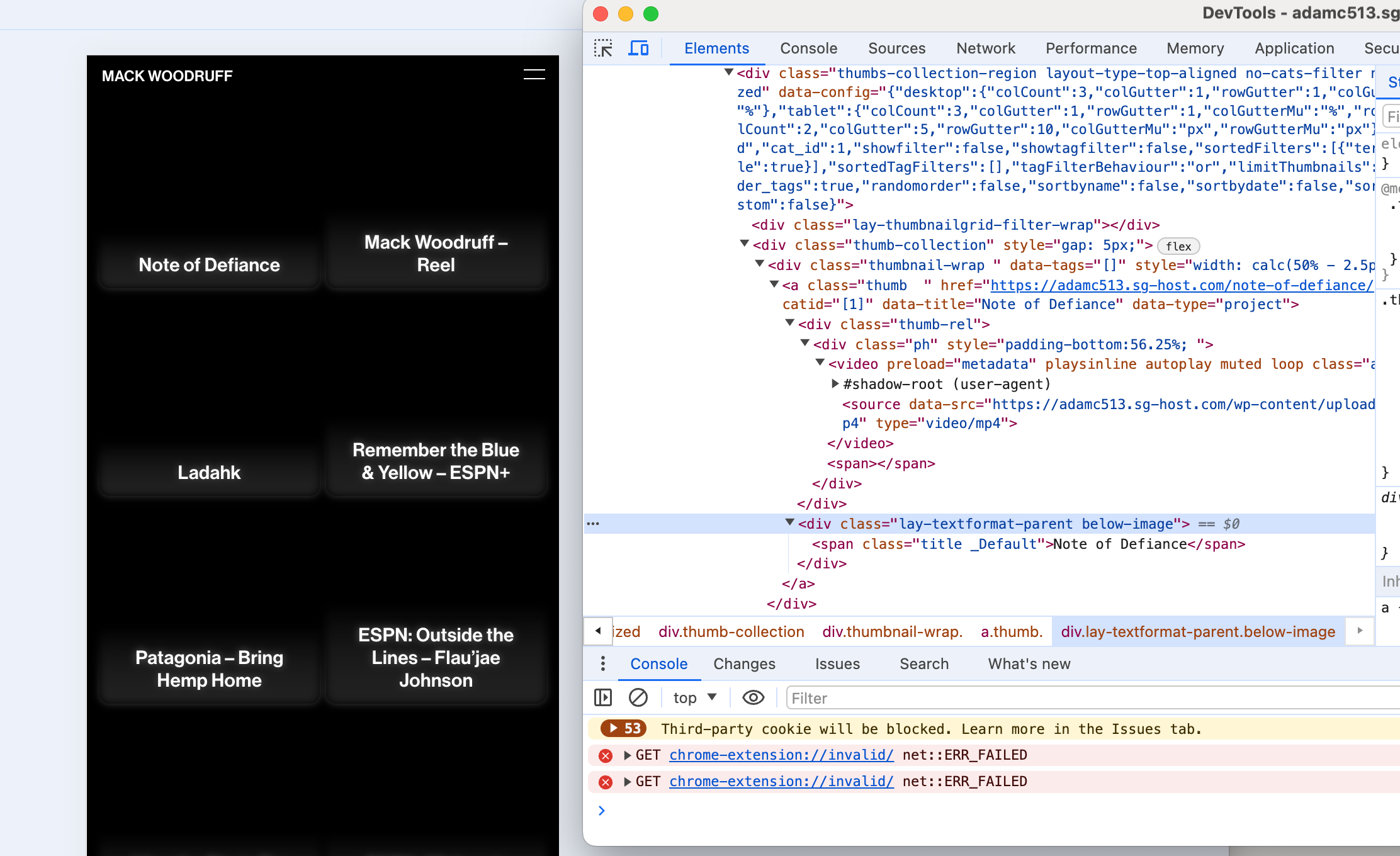
    hey so i think it seems that your links that should expand the row below are sometimes missing some data- attributes. this is what it should look like: [image: 1717431604305-screenshot-2024-06-03-at-18.20.00.png] but on phone some links look like this: [image: 1717431624487-screenshot-2024-06-03-at-18.20.19.png] so it has nothing to do with links being inside collapsed rows, but there is sth wrong with the links that expand the row can you try and re-link the links to make the rows underneath expand/collapse? before you do that, can you right click the text element that contains the link, and then make sure sync is off [image: 1717431766430-screenshot-2024-06-03-at-18.22.42.png] (here its on)
  • one particular Page generating problems only on mobile devices

    5
    1
    0 Votes
    5 Posts
    502 Views
    arminunruhA
    did you get it to work? for me it doesnt crash anymore
  • This topic is deleted!

    1
    0 Votes
    1 Posts
    8 Views
    No one has replied
  • This topic is deleted!

    1
    0 Votes
    1 Posts
    12 Views
    No one has replied
  • This topic is deleted!

    2
    1
    0 Votes
    2 Posts
    9 Views
  • Embedded html5-Video: Loop not working

    4
    1
    0 Votes
    4 Posts
    729 Views
    Z
    My bad, seems that the mp4 file was corrupt, its working now!
  • backLinks in text doesn't work correctly

    3
    0 Votes
    3 Posts
    144 Views
    arminunruhA
    i think i released an update some days ago that fixed this mmh if not: can you send your website address, /wp-admin/ username and password and a link to this topic to info@laytheme.com?
  • home keeps showing old version

    5
    3
    0 Votes
    5 Posts
    423 Views
    arminunruhA
    ah :/ yea maybe it was a little dumb to put this setting there. but i had to code my own setting for this to be able to put a category as a frontpage.
  • mobile menu bar blurred

    4
    2
    0 Votes
    4 Posts
    175 Views
    arminunruhA
    maybe u need to set padding-top to 0 of body body{ padding-top:0!important; } not sure hard to help without a link
  • The blur effect in the mobile menu bar does not work properly

    3
    0 Votes
    3 Posts
    249 Views
    arminunruhA
    so do u have a link maybe ur phone doesnt support it
  • Carousel bugs in mobile view

    7
    1 Votes
    7 Posts
    902 Views
    ArneRobotA
    Thank you @arminunruh that solved the problem! :-) I did not see it, though I am sure I have checked it… sorry! I will document my problem better next time, promised!
  • This topic is deleted!

    1
    0 Votes
    1 Posts
    3 Views
    No one has replied
  • Element Grid and Thumbnail Grid does not fade in

    4
    0 Votes
    4 Posts
    378 Views
    arminunruhA
    can you send your website address, /wp-admin/ username and password and a link to this topic to info@laytheme.com?
  • Messed up gridder layout in google Chrome

    4
    2
    0 Votes
    4 Posts
    382 Views
    L
    Was able to resolve the issue by changing the Litespeed Cache Preset to "Basic" where it skips certain things. [image: 1716134572211-2024-05-19_18-02-04_firefox.png]
  • 0 Votes
    5 Posts
    455 Views
    arminunruhA
    so, number 2: yes mh so u use the setting to show the full content of the news posts and then you'd have the titles show up twice? how about you hide the news title in the news element? do u have a link of the page where u show the news element please
  • Admin project pannel does not show projects

    2
    2
    0 Votes
    2 Posts
    104 Views
    arminunruhA
    can u do the steps in the blue box to the right "before u post" can u also update wordpress
  • Horizontal images looking distorted in lightbox

    5
    2
    0 Votes
    5 Posts
    357 Views
    A
    OMG it worked! Thank you so so much - U saved my life! My fault for not reading through the blue box, sorry! I am actually super glad you liked the artworks <3 Thank you!
  • Sizes variable for full screen images

    11
    0 Votes
    11 Posts
    1k Views
    arminunruhA
    ok we managed to fix it
Online Users
Forgot your key, lost your files, need a previous Lay Theme or Addon version? Go to www.laykeymanager.com