Submenu disappears when clicked on
-
Hi there,
this worked before Updating recently.
I have some Custom CSS and Javascript for the Menubar:/*menu*/ .sitetitle { display: block; left: 0; width: 20.25%; padding: 2%; height: 200px; top: 0; background: #2F2F2F; border-right: 1px solid black; box-sizing: border-box; } .sitetitle img { max-height: 100%; max-width: 100%; width: auto !important; } nav.primary { left: 0; background: #2F2F2F; border-right: 1px solid black; width: 20.25%; padding: 2%; height: calc(100% - 200px); overflow: auto; top: 200px; box-sizing: border-box; } nav.primary li { margin-bottom: 0px; } nav.primary li a { display: inline-block; margin-bottom: 6px !important; font-size: 14px; white-space: pre-wrap; } nav.primary ul ul{ margin-left: 15px; } nav.laynav.primary li.hidden { display: none; } nav.laynav.primary li.hidden.show { display: inline-block; } .sub-menu { display: none; margin-bottom: 16px; } .menu-item > a { color: #cccccc; } .menu-item > a :hover { color: #EEA978; } nav.laynav .menu-item.current-menu-item > a { color: #EEA978 !important; } .menu-item-has-children > a { position: relative; padding-left:15px; } .menu-item-has-children > a::before { content: "\f0da"; font-family: 'FontAwesome'; display: block; position: absolute; left: 0; top: 0px; width:10px; height: 24px; transition: all 0.3s; font-size: 16px; line-height: 20px; color: #EEA978; } .menu-item-has-children.active > a::before, .current-menu-parent.active > a::before, .current-menu-ancestor > a::before { content: "\f0d7"; } .menu-item-has-children.active > .sub-menu, .current-menu-parent.active > .sub-menu, .current-menu-ancestor > .sub-menu { display: block; margin-bottom: 10px; }and:
<script type="text/javascript">
var parent = document.querySelectorAll(".current-menu-ancestor > a")[0];

var elements = document.querySelectorAll(".menu-item-has-children > a");

var onClickFunction = function(e) {
    e.preventDefault();
    e.stopPropagation();
    this.parentNode.classList.toggle('active');
    return false;
};

for (var i = 0; i < elements.length; i++) {
    elements[i].addEventListener('click', onClickFunction, false);
}

var searchParams = new URLSearchParams(location.search);

if(searchParams.has('moduleKey')) {
 //   window.location = "https://docs.nextra-web.com/de/intro/";

    var showElements = document.querySelectorAll("a[title='"+searchParams.get('moduleKey')+"']");
    if(showElements.length > 0) {
        var elements = document.querySelectorAll("nav.primary > ul > li > a:not([title='nextra.Basics'])");
        for (var i = 0; i < elements.length; i++) {
            elements[i].parentNode.classList.add('hidden');
        }

        for (var i = 0; i < showElements.length; i++) {
            elements[i].parentNode.classList.add('show');
        }
    }
}

</script>
The Menu looks like this:
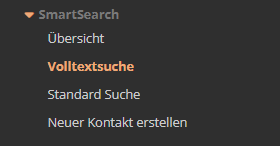
Now when i Mouseclick on the Submenu it loads the Site but the Dropdown disappears:

i already tried some changes but none worked and i cant find the problem :(
Maybe someone knows more?
Kindly,
Sebastien
-
hello i hope u can understand that i dont really have time to help with custom code im too busy at the moment
you can always go to laykeymanager.com and use a previous lay theme version, download an older version there
there is a setting for what u'r trying to do. u dont need to code this by yourself.

in customize → menu style → submenus
maybe u can remove your code and use this instead
-

Hello! It looks like you're interested in this conversation, but you don't have an account yet.
Getting fed up of having to scroll through the same posts each visit? When you register for an account, you'll always come back to exactly where you were before, and choose to be notified of new replies (either via email, or push notification). You'll also be able to save bookmarks and upvote posts to show your appreciation to other community members.
With your input, this post could be even better 💗
Register Login