Skip to content

General Discussion

A place to talk about anything Lay Theme related
5.0k Topics 21.6k Posts
  • Text styles thumbnail grid

    3
    0 Votes
    3 Posts
    471 Views
    arminunruhA
    i think the jumping is because some positions inside of the font itself maybe you can work around it by using css: position: relative; top: -2px; or top: 2px; or bottom: -2px; on the css that shows the other font
  • Best practice to Clone Website and LCP Speed

    11
    0 Votes
    11 Posts
    793 Views
    L
    i tried the recommended plugin but speed results on page insights were worse so i switched back. Thanks i think its ok for now but with the redesign i will try to solve this. thanks!
  • PHP versions - compatibility

    3
    0 Votes
    3 Posts
    370 Views
    A
    thank you
  • 9:16 video on mobile, look cropped to 1:1

    5
    1
    0 Votes
    5 Posts
    460 Views
    arminunruhA
    fix for this: http://laythemeforum.com/topic/10701/mobile-videos-are-forced-1x1/4
  • Problems with custom video-format

    5
    0 Votes
    5 Posts
    752 Views
    arminunruhA
    hello i created a fix for this now where you can set the correct video dimensions, you can read about it here: http://laythemeforum.com/topic/10701/mobile-videos-are-forced-1x1/4
  • 3:4 Videos get chopped

    9
    1
    0 Votes
    9 Posts
    778 Views
    arminunruhA
    Hey i know this is an old post, but i created a way to fix this now. You can read about it here: http://laythemeforum.com/topic/10701/mobile-videos-are-forced-1x1/4
  • order on mobile

    2
    0 Votes
    2 Posts
    192 Views
    arminunruhA
    i see you already did it. the way to do it is use a custom phone layout https://laytheme.com/documentation/custom-phone-layouts.html
  • Project grid separator

    6
    2
    0 Votes
    6 Posts
    532 Views
    C
    thanksssssss!!
  • Column responsiveness for tablet and phone

    6
    0 Votes
    6 Posts
    980 Views
    arminunruhA
    actually it would be easier for me to just code the possibility to replace thumbnail images I know that I can do this with the element or thumbnail grid but if you use this then, you can't do the "replace image" for a project thumnbail. cause that was your main concern why you didnt want to use the elementgrid or thumbnailgrid right? if i would do that would it fix the issue for you?
  • Spacing on top of social media icons

    4
    0 Votes
    4 Posts
    361 Views
    arminunruhA
    [image: 1739264576911-screenshot-2025-02-11-at-10.02.53.png] if i look at your textbox, it seems that the text element has additional spacing (blue gap on top) the reason for this is your text element doesnt just contain text, but it contains addition html markup: [image: 1739264700180-screenshot-2025-02-11-at-10.04.53.png] <div class="flex flex-col gap-2 items-start…" you may have copied the text from another website and pasted it into the texteditor. however, this also copies over the HTML, not just the text. so i would go to this textbox in /wp-admin/, edit the text, click the <> code button: [image: 1739264842226-screenshot-2025-02-11-at-10.07.17.png] and remove the outer div, so we only have the inner <p tag so basically you just want this part inside the code: [image: 1739264915332-screenshot-2025-02-11-at-10.08.30.png] next time you copy text from a website or pdf, if you want to make sure theres not extra HTML, you can first paste it into a texteditor, then copy it from there and then paste it into the gridder textbox

  • how to create fixed text overlay for whole website

    1
    2
    0 Votes
    1 Posts
    159 Views
    No one has replied
  • overflow

    2
    0 Votes
    2 Posts
    368 Views
    arminunruhA
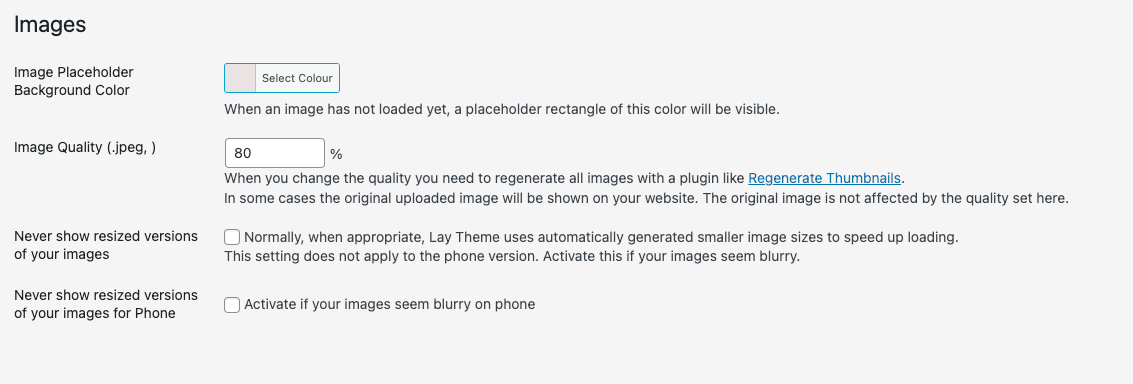
    can you only use this css: html, body { overscroll-behavior: none; } and delete the other css? why do u even need this css? why don't you use the default behaviour, what is wrong with it? maybe you can make a video to show what you dont like about the default behaviour? when u open the project overlay and scroll, does it not work well enough without custom css? make sure in lay options you have this setting disabled (its at the bottom): [image: 1739213544329-screenshot-2025-02-10-at-19.52.20.png]
  • This topic is deleted!

    1
    2
    0 Votes
    1 Posts
    18 Views
    No one has replied
  • submenu position

    13
    0 Votes
    13 Posts
    2k Views
    arminunruhA
    and now youd also need to decide: when will the submenu be hidden? right now its only hidden, if you click the menu point again that opened it. i think this would hide it if you click any link inside the submenu: <script> jQuery('.fixed-submenu a').on('click', function(e){ jQuery(this).closest('.fixed-submenu').hide(); }) </script>
  • carousel caption on top the pictures

    7
    0 Votes
    7 Posts
    719 Views
    arminunruhA
    actually i found a way: .lay-carousel-wrap{ display: flex; flex-direction: column; } .laycarousel-bullets{ order: -1; padding-bottom: 10px; padding-top: 0; } Enter this css in "lay options" -> "custom css & html" -> "custom css for desktop" Make sure to use the setting that puts captions and numbers below the carousel. This CSS will then only put the dots above, while the rest stays below.
  • menu text color change when overlapping with images

    7
    0 Votes
    7 Posts
    719 Views
    arminunruhA
    thats not possible i think
  • Carousel mouseover

    3
    0 Votes
    3 Posts
    784 Views
    arminunruhA
    you can use custom css .lay-carousel-slide a[data-type="project"] img{ transition: opacity 300ms ease; } .lay-carousel-slide a[data-type="project"]:hover img{ opacity: 0.5!important; } .lay-carousel-slide a[data-type="project"]{ background-color: red; } for example. or .lay-carousel-slide a[data-type="project"] img{ transition: all 300ms ease; filter: brightness(1); } .lay-carousel-slide a[data-type="project"]:hover img{ filter: brightness(0.5); }
  • Disabling Lightbox on Desktop Only (Full Screen Addon)

    2
    0 Votes
    2 Posts
    260 Views
    arminunruhA
    try this css .img img{ pointer-events: none; } Enter this css in "lay options" -> "custom css & html" -> "custom css for desktop" how to do css based on certain pages: https://laytheme.com/documentation/custom-css-styling.html#css-based-on-current-page sorry about the late reply
  • gap between splitscreen

    2
    1
    0 Votes
    2 Posts
    164 Views
    arminunruhA
    mmh i think its not possible this has nothing to do with this no? https://laytheme.com/tutorials/create-a-splitscreen-website.html do u have a link?
  • Layout Issue in Landscape Mode on Mobile Devices

    2
    0 Votes
    2 Posts
    220 Views
    arminunruhA
    do u have a link? Is there a way to force the site to display only in portrait mode and prevent it from showing in landscape mode? mmh how about you increase numbers here: [image: 1738168719807-screenshot-2025-01-29-at-17.38.34.png] phone breakpoint to 1000 tablet breakpoint to 1200 maybe? or even higher because i think the desktop version of your website is shown on a landscape phone sorry for the late reply
Online Users
Forgot your key, lost your files, need a previous Lay Theme or Addon version? Go to www.laykeymanager.com