Skip to content

Addons

905 Topics 4.2k Posts

Got a question about an Addon?

  • Question re: Carousel Add-On + Use Browser Height

    7
    0 Votes
    7 Posts
    974 Views
    mariusjopenM
    Dear @jfrederick the dimensions are always different depending on the window size. Do the image will be cropped. You can try to use the CSS command object-fit: cover; on the image. Let me know if that helped. Best! Marius
  • MENU add to the website panel.

    4
    2
    0 Votes
    4 Posts
    423 Views
    mariusjopenM
    Dear @darius sure! Best! Marius
  • Lightbox Mobile doesn't work

    5
    2 Votes
    5 Posts
    1k Views
    mariusjopenM
    Dear @hgbnd no news yet. But it is on our list. Best! Marius
  • Problem with text slides' vertical alignment

    2
    0 Votes
    2 Posts
    437 Views
    mariusjopenM
    Dear @nuotio for me it works. Can you check if you use any CUSTOM CSS code or other things which could influence it? Best! Marius
  • Carousel Full Screen and Swipe Speed

    12
    0 Votes
    12 Posts
    2k Views
    mariusjopenM
    Dear @lousydeal I am not sure if I would go for this solution. I would not give many rows the position fixed. Then you always need to tell them their position, etc. There are two ways to go in my opinion. But all the content you want to be fixed in one row and use the stack element. Then you can just tell that row to be position fixed. Put the content which you want to position fixed in the CUSTOM HTML section. Then you can style it however you want it to be. Hope I could help! Marius

  • Lightbox Hover

    hover hover image mouseover
    8
    0 Votes
    8 Posts
    2k Views
    mariusjopenM
    Hi @Jan cool! Happy to hear! Marius
  • 0 Votes
    4 Posts
    606 Views
    mariusjopenM
    You are welcome!
  • Lightbox in Mobile - I cannot see the images

    2
    0 Votes
    2 Posts
    286 Views
    mariusjopenM
    Dear @tali can you post a link to your website? Thank you! marius
  • Questions About FullScreen Slider

    4
    0 Votes
    4 Posts
    964 Views
    arminunruhA
    My autoscrolling is not working. How can I make it work? Well you haven't configured the fullscreen slider to be vertical. Horizontal fullscreen slider does not work with scrolling. Your setting atm is this: [image: 0_1542198483578_Screenshot 2018-11-14 at 13.27.16.png] On my mobile site, I want my full screen slider images to fill up the whole screen. How can I make it work? Create a custom phone layout and use background images on rows that you configure to be browser-filling: http://laytheme.com/documentation.html#use-browser-height-for-row-height
  • Exchange addon possible?

    wrong addon exchange addon
    2
    0 Votes
    2 Posts
    293 Views
    mariusjopenM
    Dear @vostik Best is if you write an email to info@laytheme.com and include a link to this conversation. Marius
  • Lightbox-Bilder größer als Original

    8
    0 Votes
    8 Posts
    1k Views
    mariusjopenM
    Dear @Layer have a look here: #lightbox-inner .lazyloaded { width: initial !important; height: initial !important; max-height: 100vh; max-width: 100vw; } Best! Marius
  • Can't disable continous vertical in fullscreen slider

    5
    0 Votes
    5 Posts
    981 Views
    mariusjopenM
    Dear @arminunruh not really yet. We wrote it down and might include it in a future update. Best! Marius
  • Align Captions and Numbers to height of slides

    2
    0 Votes
    2 Posts
    336 Views
    mariusjopenM
    Dear @jspinkus can you make a quick sketch to show what exactly you mean? Best! Marius
  • Simple question about fullscreen slider

    7
    0 Votes
    7 Posts
    2k Views
    arminunruhA
    Hey! I turned "Auto Scrolling" on. The fullscreen slider was turned on all the time, but the behaviour of it maybe was not what you expected because this one setting was turned off.
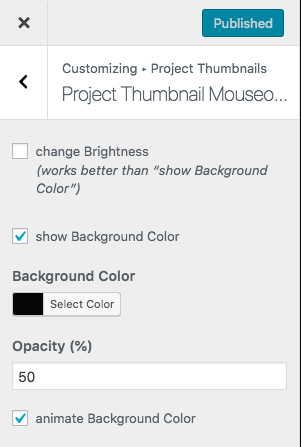
  • Transparency Option for Project Thumbnail Mouseover

    2
    1
    0 Votes
    2 Posts
    335 Views
    mariusjopenM
    Dear @edgrbnz good point. We will look into this! Best! Marius
  • Zoom feature on mobile layout?

    11
    0 Votes
    11 Posts
    2k Views
    mariusjopenM
    Cool! Happy we got the solution. Best!
  • Cursor highlighting text on Carousel?

    6
    0 Votes
    6 Posts
    1k Views
    N
    Oh thanks for considering this as an option! Looking forward to this in the future!
  • Multiple slides per view (Laytheme Carousel)

    19
    0 Votes
    19 Posts
    7k Views
    arminunruhA
    hey! hmm i should add this as a feature. hmm really busy with a few other things right now. might take a while!
  • Pictures various size

    2
    0 Votes
    2 Posts
    700 Views
    mariusjopenM
    Dear @Stefanie there is not an official way to do this because the carousel adjusts to the grid from your LayGrid. You could use CUSTOM CSS to make changes. For example like here: .col .lay-carousel-wrap { width: 80vw !IMPORTANT; } Now the carousel size adjusts. With some more basic CSS magic you will be able to position the carousel better. I hope that helped. Let me know if you need more specific help. Best! Marius
  • change carousel transition type for one page only

    2
    0 Votes
    2 Posts
    338 Views
    mariusjopenM
    Dear @tizi not possible. We are sorry. Best! Marius
Online Users
Forgot your key, lost your files, need a previous Lay Theme or Addon version? Go to www.laykeymanager.com