Transparency Option for Project Thumbnail Mouseover
-
Hey there Lay-Team,
I currently am struggling a bit with the available options for the Project Thumbnail Mouseover.
My whole page works with an off-black background (image!) and a lot of the images have the same background color to make them seem to be free floating. The problem with the current options is, that they all change the background color of my image when hovered:- Change Brightness: makes the whole thumbnail darker which in my case reveals a border I don’t want to be shown.
- Show Background Color: shows a background color, which (depending on the browser) also reveals a border for a short time depending on the color settings of the used monitor.
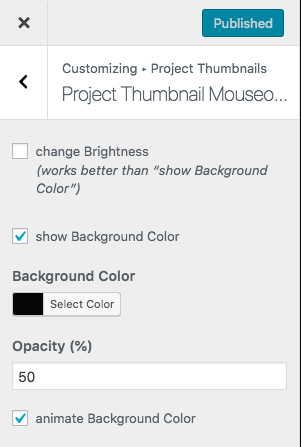
I'd love to have a third option like:
- Change Opacity: which simply controls and animates the opacity for the Project Thumbnails.
Or a way to set the Background Color in Show Background Color to transparent. I hope that makes sense!
Cheers & Thank you!
-


Hello! It looks like you're interested in this conversation, but you don't have an account yet.
Getting fed up of having to scroll through the same posts each visit? When you register for an account, you'll always come back to exactly where you were before, and choose to be notified of new replies (either via email, or push notification). You'll also be able to save bookmarks and upvote posts to show your appreciation to other community members.
With your input, this post could be even better 💗
Register Login