Hiding second and third menu on mobile
-
Dear @zochovsky
sorry. I don't quite understand.
On mobile you want to hide the second and third menu?
And on desktop you want to…?:-)
Best!
Marius
-
Dear @zochovsky
sorry. I don't quite understand.
On mobile you want to hide the second and third menu?
And on desktop you want to…?:-)
Best!
Marius
@mariusjopen
Hi !
I have the same issue I think, on my desktop version I have 4 menu points and because I changed the layout of my mobile version, I only need 2 menu points for it.Read a couple of hiding-menu-points-questions, nothing quite answered mine, you know what I mean though ?
Thanks ! -
Dear @jui & @zochovsky
You can hide specific menu points from the navigation with the IDFor example:
#menu-item-64 {
    display: none;
}
Hope that helped!
Marius
-
Dear @jui & @zochovsky
You can hide specific menu points from the navigation with the IDFor example:
#menu-item-64 {
    display: none;
}
Hope that helped!
Marius
@mariusjopen Alright, how do I find out the menu-item-nr ?
-
-
@jui Easy!
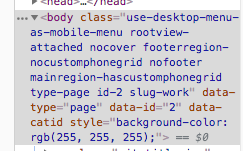
Visit the page in your browser, open inspector (cmd+alt+i) or right click → inspect and click the menu-item you want to hide, Then you can see the item number in the inspector panel, like so:
-
-
-
-
-



Hello! It looks like you're interested in this conversation, but you don't have an account yet.
Getting fed up of having to scroll through the same posts each visit? When you register for an account, you'll always come back to exactly where you were before, and choose to be notified of new replies (either via email, or push notification). You'll also be able to save bookmarks and upvote posts to show your appreciation to other community members.
With your input, this post could be even better 💗
Register Login