Skip to content
  • Recent
  • Tags
  • Popular
  • Users
  • Search
Skins
  • Light
  • Brite
  • Cerulean
  • Cosmo
  • Flatly
  • Journal
  • Litera
  • Lumen
  • Lux
  • Materia
  • Minty
  • Morph
  • Pulse
  • Sandstone
  • Simplex
  • Sketchy
  • Spacelab
  • United
  • Yeti
  • Zephyr
  • Dark
  • Cyborg
  • Darkly
  • Quartz
  • Slate
  • Solar
  • Superhero
  • Vapor

  • Default (No Skin)
  • No Skin
Collapse

Lay Theme Forum

  1. Home
  2. General Discussion
  3. Limit all images beyond a certain point with window resizing?

Limit all images beyond a certain point with window resizing?

Scheduled Pinned Locked Moved General Discussion
4 Posts 2 Posters 465 Views
  • Oldest to Newest
  • Newest to Oldest
  • Most Votes
Reply
  • Reply as topic
Log in to reply
This topic has been deleted. Only users with topic management privileges can see it.
  • N Offline
    N Offline
    ngoma
    wrote on last edited by
    #1

    So that all images stop expanding at a certain point,

    like on this site: https://velvetspectrum.com/projects

    "Max Width of Content" would work if it is by percentage.
    But it's by pixels...
    which doesn't work because the smaller and larger images need different pixel limits obviously!

    This should be possible? I really hope?

    Appreciate any pointers. Cheers

    1 Reply Last reply
    0
    • mariusjopenM Offline
      mariusjopenM Offline
      mariusjopen
      Global Moderator
      wrote on last edited by
      #2

      Dear @ngoma
      that would destroy the layout in the gridder if you would max-width only certain elements like images.

      You can set a max-width for the whole website in LayTheme options.

      Otherwise you could CUSTOM CSS image containers.

      Best!

      Marius

      www.mariusjopen.world

      1 Reply Last reply
      0
      • N Offline
        N Offline
        ngoma
        wrote on last edited by
        #3

        Hey thanks for the answer.

        But I don't see a "Max-Width For Whole Website" option in Lay Options?

        There is only a "Max width of content" option, which is for each image, right?

        cheers!

        1 Reply Last reply
        0
        • mariusjopenM Offline
          mariusjopenM Offline
          mariusjopen
          Global Moderator
          wrote on last edited by
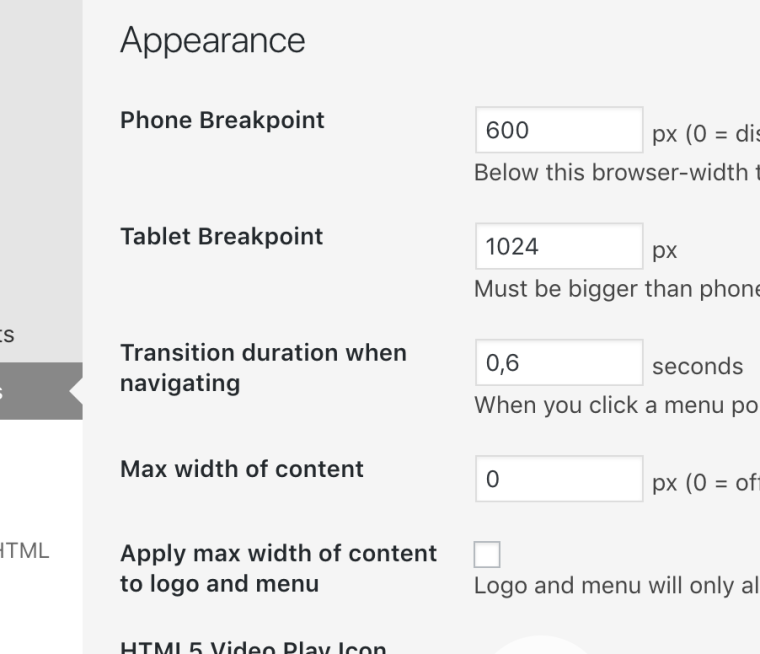
          #4

          Dear @ngoma
          have a look here:
          0_1544104646600_Bildschirmfoto 2018-12-06 um 14.57.14.png

          Hope that helps!

          Best!

          Marius

          www.mariusjopen.world

          1 Reply Last reply
          0
          Reply
          • Reply as topic
          Log in to reply
          • Oldest to Newest
          • Newest to Oldest
          • Most Votes


          Online Users
          arminunruhA
          arminunruh
          Forgot your key, lost your files, need a previous Lay Theme or Addon version? Go to www.laykeymanager.com
          laytheme.com
          • Login

          • Don't have an account? Register

          • Login or register to search.
          • First post
            Last post
          0
          • Recent
          • Tags
          • Popular
          • Users
          • Search