Skip to content
  • Recent
  • Tags
  • Popular
  • Users
  • Search
Skins
  • Light
  • Brite
  • Cerulean
  • Cosmo
  • Flatly
  • Journal
  • Litera
  • Lumen
  • Lux
  • Materia
  • Minty
  • Morph
  • Pulse
  • Sandstone
  • Simplex
  • Sketchy
  • Spacelab
  • United
  • Yeti
  • Zephyr
  • Dark
  • Cyborg
  • Darkly
  • Quartz
  • Slate
  • Solar
  • Superhero
  • Vapor

  • Default (No Skin)
  • No Skin
Collapse

Lay Theme Forum

  1. Home
  2. General Discussion
  3. Sub Menu Background

Sub Menu Background

Scheduled Pinned Locked Moved General Discussion
17 Posts 2 Posters 2.8k Views 1 Watching
  • Oldest to Newest
  • Newest to Oldest
  • Most Votes
Reply
  • Reply as topic
Log in to reply
This topic has been deleted. Only users with topic management privileges can see it.
  • mariusjopenM
    mariusjopenM
    mariusjopen
    Global Moderator
    wrote on last edited by
    #2

    Dear @rbnbm
    can you provide a rough sketch to be more clear? :-)

    Best!

    Marius

    www.mariusjopen.world

    1 Reply Last reply
    0
    • R
      R
      rbnbm
      wrote on last edited by
      #3

      Hi!

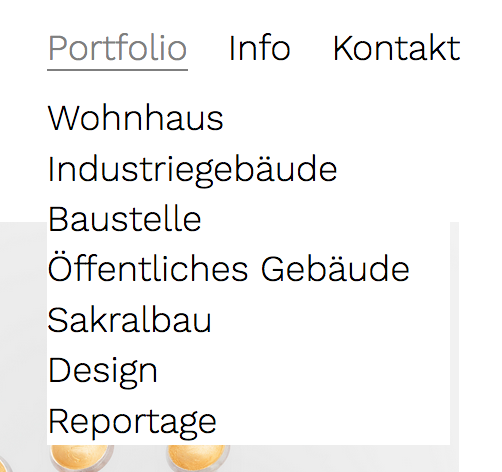
      Sorry for being unclear, is the picture helpful?

      0_1551968805315_Screen Shot 2019-03-07 at 15.26.29.png

      I mean the space on the left of the sub menu points.

      Thanks!

      1 Reply Last reply
      0
      • mariusjopenM
        mariusjopenM
        mariusjopen
        Global Moderator
        wrote on last edited by
        #4

        Dear @rbnbm
        if you post a link if could help you better. Until now I cán only say: Dive into the CSS. Use the !important tag. And apply a width: 100vw

        Hope that helps!

        Best!

        Marius

        www.mariusjopen.world

        1 Reply Last reply
        0
        • R
          R
          rbnbm
          wrote on last edited by
          #5

          Hey,

          Sorry, forgot that – here is the link:
          http://ah-fotografie.de.w019239e.kasserver.com/site

          Problem is that I cannot find the selector for the background.
          Thanks a lot!

          1 Reply Last reply
          0
          • mariusjopenM
            mariusjopenM
            mariusjopen
            Global Moderator
            wrote on last edited by
            #6

            Dear @rbnbm

            does that help?

            .sub-menu {
                width: 100vw !important;
            }
            

            Best!

            Marius

            www.mariusjopen.world

            1 Reply Last reply
            0
            • R
              R
              rbnbm
              wrote on last edited by
              #7

              Hi @mariusjopen

              unfortunately not – nothing is happening...
              Any other ideas?

              Thanks!

              1 Reply Last reply
              0
              • mariusjopenM
                mariusjopenM
                mariusjopen
                Global Moderator
                wrote on last edited by
                #8

                Dear  @rbnbm
                for me it did. It extended the background of the navigation to the right border of the screen.

                Best!

                Marius

                www.mariusjopen.world

                1 Reply Last reply
                0
                • R
                  R
                  rbnbm
                  wrote on last edited by
                  #9

                  Hi @mariusjopen ,

                  Sorry, you are right! I failed to explain – there is white space on the right side, but I would like to have some space on the LEFT side of the items (letters) in the submenu. Possible?

                  1 Reply Last reply
                  0
                  • mariusjopenM
                    mariusjopenM
                    mariusjopen
                    Global Moderator
                    wrote on last edited by
                    #10

                    Dear @rbnbm
                    have a look here:

                    .sub-menu {
                        padding-left: 15px !important;
                    }
                    

                    And here. You can use the :hover in the Chrome Inspector:
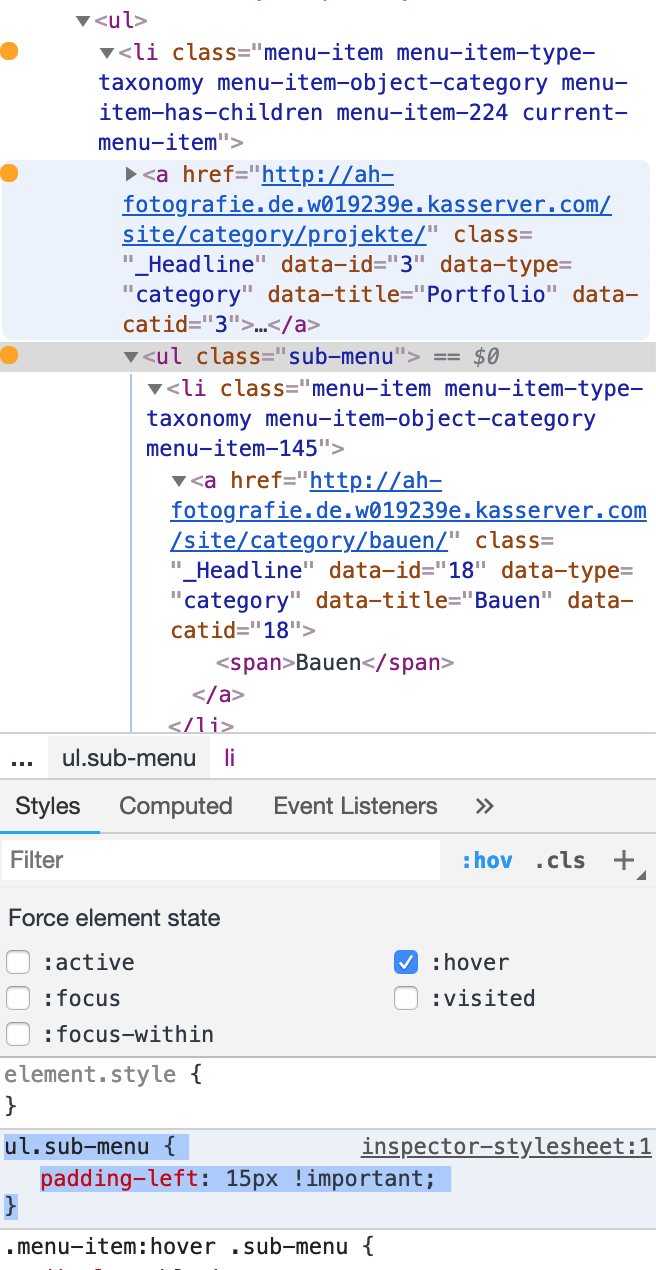
                    0_1552669612107_Bildschirmfoto 2019-03-15 um 18.06.43.png

                    Best!

                    Marius

                    www.mariusjopen.world

                    1 Reply Last reply
                    0
                    • R
                      R
                      rbnbm
                      wrote on last edited by
                      #11

                      Dear @mariusjopen ,

                      Thanks, but I already got that to work, I am looking for a code so that it looks like this: 0_1552976178143_menu-design.jpg
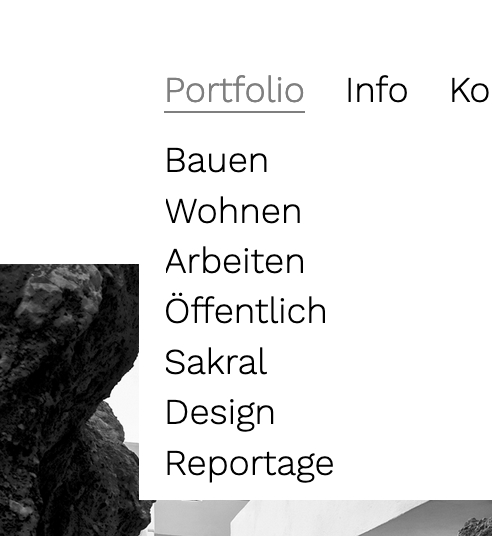
                      Possible? Thanks again!

                      1 Reply Last reply
                      0
                      • mariusjopenM
                        mariusjopenM
                        mariusjopen
                        Global Moderator
                        wrote on last edited by
                        #12

                        Dear @rbnbm
                        but that was the solution I provided, no?
                        You can also play around with the code I gave you.

                        Best!

                        Marius

                        www.mariusjopen.world

                        1 Reply Last reply
                        0
                        • R
                          R
                          rbnbm
                          wrote on last edited by
                          #13

                          Dear @mariusjopen ,

                          Sorry, but your code delivers the following:
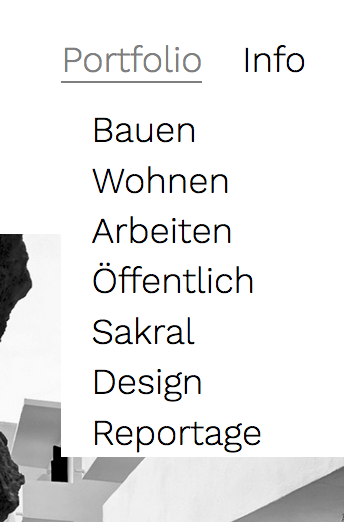
                          0_1553165750853_Screen Shot 2019-03-21 at 11.54.25.png

                          The text is indented, not aligned with the item of the menu. Minor, I know, but still... I already tried different things but couldn't make it work. If it's not possble - okay. (I send you the login data via chat regarding the other matter, if you want to take a look....)

                          Thanks again, your help is much appreciated!!!

                          1 Reply Last reply
                          0
                          • mariusjopenM
                            mariusjopenM
                            mariusjopen
                            Global Moderator
                            wrote on last edited by
                            #14

                            Dear @rbnbm
                            try this one:

                            .primary .sub-menu {
                                display: none;
                                position: absolute;
                                background-color: white;
                                border: 0px solid grey;
                                padding-top: 10px;
                                padding-left: 20px;
                                margin-left: -20px !important;
                                padding-bottom: 20px;
                            }
                            

                            Best!

                            Marius

                            www.mariusjopen.world

                            1 Reply Last reply
                            0
                            • R
                              R
                              rbnbm
                              wrote on last edited by
                              #15

                              Hi @mariusjopen ,

                              Sorry, does not work, now all Sub Items are in line:
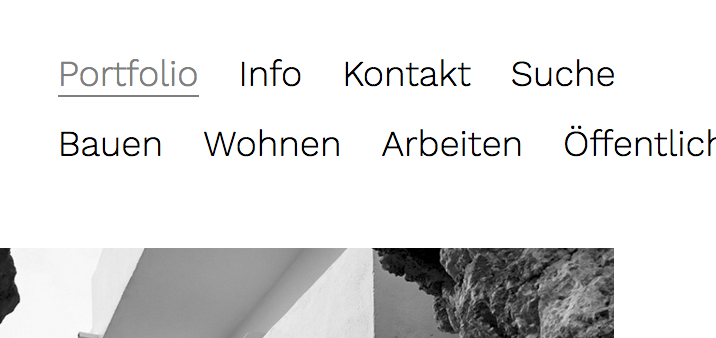
                              0_1553503036988_Screen Shot 2019-03-25 at 09.27.46.png

                              Nevermind, let's leave it at that. I'll file this under "not possible".

                              Any news on why the search does not work (my chat message)? Did you get my login data?

                              Thanks
                              rbnbm

                              1 Reply Last reply
                              0
                              • mariusjopenM
                                mariusjopenM
                                mariusjopen
                                Global Moderator
                                wrote on last edited by
                                #16

                                Dear @rbnbm
                                try this then. I think this is what you want:

                                .primary .sub-menu {
                                    display: none;
                                    position: absolute;
                                    background-color: white;
                                    border: 0px solid grey;
                                    padding: 10px 0px 10px 10px;
                                    width: 100vw;
                                }
                                

                                I wrote Armin about the search and he will reply soon I assume.

                                Best!

                                Marius

                                www.mariusjopen.world

                                1 Reply Last reply
                                0
                                • R
                                  R
                                  rbnbm
                                  wrote on last edited by
                                  #17

                                  dear @mariusjopen ,

                                  Thanks, but it does not work ; -)

                                  Text is indented again.
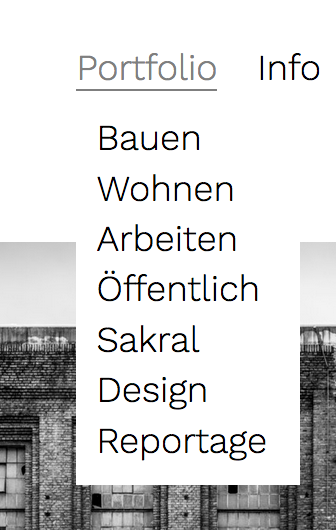
                                  0_1553768089126_Screen Shot 2019-03-28 at 11.14.35.png

                                  As I see it, the padding indents the text to the right. A negative value puts it back in place, but then there is no white space to the left.

                                  As I said, not perfect, but also not a big deal. I'm just wondering whether it is possible at all (I also tried different negative values, to no effect).

                                  Just to make sure, here is all of the code I am using right now for the menu:

                                  .primary .sub-menu {
                                  display: none;
                                  position: absolute;
                                  background-color: white;
                                  border: 0px solid grey;
                                  padding: 10px 0px 10px 10px;
                                  }
                                  .primary .sub-menu li {
                                  display: block;
                                  }
                                  .menu-item:hover .sub-menu{
                                  display: block;
                                  }

                                  Looking forward to the search thing...

                                  Best,
                                  RBNBM

                                  1 Reply Last reply
                                  0

                                  Hello! It looks like you're interested in this conversation, but you don't have an account yet.

                                  Getting fed up of having to scroll through the same posts each visit? When you register for an account, you'll always come back to exactly where you were before, and choose to be notified of new replies (either via email, or push notification). You'll also be able to save bookmarks and upvote posts to show your appreciation to other community members.

                                  With your input, this post could be even better 💗

                                  Register Login
                                  Reply
                                  • Reply as topic
                                  Log in to reply
                                  • Oldest to Newest
                                  • Newest to Oldest
                                  • Most Votes


                                  Online Users
                                  Forgot your key, lost your files, need a previous Lay Theme or Addon version? Go to www.laykeymanager.com
                                  laytheme.com
                                  • Login

                                  • Don't have an account? Register

                                  • Login or register to search.
                                  • First post
                                    Last post
                                  0
                                  • Recent
                                  • Tags
                                  • Popular
                                  • Users
                                  • Search