Skip to content
  • Recent
  • Tags
  • Popular
  • Users
  • Search
Skins
  • Light
  • Brite
  • Cerulean
  • Cosmo
  • Flatly
  • Journal
  • Litera
  • Lumen
  • Lux
  • Materia
  • Minty
  • Morph
  • Pulse
  • Sandstone
  • Simplex
  • Sketchy
  • Spacelab
  • United
  • Yeti
  • Zephyr
  • Dark
  • Cyborg
  • Darkly
  • Quartz
  • Slate
  • Solar
  • Superhero
  • Vapor

  • Default (No Skin)
  • No Skin
Collapse

Lay Theme Forum

  1. Home
  2. Addons
  3. I can't see Lightbox plugin even though it's installed

I can't see Lightbox plugin even though it's installed

Scheduled Pinned Locked Moved Addons
4 Posts 3 Posters 459 Views 1 Watching
  • Oldest to Newest
  • Newest to Oldest
  • Most Votes
Reply
  • Reply as topic
Log in to reply
This topic has been deleted. Only users with topic management privileges can see it.
  • S
    S
    sophiepaynter
    wrote on last edited by
    #1

    Hi there, I'm creating a website for an artist which is hosted on Dreamhost. I intend to use the Lightbox plugin as it will feature many images under different categories. The problem is I can't see the plugin to be able to use it. I've installed it and I can view Lay Options > Lightbox Addon, but it's not showing up anywhere when I want to use it (i.e. it's not appearing under the 'More' dropdown menu in the Gridder, where I believe it should be). Many thanks for your help! Sophie

    1 Reply Last reply
    0
    • edgrbnzE
      edgrbnzE
      edgrbnz
      wrote on last edited by
      #2

      Hi @sophiepaynter,

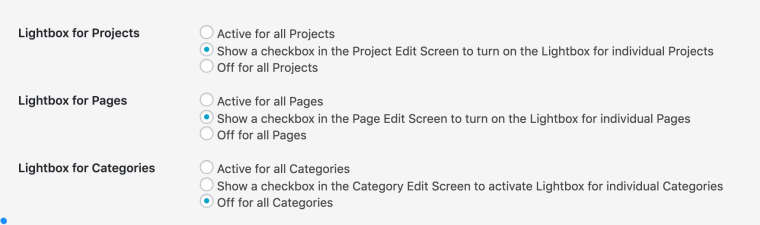
      as soon as you activate the lightbox addon it’s active per default. You are able to globally configure it via its settings in Lay Options / Lightbox Addon:
      0_1557391517523_Lightbox_Addon_‹Moritz_Welker—_WordPress.jpg
      It is not in the more dropdown of the gridder. Depening on how you configured it (see above) you just get a checkbox to activate / deactivate it for a whole project, page or category or it is just active or inactive depending on your settings.

      If you you don’t want certain images to be lightboxed there is a short explanation on how to exclude images in the page of the addon:

      0_1557391766196_Lightbox_Addon_‹Moritz_Welker—_WordPress.jpg

      I hope that helps!
      𝔈

      ✦ ✦ ✦

      S 1 Reply Last reply
      0
      • mariusjopenM
        mariusjopenM
        mariusjopen
        Global Moderator
        wrote on last edited by
        #3

        Dear @edgrbnz
        thank you!!

        Marius

        www.mariusjopen.world

        1 Reply Last reply
        0
        • edgrbnzE edgrbnz

          Hi @sophiepaynter,

          as soon as you activate the lightbox addon it’s active per default. You are able to globally configure it via its settings in Lay Options / Lightbox Addon:

          0_1557391517523_Lightbox_Addon_‹Moritz_Welker—_WordPress.jpg
          It is not in the more dropdown of the gridder. Depening on how you configured it (see above) you just get a checkbox to activate / deactivate it for a whole project, page or category or it is just active or inactive depending on your settings.

          If you you don’t want certain images to be lightboxed there is a short explanation on how to exclude images in the page of the addon:

          0_1557391766196_Lightbox_Addon_‹Moritz_Welker—_WordPress.jpg

          I hope that helps!
          𝔈

          S
          S
          sophiepaynter
          wrote on last edited by
          #4

          @edgrbnz thanks so much! Really helpful. Sophie

          1 Reply Last reply
          0

          Hello! It looks like you're interested in this conversation, but you don't have an account yet.

          Getting fed up of having to scroll through the same posts each visit? When you register for an account, you'll always come back to exactly where you were before, and choose to be notified of new replies (either via email, or push notification). You'll also be able to save bookmarks and upvote posts to show your appreciation to other community members.

          With your input, this post could be even better 💗

          Register Login
          Reply
          • Reply as topic
          Log in to reply
          • Oldest to Newest
          • Newest to Oldest
          • Most Votes


          Online Users
          Forgot your key, lost your files, need a previous Lay Theme or Addon version? Go to www.laykeymanager.com
          laytheme.com
          • Login

          • Don't have an account? Register

          • Login or register to search.
          • First post
            Last post
          0
          • Recent
          • Tags
          • Popular
          • Users
          • Search
