Skip to content
  • Recent
  • Tags
  • Popular
  • Users
  • Search
Skins
  • Light
  • Brite
  • Cerulean
  • Cosmo
  • Flatly
  • Journal
  • Litera
  • Lumen
  • Lux
  • Materia
  • Minty
  • Morph
  • Pulse
  • Sandstone
  • Simplex
  • Sketchy
  • Spacelab
  • United
  • Yeti
  • Zephyr
  • Dark
  • Cyborg
  • Darkly
  • Quartz
  • Slate
  • Solar
  • Superhero
  • Vapor

  • Default (No Skin)
  • No Skin
Collapse

Lay Theme Forum

  1. Home
  2. General Discussion
  3. menu text -individual colour

menu text -individual colour

Scheduled Pinned Locked Moved General Discussion
16 Posts 3 Posters 1.5k Views
  • Oldest to Newest
  • Newest to Oldest
  • Most Votes
Reply
  • Reply as topic
Log in to reply
This topic has been deleted. Only users with topic management privileges can see it.
  • T
    T
    Toby
    wrote on last edited by Toby
    #5

    Thanks - I added the code and this still appears <font color ="#e0759f">SHOP</font>

    however if i refresh the page it disappears but then reappears if i click on to another menu item then return to Shop

    any thoughts?

    Cheers
    Toby

    1 Reply Last reply
    0
    • mariusjopenM
      mariusjopenM
      mariusjopen
      Global Moderator
      wrote on last edited by
      #6

      Dear @Toby
      to which part of the website did you add this piece of code?

      Best!

      Marius

      www.mariusjopen.world

      1 Reply Last reply
      0
      • T
        T
        Toby
        wrote on last edited by
        #7

        Hi Marius

        I initially aded

        <font color ="#e0759f">SHOP</font>

        into my site title see screen grab below - it works but the code appeared in the toolbar again see screen grab below

        edgrbnz - suggested I add his code to my CSS & HTML which I did and removed my code from site title, but I'm still seeing the code appear within the toolbar - it only disappearing once I've refreshed the page
        but reappearing if I view another menu page and then return to the SHOP.

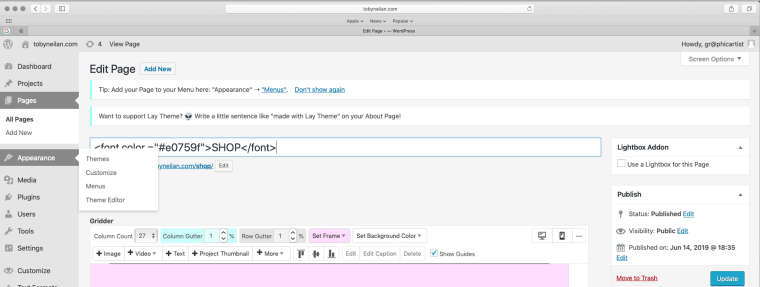
        0_1570786529121_Screenshot 2019-10-09 at 11.32.36 copy.jpg

        0_1570786443253_Screenshot 2019-10-11 at 10.32.23.jpg

        1 Reply Last reply
        0
        • edgrbnzE
          edgrbnzE
          edgrbnz
          wrote on last edited by edgrbnz
          #8

          That’s weird…
          Perhaps the <font color ="#e0759f">… is used as a title in your menus?

          ✦ ✦ ✦

          1 Reply Last reply
          0
          • T
            T
            Toby
            wrote on last edited by
            #9

            I removed that code from my title like you said - very odd

            1 Reply Last reply
            0
            • edgrbnzE
              edgrbnzE
              edgrbnz
              wrote on last edited by edgrbnz
              #10

              Did you also check your menus in Appearance / Menus?
              Are you using any caching plugins? → Perhaps it’s just stuck in the cache?

              ✦ ✦ ✦

              1 Reply Last reply
              0
              • T
                T
                Toby
                wrote on last edited by
                #11

                Hi Edgrbnz

                I stupidly forgot to remove the old 'SHOP' title from the Appearance / menu
                however I have now replaced with the new title and your code doesn't seem to work

                any ideas?

                Thanks
                Toby

                1 Reply Last reply
                0
                • edgrbnzE
                  edgrbnzE
                  edgrbnz
                  wrote on last edited by
                  #12

                  That’s because the menu item changed I think.
                  Try this one instead:

                  .menu-item-476 a{
                      color: #e0759f;
                  }
                  

                  Cheers!

                  ✦ ✦ ✦

                  1 Reply Last reply
                  0
                  • T
                    T
                    Toby
                    wrote on last edited by
                    #13

                    Thanks - but still no joy

                    1 Reply Last reply
                    0
                    • edgrbnzE
                      edgrbnzE
                      edgrbnz
                      wrote on last edited by edgrbnz
                      #14

                      It’s weird because the color doesn’t even show up in the inspector…

                      Would you mind sending me your login details via chat?
                      Then I could hava a look into the backend.

                      ✦ ✦ ✦

                      1 Reply Last reply
                      0
                      • T
                        T
                        Toby
                        wrote on last edited by
                        #15

                        HI edgrbnz

                        Thanks for your help - I solved it I had to also include the data-type and data-id numbers for all the pages

                        Cheers
                        Toby

                        1 Reply Last reply
                        0
                        • edgrbnzE
                          edgrbnzE
                          edgrbnz
                          wrote on last edited by
                          #16

                          Glad it works 💐

                          ✦ ✦ ✦

                          1 Reply Last reply
                          1

                          Hello! It looks like you're interested in this conversation, but you don't have an account yet.

                          Getting fed up of having to scroll through the same posts each visit? When you register for an account, you'll always come back to exactly where you were before, and choose to be notified of new replies (either via email, or push notification). You'll also be able to save bookmarks and upvote posts to show your appreciation to other community members.

                          With your input, this post could be even better 💗

                          Register Login
                          Reply
                          • Reply as topic
                          Log in to reply
                          • Oldest to Newest
                          • Newest to Oldest
                          • Most Votes


                          Online Users
                          Forgot your key, lost your files, need a previous Lay Theme or Addon version? Go to www.laykeymanager.com
                          laytheme.com
                          • Login

                          • Don't have an account? Register

                          • Login or register to search.
                          • First post
                            Last post
                          0
                          • Recent
                          • Tags
                          • Popular
                          • Users
                          • Search