Skip to content
  • Recent
  • Tags
  • Popular
  • Users
  • Search
Skins
  • Light
  • Brite
  • Cerulean
  • Cosmo
  • Flatly
  • Journal
  • Litera
  • Lumen
  • Lux
  • Materia
  • Minty
  • Morph
  • Pulse
  • Sandstone
  • Simplex
  • Sketchy
  • Spacelab
  • United
  • Yeti
  • Zephyr
  • Dark
  • Cyborg
  • Darkly
  • Quartz
  • Slate
  • Solar
  • Superhero
  • Vapor

  • Default (No Skin)
  • No Skin
Collapse

Lay Theme Forum

  1. Home
  2. Bug Reports
  3. Burger position issue
Burger position issue

Scheduled Pinned Locked Moved Bug Reports
5 Posts 3 Posters 606 Views 2 Watching
  • Oldest to Newest
  • Newest to Oldest
  • Most Votes
Reply
  • Reply as topic
Log in to reply
This topic has been deleted. Only users with topic management privileges can see it.
  • edgrbnzE
    edgrbnzE
    edgrbnz
    wrote on last edited by
    #1

    Hi there @arminunruh and @mariusjopen,
    I think I found a 🐞 with the mobile menues (sorry! 🙈):

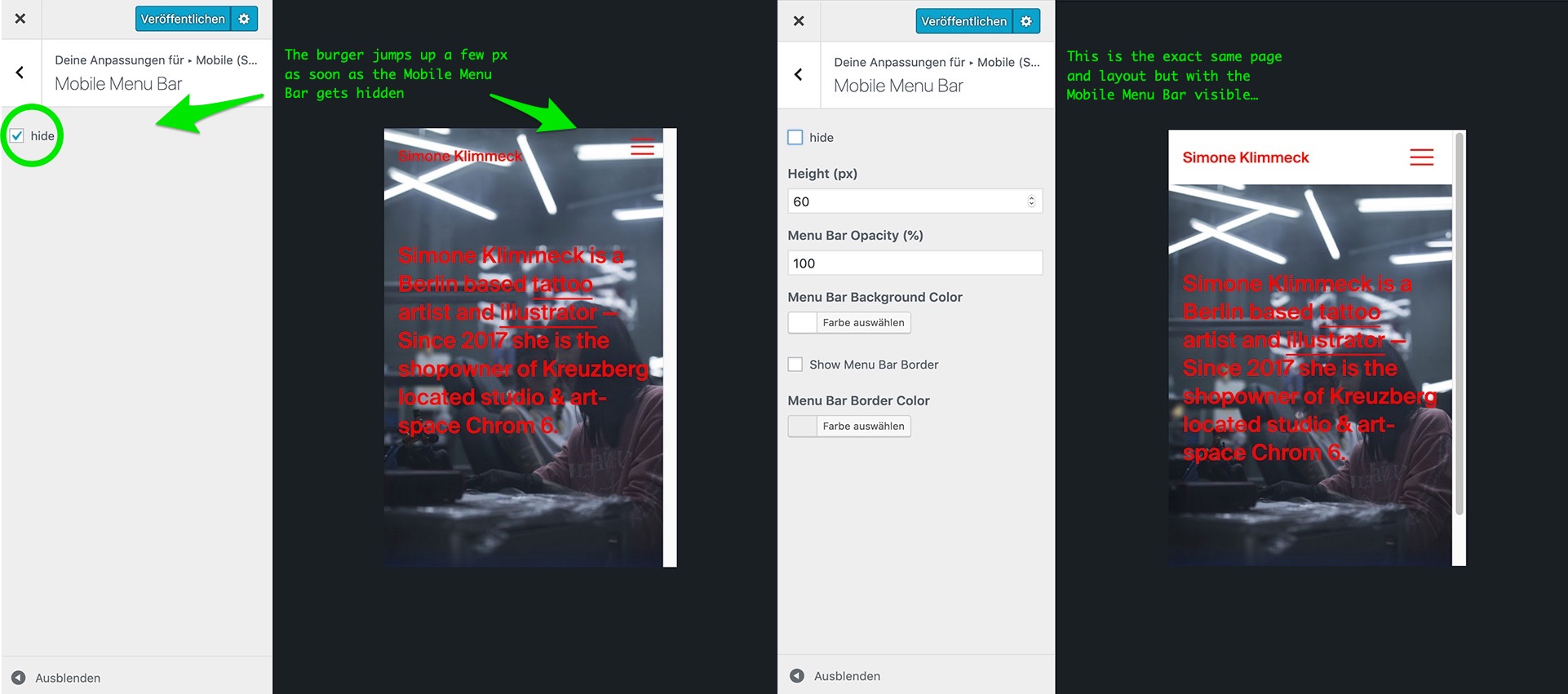
    I deactivated the Mobile Menu Bar on this site and the burger jumped to a different position as it was in the same layout with the visible Mobile Menu Bar.
    I searched for an option to alter the placement of the burger but couldn’t find anything…

    Here are some screenhots w/ notes:
    0_1573085548309_Unbenannt-1.jpg

    Is there a way to fix this / get this fixed?
    Thanks in advance!!

    ✦ ✦ ✦

    1 Reply Last reply
    0
    • mariusjopenM
      mariusjopenM
      mariusjopen
      Global Moderator
      wrote on last edited by
      #2

      Dear @edgrbnz
      ok. Thank you for letting us know.
      I assume that no CUSTOM CSS interferes with that?

      We will have a look and thank you for using LayTheme and being an active forum member :-D

      Best!

      Marius

      www.mariusjopen.world

      1 Reply Last reply
      0
      • edgrbnzE
        edgrbnzE
        edgrbnz
        wrote on last edited by edgrbnz
        #3

        Hey @mariusjopen
        I just checked to make sure – No, there’s only very little custom CSS, none of that could possibly interfere with the burger as far as I can see:

        Custom CSS

        /*footer links*/
        
        #footer-region a {
            border-bottom: none !important;
        }
        .scrolltotop p:hover {
            color: #efcece !important;
        }
        
        
        /*caption styling*/
        
        .caption {
            margin-top: 4px;
        }
        .caption a{
            border-bottom: none;
        }
        

        Custom CSS for Desktop Version

        /*max-width & alignments*/
        
        ._center-block{
            max-width: 1440px;
            margin: auto!important;
        }
        ._center-1200{
            max-width: 1200px;
            margin: auto!important;
        }
        

        Thank you very much for checking!
        Talk soon!

        ✦ ✦ ✦

        1 Reply Last reply
        0
        • arminunruhA
          arminunruhA
          arminunruh
          Global Moderator
          wrote on last edited by arminunruh
          #4

          ehehe

          so, it's not a bug.
          when you set the height of the menubar, the burger position is changed to stay in the center of the menubar.
          if you hide the menubar, the burger will go back to its default position.

          if you'd like to change the position of the burger, you can do so by css:

          .burger-wrap {
              padding-top: 20px;
              padding-right: 20px;
          }
          
          1 Reply Last reply
          0
          • edgrbnzE
            edgrbnzE
            edgrbnz
            wrote on last edited by edgrbnz
            #5

            Damn! Thanks @arminunruh !

            It would make a lot of sense to also have these settings in the customizer, though.

            ✦ ✦ ✦

            1 Reply Last reply
            0

            Hello! It looks like you're interested in this conversation, but you don't have an account yet.

            Getting fed up of having to scroll through the same posts each visit? When you register for an account, you'll always come back to exactly where you were before, and choose to be notified of new replies (either via email, or push notification). You'll also be able to save bookmarks and upvote posts to show your appreciation to other community members.

            With your input, this post could be even better 💗

            Register Login
            Reply
            • Reply as topic
            Log in to reply
            • Oldest to Newest
            • Newest to Oldest
            • Most Votes


            Online Users
            Forgot your key, lost your files, need a previous Lay Theme or Addon version? Go to www.laykeymanager.com
            laytheme.com
            • Login

            • Don't have an account? Register

            • Login or register to search.
            • First post
              Last post
            0
            • Recent
            • Tags
            • Popular
            • Users
            • Search

