Skip to content
  • Recent
  • Tags
  • Popular
  • Users
  • Search
Skins
  • Light
  • Brite
  • Cerulean
  • Cosmo
  • Flatly
  • Journal
  • Litera
  • Lumen
  • Lux
  • Materia
  • Minty
  • Morph
  • Pulse
  • Sandstone
  • Simplex
  • Sketchy
  • Spacelab
  • United
  • Yeti
  • Zephyr
  • Dark
  • Cyborg
  • Darkly
  • Quartz
  • Slate
  • Solar
  • Superhero
  • Vapor

  • Default (No Skin)
  • No Skin
Collapse

Lay Theme Forum

  1. Home
  2. General Discussion
  3. image alt tags doesn't work / don't appear in code

image alt tags doesn't work / don't appear in code

Scheduled Pinned Locked Moved General Discussion
15 Posts 3 Posters 941 Views 1 Watching
  • Oldest to Newest
  • Newest to Oldest
  • Most Votes
Reply
  • Reply as topic
Log in to reply
This topic has been deleted. Only users with topic management privileges can see it.
  • T
    T
    TvDalen
    wrote on last edited by
    #3

    Hi Marius,

    Thank you for your reply. I see that it works in the testpage but in our website it doesn't work.

    For example:
    https://ibb.co/PtcnjXL

    I've add the alt tags here, but If I look in the code I couldn't find the specifiek alt tag.
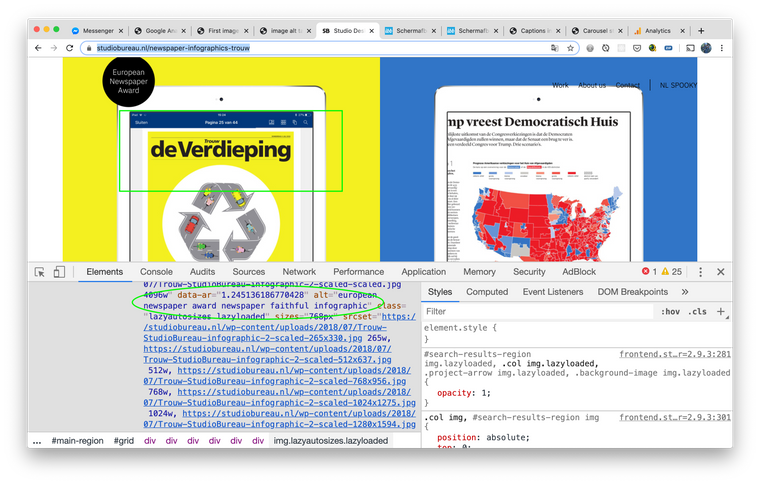
    All the images have (automatically?) the name of the title of the page as alt tag as you can see in the code:
    https://ibb.co/W3xjnxS

    As you can see the title page seem like to overrule the alt tags that we've added?
    (We use the Yoast SEO plugin for our SEO)

    1 Reply Last reply
    0
    • mariusjopenM
      mariusjopenM
      mariusjopen
      Global Moderator
      wrote on last edited by
      #4

      Dear @TvDalen
      this seems to be a YOAST thing. Can you deactivate it for a second and see if the problem remains?

      Best!

      Marius

      www.mariusjopen.world

      1 Reply Last reply
      0
      • T
        T
        TvDalen
        wrote on last edited by
        #5

        Hi Marius,

        I have now deactivated the YOAST plugin, but the problem is still remains..

        It changes all the alt tags in the title name of our website (instead of the page title name)

        1 Reply Last reply
        0
        • mariusjopenM
          mariusjopenM
          mariusjopen
          Global Moderator
          wrote on last edited by mariusjopen
          #6

          Dear @TvDalen
          I can see. All your images have the alt text: "Studio Bureau | Concept-en ontwerpbureau | Creative Agency — Work"

          Best is if you write me a PM and include your username, password and a link to this conversation.
          Best!

          Marius

          www.mariusjopen.world

          T 1 Reply Last reply
          0
          • mariusjopenM mariusjopen

            Dear @TvDalen
            I can see. All your images have the alt text: "Studio Bureau | Concept-en ontwerpbureau | Creative Agency — Work"

            Best is if you write me a PM and include your username, password and a link to this conversation.
            Best!

            Marius

            T
            T
            TvDalen
            wrote on last edited by
            #7

            @mariusjopen I have send you a pm with username and password.

            T 1 Reply Last reply
            0
            • T TvDalen

              @mariusjopen I have send you a pm with username and password.

              T
              T
              TvDalen
              wrote on last edited by
              #8

              Hi @mariusjopen I've send a chat message, I'm curious if you all ready had time to login and check our website?

              1 Reply Last reply
              0
              • mariusjopenM
                mariusjopenM
                mariusjopen
                Global Moderator
                wrote on last edited by
                #9

                Dear @TvDalen
                I had a look in your admin and like you said, it is not possible to change the alt tags.
                I do not want to mess around with your website too much.

                I will have a chat with Armin about it.

                Best!

                Marius

                www.mariusjopen.world

                T 1 Reply Last reply
                0
                • mariusjopenM mariusjopen

                  Dear @TvDalen
                  I had a look in your admin and like you said, it is not possible to change the alt tags.
                  I do not want to mess around with your website too much.

                  I will have a chat with Armin about it.

                  Best!

                  Marius

                  T
                  T
                  TvDalen
                  wrote on last edited by
                  #10

                  @mariusjopen Thank you for your response, We would like to hear the reaction of Armin and are curious to the solution.

                  1 Reply Last reply
                  0
                  • arminunruhA
                    arminunruhA
                    arminunruh
                    Global Moderator
                    wrote on last edited by
                    #11

                    will be fixed in the next update

                    1 Reply Last reply
                    0
                    • arminunruhA
                      arminunruhA
                      arminunruh
                      Global Moderator
                      wrote on last edited by
                      #12

                      please update lay theme now and then it should work

                      T 1 Reply Last reply
                      0
                      • arminunruhA arminunruh

                        please update lay theme now and then it should work

                        T
                        T
                        TvDalen
                        wrote on last edited by
                        #13

                        @arminunruh Thank you, we have updated our website with the latest Laytheme.
                        If I check an image witg alt tag in Google Chrome with right mouse click on the image. I see the right alt tag. https://ibb.co/Qbyzfhf

                        But if i just check the HMTL source on the page, I still see the wrong/ page title alt tags.
                        check: https://ibb.co/svVJdqz

                        So I'm not sure if Google sees the alt tag right now?

                        1 Reply Last reply
                        0
                        • arminunruhA
                          arminunruhA
                          arminunruh
                          Global Moderator
                          wrote on last edited by
                          #14

                          i need a link to a page where an image has an alt tag that is set by you and then also please send a screenshot of the exact image that you'll want me to look at

                          1 Reply Last reply
                          0
                          • arminunruhA
                            arminunruhA
                            arminunruh
                            Global Moderator
                            wrote on last edited by
                            #15

                            oh i see it is here:
                            https://studiobureau.nl/newspaper-infographics-trouw

                            and its this pic
                            Screenshot 2020-01-23 at 15.07.07.png

                            so when an image does not have any alt tag, it will just revert to the usual alt tag that lay theme sets which is the site title.

                            so maybe what you're seeing in your page source code is just a different image that has no alt tag.

                            also if you set an alt tag for an image in the media library, you'll still need to re-insert that image into the grid for the alt tag to update, sorry about that :O


                            1 Reply Last reply
                            0

                            Hello! It looks like you're interested in this conversation, but you don't have an account yet.

                            Getting fed up of having to scroll through the same posts each visit? When you register for an account, you'll always come back to exactly where you were before, and choose to be notified of new replies (either via email, or push notification). You'll also be able to save bookmarks and upvote posts to show your appreciation to other community members.

                            With your input, this post could be even better 💗

                            Register Login
                            Reply
                            • Reply as topic
                            Log in to reply
                            • Oldest to Newest
                            • Newest to Oldest
                            • Most Votes


                            Online Users
                            Forgot your key, lost your files, need a previous Lay Theme or Addon version? Go to www.laykeymanager.com
                            laytheme.com
                            • Login

                            • Don't have an account? Register

                            • Login or register to search.
                            • First post
                              Last post
                            0
                            • Recent
                            • Tags
                            • Popular
                            • Users
                            • Search