Three Column doesn't show correct
-
Three Column doesn't show correct
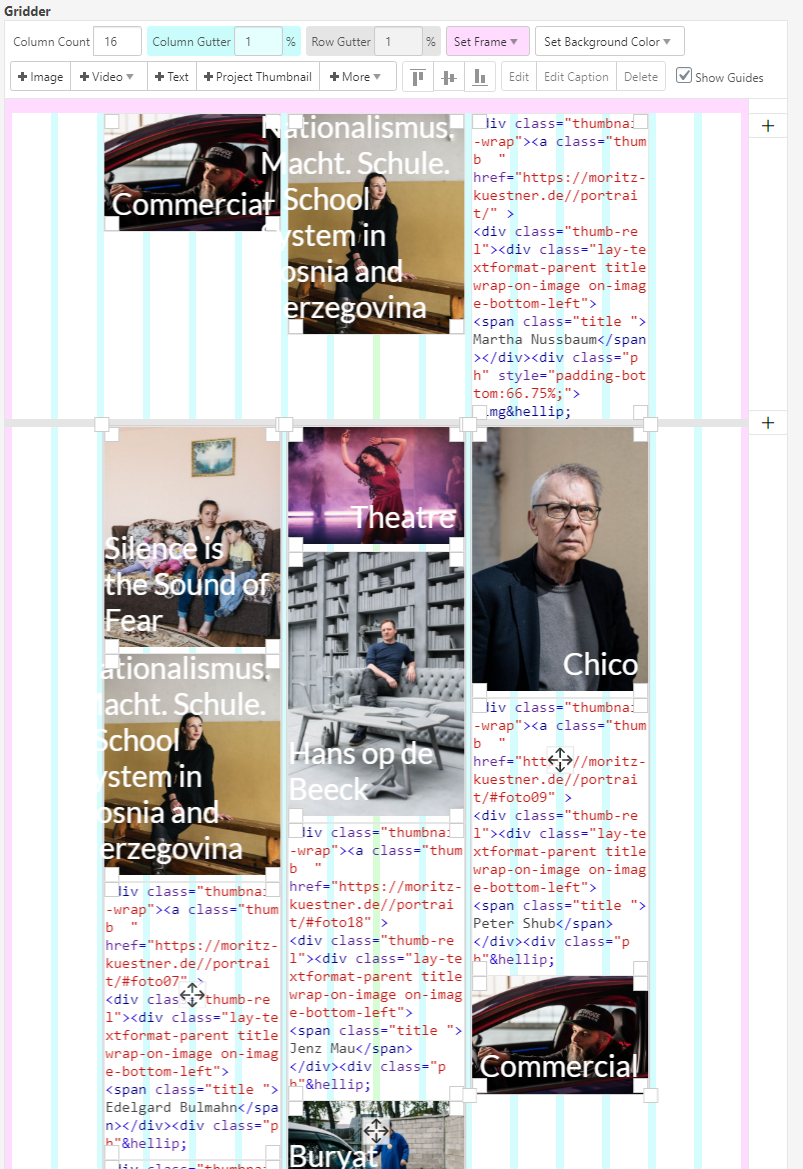
After the Update is my Startpage where I have three columns not show current. The third column displays under the others and not on left.


-
Dear @jomoku
Do you have any third-party plugins installed or CUSTOM JS code? Is it possible to deactivate it for a moment to see if the problem remains?
Many wishes!
Marius -
Hi @mariusjopen
i deactivate all third-party plugins and kicked ot my CUSTOM JS code. But it still the same.
Moritz
-
Dear @jomoku
it looks like that the third row (which gets pushed down) is in another row.
And not in the same row like the other two stacks.
Best!
Marius -
@mariusjopen said in Three Column doesn't show correct:
Marius
Hi Marius, all three stacks are in the same row. If I using a new row and put the image in it works.

-
Dear @jomoku
what happens if you only put images in the STACKS?
Best!
Marius

Hello! It looks like you're interested in this conversation, but you don't have an account yet.
Getting fed up of having to scroll through the same posts each visit? When you register for an account, you'll always come back to exactly where you were before, and choose to be notified of new replies (either via email, or push notification). You'll also be able to save bookmarks and upvote posts to show your appreciation to other community members.
With your input, this post could be even better 💗
Register Login