Skip to content
  • Recent
  • Tags
  • Popular
  • Users
  • Search
Skins
  • Light
  • Brite
  • Cerulean
  • Cosmo
  • Flatly
  • Journal
  • Litera
  • Lumen
  • Lux
  • Materia
  • Minty
  • Morph
  • Pulse
  • Sandstone
  • Simplex
  • Sketchy
  • Spacelab
  • United
  • Yeti
  • Zephyr
  • Dark
  • Cyborg
  • Darkly
  • Quartz
  • Slate
  • Solar
  • Superhero
  • Vapor

  • Default (No Skin)
  • No Skin
Collapse

Lay Theme Forum

  1. Home
  2. General Discussion
  3. Fixed Height for Html5 videos

Fixed Height for Html5 videos

Scheduled Pinned Locked Moved General Discussion
23 Posts 4 Posters 3.0k Views 1 Watching
  • Oldest to Newest
  • Newest to Oldest
  • Most Votes
Reply
  • Reply as topic
Log in to reply
This topic has been deleted. Only users with topic management privileges can see it.
  • mariusjopenM
    mariusjopenM
    mariusjopen
    Global Moderator
    wrote on last edited by
    #2

    Dear @vj
    Can you post a link to your website?
    We will then have a look and inspect that!
    Many wishes!
    Marius

    www.mariusjopen.world

    1 Reply Last reply
    0
    • V
      V
      vj
      wrote on last edited by
      #3
      This post is deleted!
      1 Reply Last reply
      0
      • V
        V
        vj
        wrote on last edited by
        #4

        Hi Marius,
        I hope that you are good!
        Any idea of how can I solve this problem?
        Thanks for your help!

        1 Reply Last reply
        0
        • mariusjopenM
          mariusjopenM
          mariusjopen
          Global Moderator
          wrote on last edited by
          #5

          Dear @vj
          this is not the solutin but gives you an idea of how to play around:

          video {
              height: 100vh !important;
              object-fit: cover;
              width: 100vw;
          }
          

          Bst!
          Marius

          www.mariusjopen.world

          V 1 Reply Last reply
          0
          • mariusjopenM mariusjopen

            Dear @vj
            this is not the solutin but gives you an idea of how to play around:

            video {
                height: 100vh !important;
                object-fit: cover;
                width: 100vw;
            }
            

            Bst!
            Marius

            V
            V
            vj
            wrote on last edited by
            #6

            @mariusjopen Thanks Marius. Here you can see what happens when I add a video inside a carousel: http://www.virgilijubero.com/danone

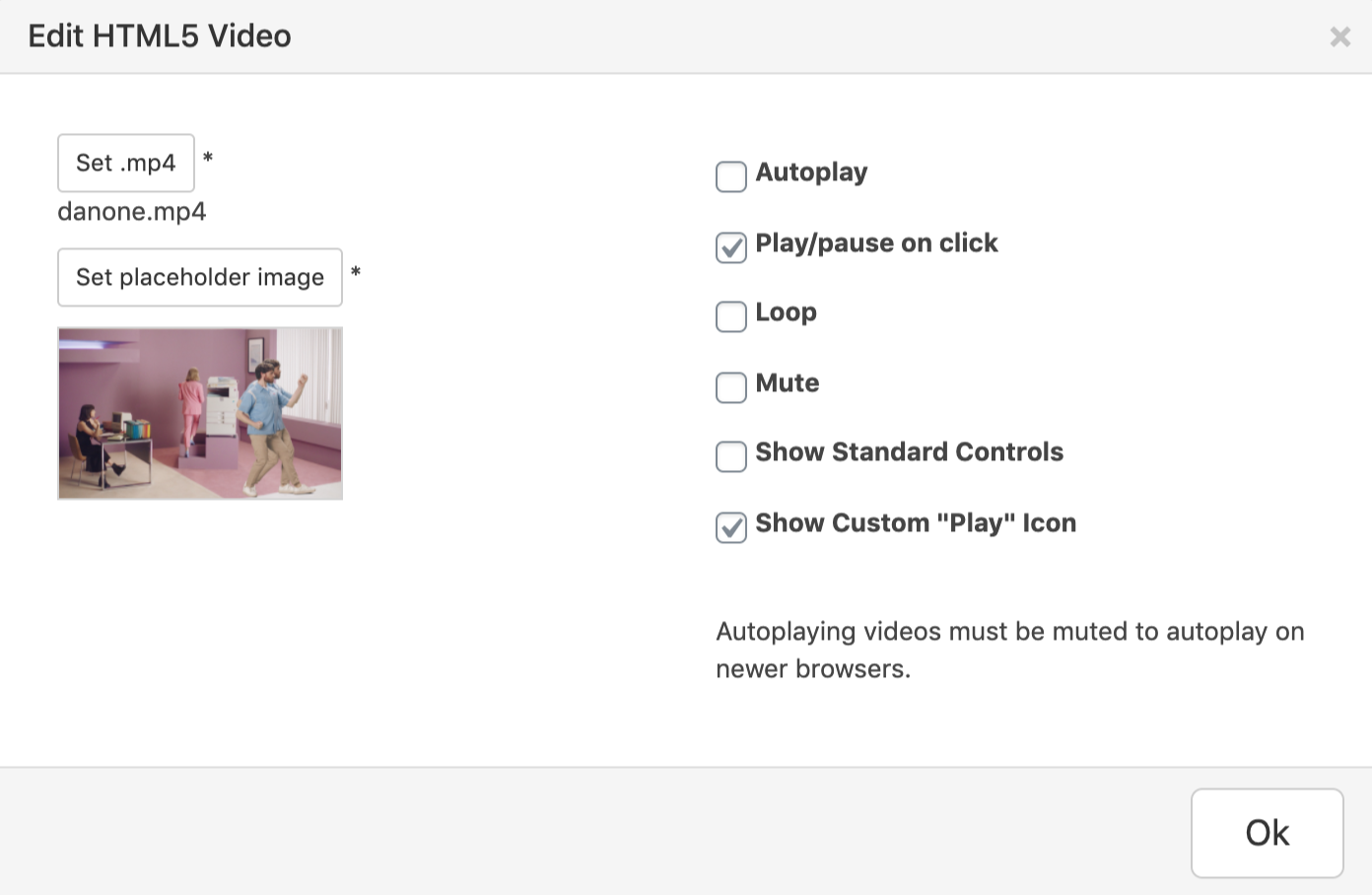
            The video autoplays with no sound and it's not possible to play/pause on clicking. Instead, I would like to see the placeholder with the play button and that when you click the video starts with sound on. This is how I set it up: Captura de pantalla 2020-05-28 a las 19.04.36.png
            1 Reply Last reply
            0
            • mariusjopenM
              mariusjopenM
              mariusjopen
              Global Moderator
              wrote on last edited by
              #7

              Dear @vj
              ok. This looks weird.
              We will have a look.
              Best!
              Marius

              www.mariusjopen.world

              V 1 Reply Last reply
              0
              • arminunruhA
                arminunruhA
                arminunruh
                Global Moderator
                wrote on last edited by
                #8

                :D

                better insert a normal html5 video, don't use a carousel for this

                then give it a html class and edit the css to fit your needs

                V 1 Reply Last reply
                0
                • arminunruhA arminunruh

                  :D

                  better insert a normal html5 video, don't use a carousel for this

                  then give it a html class and edit the css to fit your needs

                  V
                  V
                  vj
                  wrote on last edited by
                  #9

                  @arminunruh thanks! I tried to do this but the css for the html5 video didn't work, it didn't fixed the Height as I wanted. That's why I put the video inside the carousel. Any idea of what can I do? Thanks!

                  1 Reply Last reply
                  0
                  • mariusjopenM mariusjopen

                    Dear @vj
                    ok. This looks weird.
                    We will have a look.
                    Best!
                    Marius

                    V
                    V
                    vj
                    wrote on last edited by
                    #10

                    @mariusjopen hello Marius! Is there something I can do to fix this problem? I eventually want to have photos and videos in a carousel, so I think that @arminunruh answer won't be the solution :( Many thanks

                    1 Reply Last reply
                    0
                    • mariusjopenM
                      mariusjopenM
                      mariusjopen
                      Global Moderator
                      wrote on last edited by
                      #11

                      Dear @vj
                      we will have another look!
                      Best!
                      Marius

                      www.mariusjopen.world

                      1 Reply Last reply
                      0
                      • arminunruhA
                        arminunruhA
                        arminunruh
                        Global Moderator
                        wrote on last edited by
                        #12

                        I mean in the end its about applying CSS in the right way for your case

                        @mariusjopen can you try and see which CSS he used and see if you can improve his CSS

                        1 Reply Last reply
                        0
                        • arminunruhA
                          arminunruhA
                          arminunruh
                          Global Moderator
                          wrote on last edited by arminunruh
                          #13

                          anyway, i added this to my list, would be great to be able to make elements have a certain fixed height one day. however, this is kind of low priority right now

                          if you'd like us to take another look at your css, please create a new page, insert a html5 video and use a html class on it that has your css applied and post the link please <3

                          V 1 Reply Last reply
                          0
                          • arminunruhA arminunruh

                            anyway, i added this to my list, would be great to be able to make elements have a certain fixed height one day. however, this is kind of low priority right now

                            if you'd like us to take another look at your css, please create a new page, insert a html5 video and use a html class on it that has your css applied and post the link please <3

                            V
                            V
                            vj
                            wrote on last edited by
                            #14
                            This post is deleted!
                            1 Reply Last reply
                            0
                            • mariusjopenM
                              mariusjopenM
                              mariusjopen
                              Global Moderator
                              wrote on last edited by
                              #15

                              Dear @vj

                              have a look here:

                              .html5video .html5-video-placeholder-image.w100 img {
                                  width: 100%;
                                  height: auto;
                                  position: absolute;
                                  left: 0;
                                  top: 50%;
                                  -webkit-transform: translateY(-50%);
                                  -ms-transform: translateY(-50%);
                                  transform: translateY(-50%);
                                  height: 100vh;
                                  object-fit: cover;
                              }
                              .html5video .ph {
                                  position: relative;
                                  padding-bottom: 100vh !important;
                              }
                              

                              Best!

                              Marius

                              www.mariusjopen.world

                              1 Reply Last reply
                              0
                              • V
                                V
                                vj
                                wrote on last edited by
                                #16

                                Thanks, it works!

                                1 Reply Last reply
                                0
                                • CyberSlayersC
                                  CyberSlayersC
                                  CyberSlayers
                                  wrote on last edited by
                                  #17

                                  Nice!
                                  Thank you for letting us know!
                                  Best and have a wonderful day!

                                  Audrey

                                  ✦ Audrey@CyberSlayers.work ✦
                                  www.cyberslayers.work

                                  1 Reply Last reply
                                  0
                                  • V
                                    V
                                    vj
                                    wrote on last edited by
                                    #18
                                    This post is deleted!
                                    1 Reply Last reply
                                    0
                                    • V
                                      V
                                      vj
                                      wrote on last edited by
                                      #19

                                      I've achieved the desired effect by placing the video inside a carousel, but now the issue I see is that the standard video controls aren't appearing. Is there a way to make them show up?

                                      1 Reply Last reply
                                      0
                                      • arminunruhA
                                        arminunruhA
                                        arminunruh
                                        Global Moderator
                                        wrote on last edited by arminunruh
                                        #20
                                        <script>
                                        window.laytheme.on('newpageshown', function(){
                                        jQuery('.lay-carousel-wrap video').each(function(){
                                        jQuery(this).attr('controls', 'true');
                                        })
                                        })
                                        </script>
                                        

                                        if you put that in <head> content in lay options -> custom html & css
                                        does that work?

                                        or instead of using that script, maybe use a normal html5 video element and this css?:

                                        .html5video .ph {
                                            position: relative;
                                            padding-bottom: calc(101vh - 74px)!important;
                                        }
                                        
                                        1 Reply Last reply
                                        0
                                        • V
                                          V
                                          vj
                                          wrote on last edited by
                                          #21

                                          It works! Thanks :)

                                          1 Reply Last reply
                                          0

                                          Hello! It looks like you're interested in this conversation, but you don't have an account yet.

                                          Getting fed up of having to scroll through the same posts each visit? When you register for an account, you'll always come back to exactly where you were before, and choose to be notified of new replies (either via email, or push notification). You'll also be able to save bookmarks and upvote posts to show your appreciation to other community members.

                                          With your input, this post could be even better 💗

                                          Register Login
                                          Reply
                                          • Reply as topic
                                          Log in to reply
                                          • Oldest to Newest
                                          • Newest to Oldest
                                          • Most Votes


                                          Online Users
                                          I
                                          itsbadjujuju
                                          Forgot your key, lost your files, need a previous Lay Theme or Addon version? Go to www.laykeymanager.com
                                          laytheme.com
                                          • Login

                                          • Don't have an account? Register

                                          • Login or register to search.
                                          • First post
                                            Last post
                                          0
                                          • Recent
                                          • Tags
                                          • Popular
                                          • Users
                                          • Search