Image Hover - custom image position
-
Hi, i am wondering if, in the image hover addon, there is any way that i can set a custom position for the image?
For example i want to have text on the left side of the page and have the images appear on the right side of the page. I know that i can change it to centered in the addon settings but i wish there was a “centered right“ option. Is there a way to do it with custom css?
Thank you in advance! :)
Dominik -
Dear @DominikHollaus
Could you please post a link to your website with an example image and text setup if possible?
I can take a better look :)
Have a wonderful day & thank you for using Lay Theme
Best wishes
Richard -
@Richard-Keith said in Image Hover - custom image position:
Hello,
The website is divided in two parts, text on the left and images on the right. I have the same doubt that @DominikHollaus, can the hoover image appear on the right side instead of the center? If is possible use the css to define the image position?
The website is very simple, just a temporary page before developing the final website.
-
Dear @paulomariz
Thank you for providing a link.
You are correct that it is possible through Custom CSS.
We can add our css through 'Lay Options - Custom CSS & HTML'

For this we will need some basic knowledge of CSS :
https://www.khanacademy.org/computing/computer-programming/html-cssand also using the "inspect' developer tools in Google Chrome:
https://www.khanacademy.org/computing/computer-programming/html-css/web-development-tools/a/using-the-browser-developer-tools(inspecting the webpage)
So the images are located in a 'image-hover-region' that is invisible, until we hover over a link and this adds a class called 'show' which in turn makes the image visible . opacity:0 to opacity:1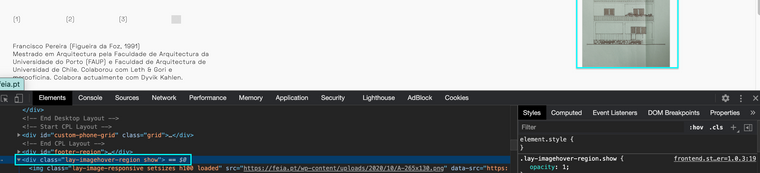
Here you can see the image is pushed to the right.
I have done this by targeting the 'img' (image) within the 'image-hover-region'My CSS:
.lay-imagehover-region img {
    margin-left:300px;
}
This is a basic CSS but you can feel free to adjust this to your needs.
Now if you wish to target a specific image, this can be done as each image has its own attribute number.
When inspecting the link we can see this:
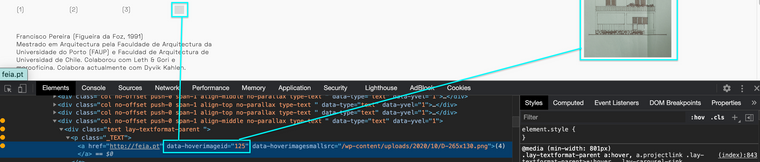
data-hoverimageid="125"so we would add this to our code in order to target this specific image:
.lay-imagehover-region img[data-hoverimageid="125"] {
    margin-left:300px;
}
I hope helps you and good Luck! :)
Thank you for using Lay Theme
Best wishes
Richard

Hello! It looks like you're interested in this conversation, but you don't have an account yet.
Getting fed up of having to scroll through the same posts each visit? When you register for an account, you'll always come back to exactly where you were before, and choose to be notified of new replies (either via email, or push notification). You'll also be able to save bookmarks and upvote posts to show your appreciation to other community members.
With your input, this post could be even better 💗
Register Login