Skip to content
  • Recent
  • Tags
  • Popular
  • Users
  • Search
Skins
  • Light
  • Brite
  • Cerulean
  • Cosmo
  • Flatly
  • Journal
  • Litera
  • Lumen
  • Lux
  • Materia
  • Minty
  • Morph
  • Pulse
  • Sandstone
  • Simplex
  • Sketchy
  • Spacelab
  • United
  • Yeti
  • Zephyr
  • Dark
  • Cyborg
  • Darkly
  • Quartz
  • Slate
  • Solar
  • Superhero
  • Vapor

  • Default (No Skin)
  • No Skin
Collapse

Lay Theme Forum

  1. Home
  2. General Discussion
  3. Vimeo & autoplay and loop

Vimeo & autoplay and loop

Scheduled Pinned Locked Moved General Discussion
6 Posts 2 Posters 1.3k Views 1 Watching
  • Oldest to Newest
  • Newest to Oldest
  • Most Votes
Reply
  • Reply as topic
Log in to reply
This topic has been deleted. Only users with topic management privileges can see it.
  • V
    V
    v1ncent
    wrote on last edited by
    #1

    hey! I am trying to embed a video with autoplay and loop. The video doesn't have any sound. I can only insert the normal link but then autoplay / loop doesn't work. Found this very old topic: http://laythemeforum.com/topic/449/add-to-vimeo-video-auto-play-and-loop
    but it is not working really well. Is there a better way to have an easy way to embed Vimeo with autoplay & loop?

    Thanks!

    1 Reply Last reply
    0
    • RichardR
      RichardR
      Richard
      Global Moderator
      wrote on last edited by
      #2

      Dear @v1ncent

      If you are having trouble with adding autoplay and loop functions yourself, Vimeo offers this option already for you.

      With Vimeo videos - within 'Share' located at top right you can select 'Show Options':

      Screen Shot 2021-02-27 at 10.52.50 AM.png

      From there you can set autoplay and loop as well as responsive Iframe sizing:

      Screen Shot 2021-02-27 at 10.53.00 AM.png

      This can them be inserted via '+more - HTML' within your Gridder Options:
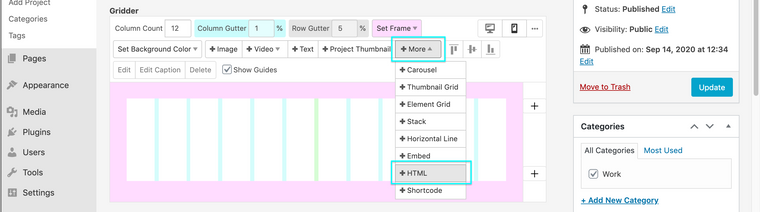
      Screen Shot 2020-09-14 at 2.50.29 PM.png

      This Video explains this:
      https://vimeo.com/349093088

      Hope this helps & have a wonderful day :)

      Richard

      1 Reply Last reply
      0
      • V
        V
        v1ncent
        wrote on last edited by
        #3

        This is wonderful! Sometimes the easiest things get overlooked ;) Thanks for your help!

        1 Reply Last reply
        0
        • V
          V
          v1ncent
          wrote on last edited by
          #4

          Actually this gives very varying results. Sometimes it autoplays, sometimes it doesn't, all with same video and Vimeo link. Any idea what could be the problem?

          1 Reply Last reply
          0
          • RichardR
            RichardR
            Richard
            Global Moderator
            wrote on last edited by
            #5

            Dear @v1ncent

            Applying the same video has different results? are you able to post a link to your website with the examples

            Best
            Richard

            1 Reply Last reply
            0
            • V
              V
              v1ncent
              wrote on last edited by
              #6

              Hey Rick, just sent my site via PM. At first the movies had autoplay on some of them. Now none of them work anymore. It's good to know I tried this with different MP4's I uploaded to Vimeo, but all rendered without sound.

              This is the video embed code I used for all of them. I used XXXXX instead of actual Vimeo ID in this example.

              <div style="padding:56.25% 0 0 0;position:relative;"><iframe src="https://player.vimeo.com/video/XXXXXX?autoplay=1&loop=1&title=0&byline=0&portrait=0" style="position:absolute;top:0;left:0;width:100%;height:100%;" frameborder="0" allow="autoplay; fullscreen; picture-in-picture" allowfullscreen></iframe></div><script src="https://player.vimeo.com/api/player.js"></script>

              1 Reply Last reply
              0

              Hello! It looks like you're interested in this conversation, but you don't have an account yet.

              Getting fed up of having to scroll through the same posts each visit? When you register for an account, you'll always come back to exactly where you were before, and choose to be notified of new replies (either via email, or push notification). You'll also be able to save bookmarks and upvote posts to show your appreciation to other community members.

              With your input, this post could be even better 💗

              Register Login
              Reply
              • Reply as topic
              Log in to reply
              • Oldest to Newest
              • Newest to Oldest
              • Most Votes


              Online Users
              I
              Ingi
              Forgot your key, lost your files, need a previous Lay Theme or Addon version? Go to www.laykeymanager.com
              laytheme.com
              • Login

              • Don't have an account? Register

              • Login or register to search.
              • First post
                Last post
              0
              • Recent
              • Tags
              • Popular
              • Users
              • Search