Different Video Play ICONs
-
Hi there!
Is it possible to use different Video Play ICONs for different pages/projects?
Video Play ICON in red!
(Regular play button set in Lay Options)However for an other page I'd like to use a black one.
How could I do this?All best
Aleks -
Dear Aleks @Aleksandar
Sorry for the delay :)
This is possible, my first thoughts were to work with (jQuery).You will first need to look into using Javascript and jQuery with Lay Theme:
https://laytheme.com/documentation.html#custom-javascriptSpecifically the 'Newpage Event' , Changing the Common jQuery character ' $ " into 'jQuery' & how to run the Script on a specific page or project e.g
<script>
window.laytheme.on("newpageshown", function(layoutObj, type, obj){
	if(type == "project" && obj.id == 1){
		console.log("fantastic!");
	}
});
</script>
Will console Log "fantastic" ' If ' the user is on the project with ID : 1
Each page or project has a data-type & unique data-id , that can be found in the <head> of your webpage - You can view the HTML structure of a webpage using the Developer Tools within a browser:
https://www.khanacademy.org/computing/computer-programming/html-css/web-development-tools/a/using-the-browser-developer-toolsI will be using this Stackoverflow thread as reference:
https://stackoverflow.com/questions/554273/changing-the-image-source-using-jqueryWithin you videos HTML structure you will see an <img> element like this, with a src path linking to your saved custom icon file:
<img class="html5video-customplayicon" src="http://www.aleksandartodorovic.com/media/play-button-large.png">We can use jQuery to redefine the src path to a different image if you wish. When viewing your Media Library clicking on an image will show you some more information about that image - At the bottom is the 'FILE URL' info - we can copy that and use it.
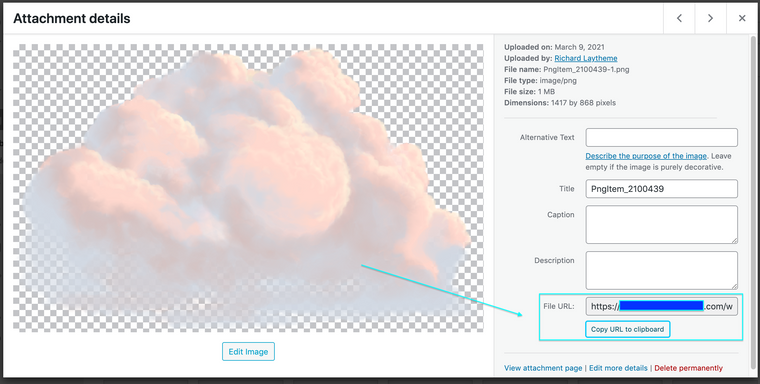
This Code:
jQuery(".html5video-customplayicon").attr("src","https://yourdomain.com/wp-content/uploads/2021/03/PngItem_2100439-1.png");jQuery > Find me element with 'class' html5video-customplayicon
Find the 'src' attribute 'attr'
Define new 'src' attribute
You will need to put the url path of your choice in.
And using the earlier 'If' project and id etcHope this helps Aleks & have a wonderful day, Thank you for using Lay Theme! :)
Sincerely
Richard

Hello! It looks like you're interested in this conversation, but you don't have an account yet.
Getting fed up of having to scroll through the same posts each visit? When you register for an account, you'll always come back to exactly where you were before, and choose to be notified of new replies (either via email, or push notification). You'll also be able to save bookmarks and upvote posts to show your appreciation to other community members.
With your input, this post could be even better 💗
Register Login