Skip to content
  • Recent
  • Tags
  • Popular
  • Users
  • Search
Skins
  • Light
  • Brite
  • Cerulean
  • Cosmo
  • Flatly
  • Journal
  • Litera
  • Lumen
  • Lux
  • Materia
  • Minty
  • Morph
  • Pulse
  • Sandstone
  • Simplex
  • Sketchy
  • Spacelab
  • United
  • Yeti
  • Zephyr
  • Dark
  • Cyborg
  • Darkly
  • Quartz
  • Slate
  • Solar
  • Superhero
  • Vapor

  • Default (No Skin)
  • No Skin
Collapse

Lay Theme Forum

  1. Home
  2. Bug Reports
  3. Links not displaying correctly after 3.7.7 update

Links not displaying correctly after 3.7.7 update

Scheduled Pinned Locked Moved Bug Reports
6 Posts 2 Posters 605 Views
  • Oldest to Newest
  • Newest to Oldest
  • Most Votes
Reply
  • Reply as topic
Log in to reply
This topic has been deleted. Only users with topic management privileges can see it.
  • P
    P
    PTD
    wrote on last edited by
    #1

    Dear Laytheme team!

    After the latest update some of my links on this website are not being displayed as intended. It was working wonderfully before the update.

    For example on the main page, a strange double line appears:

    Screen Shot 2021-04-19 at 20.18.06.png Screen Shot 2021-04-19 at 20.18.13.png

    On the info page, the style of the links are now inconsistent:
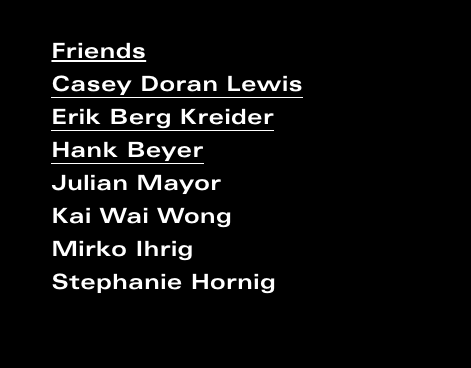
    Screen Shot 2021-04-19 at 20.19.31.png

    Do you have any suggestions on how to resolve this?

    Many thanks in advance!
    Thao

    1 Reply Last reply
    0
    • RichardR
      RichardR
      Richard
      Global Moderator
      wrote on last edited by
      #2

      Dear Thao @PTD

      Sorry for the delay.
      Just to clarify; The links need the 'underline' gone or the missing 'underlines' need to come back?

      Apologies that the recent update caused this in the first place 🙈

      Talk soon & best wishes
      Richard

      1 Reply Last reply
      0
      • P
        P
        PTD
        wrote on last edited by
        #3

        Hi Richard,

        Thank you for your reply!

        One the main page, links should have only one (thicker) underline indicating that this is a link. The second, thinner underline appeared out of nowhere after the update.

        On the info page, the links should have no underline and only appear once the mouse hovers over them.

        Thank you so much for looking into this!
        Thao

        1 Reply Last reply
        0
        • RichardR
          RichardR
          Richard
          Global Moderator
          wrote on last edited by Richard
          #4

          Dear Thao

          @PTD

          The following code is responsible:

          .lay-textformat-parent a, a.projectlink .lay-textformat-parent>*, .lay-carousel-sink .single-caption-inner a {
              /* border-bottom-width: 1px; */
          }
          

          If this is not a setting caused by options you have set in Customizer & if made sure that Wordpress, Laytheme & Addons are all up to date and in sync.

          • You could change it to 2px, to fix the issue:
          .lay-textformat-parent a, a.projectlink .lay-textformat-parent>*, .lay-carousel-sink .single-caption-inner a {
              /* border-bottom-width: 2px; */
          }
          

          This can be acheived by adding the code into the Custom CSS area of :

          Lay Options > Custom HTML & CSS >


          If after updating the problem persists:

          Could you please send your website address, /wp-admin/ username and password and a link to this topic to info@laytheme.com?

          Hope this helps & best wishes 🌞
          Richard
          1 Reply Last reply
          0
          • P
            P
            PTD
            wrote on last edited by
            #5

            Hi Richard,

            Thank you for your reply!
            I'll send you an email to explain this issue regarding the link styles that just appeared on the site after the latest laytheme update.

            Thank you for your help on this! I really appreciate it.

            Thanks!
            Thao

            1 Reply Last reply
            0
            • RichardR
              RichardR
              Richard
              Global Moderator
              wrote on last edited by
              #6

              Dear Thao

              @PTD

              Thanks for the update & best wishes 🌝

              Sincerely
              Richard
              1 Reply Last reply
              0

              Hello! It looks like you're interested in this conversation, but you don't have an account yet.

              Getting fed up of having to scroll through the same posts each visit? When you register for an account, you'll always come back to exactly where you were before, and choose to be notified of new replies (either via email, or push notification). You'll also be able to save bookmarks and upvote posts to show your appreciation to other community members.

              With your input, this post could be even better 💗

              Register Login
              Reply
              • Reply as topic
              Log in to reply
              • Oldest to Newest
              • Newest to Oldest
              • Most Votes


              Online Users
              I
              itsbadjujuju
              Forgot your key, lost your files, need a previous Lay Theme or Addon version? Go to www.laykeymanager.com
              laytheme.com
              • Login

              • Don't have an account? Register

              • Login or register to search.
              • First post
                Last post
              0
              • Recent
              • Tags
              • Popular
              • Users
              • Search