Skip to content
  • Recent
  • Tags
  • Popular
  • Users
  • Search
Skins
  • Light
  • Brite
  • Cerulean
  • Cosmo
  • Flatly
  • Journal
  • Litera
  • Lumen
  • Lux
  • Materia
  • Minty
  • Morph
  • Pulse
  • Sandstone
  • Simplex
  • Sketchy
  • Spacelab
  • United
  • Yeti
  • Zephyr
  • Dark
  • Cyborg
  • Darkly
  • Quartz
  • Slate
  • Solar
  • Superhero
  • Vapor

  • Default (No Skin)
  • No Skin
Collapse

Lay Theme Forum

  1. Home
  2. Bug Reports
  3. Double H-Tags in Source Code after Udpdating Text Formats to H1, H2 and H3

Double H-Tags in Source Code after Udpdating Text Formats to H1, H2 and H3

Scheduled Pinned Locked Moved Bug Reports
13 Posts 7 Posters 518 Views 1 Watching
  • Oldest to Newest
  • Newest to Oldest
  • Most Votes
Reply
  • Reply as topic
Log in to reply
This topic has been deleted. Only users with topic management privileges can see it.
  • M Offline
    M Offline
    Marvic
    wrote on last edited by
    #2

    Following… all my H1,2,3s are Default now in the Frontend. Backend shows the original size…

    @mariusjopen @Armin-Unruh please respond to this, as this happened after the lates update…

    1 Reply Last reply
    0
    • arminunruhA Offline
      arminunruhA Offline
      arminunruh
      Global Moderator
      wrote on last edited by arminunruh
      #3

      hey!

      Ok I just tested different things and I'm not sure if I understand the bug correctly.

      @rocked23 on your website I don't see doubled headlines

      that the content, which has H1 and H3 is now doubled on the site.

      Did it look like this?
      <h1>my headline</h1><h1>my headline</h1>?

      Maybe the seo tool has looked through the desktop version markup and custom phone layout markup. Both co-exist on a page that has a custom phone layout.

      If you could recreate that bug and let me know exactly how you recreated this, that would be helpful. And a page where the bug exists would be helpful.

      @Marvic please post a link and screenshot of where you experience the problem

      I tried out changing textformats to h1, h2, h3 and changing a paragraph format to a headline format and none of these steps produced any bugs for me.

      Please note once you have changed a format to h2, h3, h4 or changed a format type, you need to re-apply that textformat to the pre-exisiting text that uses that format in the gridder. This way the pre-existing texts that already used that format will change to h2, h3, h4 or to a different type.

      1 Reply Last reply
      0
      • R Offline
        R Offline
        rocked23
        wrote on last edited by
        #4

        Dear @arminunruh ,

        thanks for your message.

        First, i changed the text formats from p to H1 etc. and then, I changed this again on each site in the gridder to be sure, that these text-format changes have been also affected there.

        The double/duplicate content is not visible on the site itself but in the source code. That leads to the »duplicate H1, H2 content« error message in the SEO-Tool’s check (because it thinks, this content is »visible« twice).

        The site is www.matteroffact.de – if you take a look at the source code, you’ll find the H1 example twice:

        <h1 class="_verybig">Wir pressen <br />dein Vinyl!</h1>
        

        ... in line 1891 and then again in line 1941

        Or on this site as well the H2: https://matteroffact.de/vinyl_produktion

        <h2 class="_verybig">Wir produzieren deine Vision!</h2>
        

        ... first in source code line 1910 and second in line 1974

        Or the H3:

        <h3 class="_Zwischenhead">Vinyl in höchster Qualität!</h3>
        

        twice in line 1903 and line 1967.

        Thanks again for your help!

        Greetings from Cologne
        Alex

        1 Reply Last reply
        0
        • arminunruhA Offline
          arminunruhA Offline
          arminunruh
          Global Moderator
          wrote on last edited by
          #5

          Yes that headline exists twice in your markup because you use a custom phone layout.

          As I wrote:

          Maybe the seo tool has looked through the desktop version markup and custom phone layout markup. Both co-exist on a page that has a custom phone layout.

          1 Reply Last reply
          0
          • R Offline
            R Offline
            rocked23
            wrote on last edited by
            #6

            Dear @arminunruh,

            ah, good to know and sorry – I didn’t really get it, when reading it the first time. So now, I know, what the problem is.

            Will do some research, what SEO-wise could be an option for solving this.

            Thanks and greetings
            Alex

            1 Reply Last reply
            0
            • S Offline
              S Offline
              s.janssenMD
              wrote on last edited by
              #7

              @rocked23 and @arminunruh Could you explain to me how to change my textformats to h2, h3, h4 etc.? I still don't see the option to choose something different than Headline or Paragraph in my Text Formats?Screenshot 2020-11-19 at 17.54.36.png

              1 Reply Last reply
              0
              • RichardR Offline
                RichardR Offline
                Richard
                Global Moderator
                wrote on last edited by
                #8

                Dear @s-janssenMD

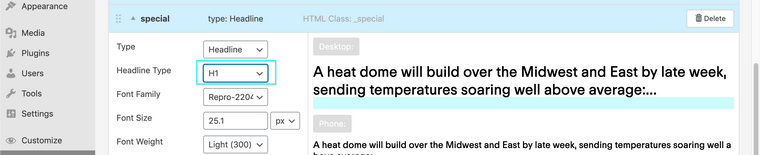
                If you choose 'Headline' in the settings of the Text it will then show you the H1, H2 etc options :)
                Screen Shot 2020-11-23 at 2.38.04 PM.png

                Best
                Richard

                1 Reply Last reply
                0
                • B Offline
                  B Offline
                  Bella
                  wrote on last edited by Bella
                  #9

                  Hey @Richard ,
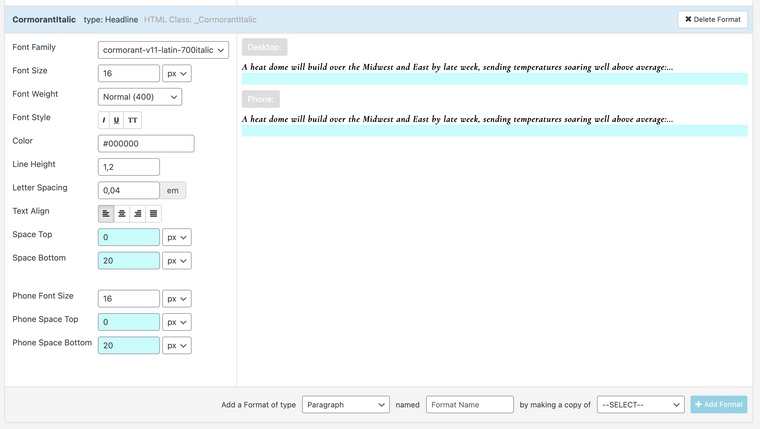
                  I have the same problem as s-janssenMD had and I see that you provided a screenshot where the Headline options show up.

                  However for me they don't show up when I'm in the text formats and I also can't find it when I've typed text (and then wanted to set it as h1)

                  Should I be looking somewhere else for this?

                  Here is a screenshot of how this looks for me:
                  Bildschirmfoto 2021-05-11 um 17.53.31.png

                  B 1 Reply Last reply
                  0
                  • B Bella

                    Hey @Richard ,
                    I have the same problem as s-janssenMD had and I see that you provided a screenshot where the Headline options show up.

                    However for me they don't show up when I'm in the text formats and I also can't find it when I've typed text (and then wanted to set it as h1)

                    Should I be looking somewhere else for this?

                    Here is a screenshot of how this looks for me:

                    Bildschirmfoto 2021-05-11 um 17.53.31.png

                    B Offline
                    B Offline
                    Bella
                    wrote on last edited by
                    #10

                    @Bella @Richard
                    Nevermind, they're showing up now :)

                    1 Reply Last reply
                    0
                    • RichardR Offline
                      RichardR Offline
                      Richard
                      Global Moderator
                      wrote on last edited by
                      #11

                      Dear Bella

                      @Bella

                      No worries 🌝& best wishes


                      Richard
                      1 Reply Last reply
                      0
                      • H Offline
                        H Offline
                        hugo2lot
                        wrote last edited by
                        #12

                        Hi there,

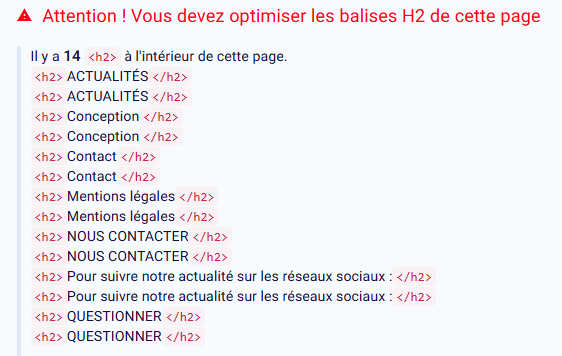
                        I am encountering the same problem that @rocked23 lighted up : all the h-tags on the website I am working on are doubled up.

                        I am pretty sure this occured because I am using custom phone layouts, but I don't know what can I do to solve this. The h-tags I used are in sync texts elements.

                        Do you have any idea of how to solve this ?

                        Here is a link to the concerned website : https://asso-odfc.org/
                        And a screenshot of an SEO analyse tool :
                        SEO-Tester-Online-12-04-2025_05_27_PM.png

                        1 Reply Last reply
                        0
                        • arminunruhA Offline
                          arminunruhA Offline
                          arminunruh
                          Global Moderator
                          wrote last edited by
                          #13

                          wow great website!

                          https://www.reddit.com/r/TechSEO/comments/agafu5/do_duplicate_elements_hidden_on_desktop_but_shown/

                          this is what i found about the topic:
                          Googlebot(s) crawl desktop and mobile using different bots/user agents that render the page content, a lot like a browser/real user would! So this shouldn't be either a duplicate content (same content, different pages) or a keyword stuffing/LSI problem.

                          Google's own quality engineer Matt Cutts on crawling: https://www.google.com/search/howsearchworks/crawling-indexing/

                          i think google is probably smart enough to get this right.
                          the only way you could make your SEO tool not show these warnings is,
                          if you would disable the custom phone layout feature in lay options.
                          or delete your custom phone layout :/.

                          i would just leave it like that.

                          i tried to find some official sources like:
                          https://developers.google.com/search/blog/2008/09/demystifying-duplicate-content-penalty?hl=en

                          but they mainly talk about duplicate content on different pages of a website.
                          but the overall message of this article seems to be not to worry about it mmh

                          1 Reply Last reply
                          0
                          Reply
                          • Reply as topic
                          Log in to reply
                          • Oldest to Newest
                          • Newest to Oldest
                          • Most Votes


                          I also code custom websites or custom Lay features.
                          đź’ż Email me here: đź’ż
                          info@laytheme.com

                          Our Web Development company: 100k.studio

                          Want to tip me? https://www.paypal.com/paypalme/arminunruh

                          Before you post:
                          1. When using a WordPress Cache plugin, disable it or clear your cache.
                          2. Update Lay Theme and all Lay Theme Addons
                          3. Disable all Plugins
                          4. Go to Lay Options → Custom CSS & HTML, click "Turn Off All Custom Code", click "Save Changes"

                          This often solves issues you might run into

                          When you post:
                          1. Post a link to where the problem is
                          2. Does the problem happen on Chrome, Firefox, Safari or iPhone or Android?
                          3. If the problem is difficult to explain, post screenshots / link to a video to explain it
                          Online Users
                          D
                          danny
                          Forgot your key, lost your files, need a previous Lay Theme or Addon version? Go to www.laykeymanager.com
                          laytheme.com
                          • Login

                          • Don't have an account? Register

                          • Login or register to search.
                          • First post
                            Last post
                          0
                          • Recent
                          • Tags
                          • Popular
                          • Users
                          • Search

