How to do this page like Parallax?
-
does anyone how to do this effects like this website
is it Parallax?
how to do it? please help~ -
Dear @sidyou
With Lay Theme's current 'Simple Parallax' I don't think it's possible. You can see here how its very close but there is a measurement problem.
I'm sure your example is possible with the use of Custom Code. These links may help:
https://www.webnots.com/how-to-create-full-width-css-parallax-page-layout/
https://www.w3schools.com/howto/tryit.asp?filename=tryhow_css_parallax_percent
Remember that you can easily set custom 'Classes' & 'ID's' to ELEMENTS and ROWS (right-clicking). Custom Code can then be applied to these elements via:
Lay Options > Custom CSS & HTML >
Or:
Customize > CSS
Hope this helps you in the right direction & best wishes. 🌝
Richard
-
@Richard said in How to do this page like Parallax?:
ember that you can easily set custom 'Classes' & 'ID's' to ELEMENTS and ROWS (right-clicking). Custom Code can then be applied to these elements via:
Big Thanks!!!!!
is work on my website~
may i ask you some other question?
how to fixed position the words with link like that???i wanna the words at Upper right corner and Bottom right corner

-
Dear @sidyou
With Lay Theme's current 'Simple Parallax' I don't think it's possible. You can see here how its very close but there is a measurement problem.
I'm sure your example is possible with the use of Custom Code. These links may help:
https://www.webnots.com/how-to-create-full-width-css-parallax-page-layout/
https://www.w3schools.com/howto/tryit.asp?filename=tryhow_css_parallax_percent
Remember that you can easily set custom 'Classes' & 'ID's' to ELEMENTS and ROWS (right-clicking). Custom Code can then be applied to these elements via:
Lay Options > Custom CSS & HTML >
Or:
Customize > CSS
Hope this helps you in the right direction & best wishes. 🌝
Richard
@Richard said in How to do this page like Parallax?:
Remember that you can easily set custom 'Classes' & 'ID's' to ELEMENTS and ROWS (right-clicking). Custom Code can then be applied to these elements via:
excuse, why i use the 'Simple Parallax'
it will have blank background on it?? like this
http://jpgstudioooo.com/sid_test/
-
Dear @sidyou
"i wanna the words at Upper right corner and Bottom right corner"
You have achieved the 'fixed' links yes?:
"excuse, why i use the 'Simple Parallax' it will have blank background on it?? like this?"
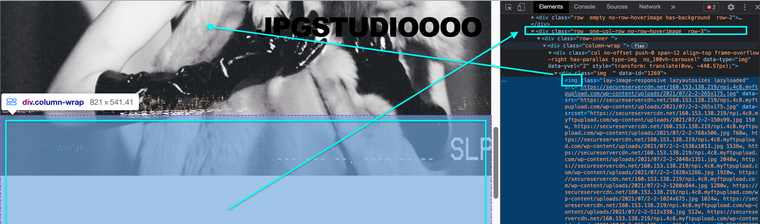
This is space left from "Row-3's" offset. I noticed on the 3rd row you have no background image set.
Hope this helps and best wishes ✨
Richard

Hello! It looks like you're interested in this conversation, but you don't have an account yet.
Getting fed up of having to scroll through the same posts each visit? When you register for an account, you'll always come back to exactly where you were before, and choose to be notified of new replies (either via email, or push notification). You'll also be able to save bookmarks and upvote posts to show your appreciation to other community members.
With your input, this post could be even better 💗
Register Login