Skip to content
  • Recent
  • Tags
  • Popular
  • Users
  • Search
Skins
  • Light
  • Brite
  • Cerulean
  • Cosmo
  • Flatly
  • Journal
  • Litera
  • Lumen
  • Lux
  • Materia
  • Minty
  • Morph
  • Pulse
  • Sandstone
  • Simplex
  • Sketchy
  • Spacelab
  • United
  • Yeti
  • Zephyr
  • Dark
  • Cyborg
  • Darkly
  • Quartz
  • Slate
  • Solar
  • Superhero
  • Vapor

  • Default (No Skin)
  • No Skin
Collapse

Lay Theme Forum

  1. Home
  2. General Discussion
  3. Maintenance/coming soon

Maintenance/coming soon

Scheduled Pinned Locked Moved General Discussion
15 Posts 6 Posters 1.8k Views 1 Watching
  • Oldest to Newest
  • Newest to Oldest
  • Most Votes
Reply
  • Reply as topic
Log in to reply
This topic has been deleted. Only users with topic management privileges can see it.
  • panteleyP
    panteleyP
    panteley
    wrote on last edited by
    #1

    Hi there,

    Hope you are are doing fine.
    I wanted to know if there is possible to add/create some kind of coming soon page, while you edit/design the website?

    Thanks
    :)

    1 Reply Last reply
    0
    • F
      F
      felix_rabe
      wrote on last edited by felix_rabe
      #2

      @pandeli you can just create this page by yourself and set it as Front Page in the customizer. disable the menu for this page by custom css so the visitors can't navigate.

      1 Reply Last reply
      1
      • RichardR
        RichardR
        Richard
        Global Moderator
        wrote on last edited by
        #3

        Thanks @felix_rabe ! 🌐

        @pandeli

        "create this page by yourself and set it as Front Page in the customizer."

        triple.jpg

        "disable the menu for this page by custom css" double.jpg
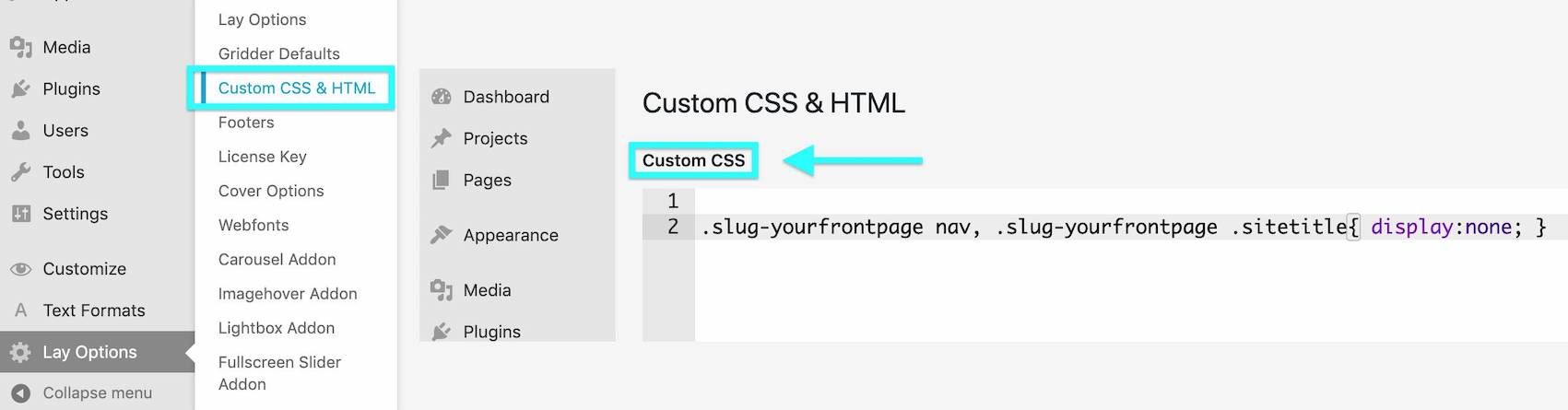
        .slug-yourfrontpage nav { display:none; }
        .slug-yourfrontpage .sitetitle { display:none; }

        https://laytheme.com/documentation.html#custom-css-styling


        Best wishes
        Richard
        panteleyP 1 Reply Last reply
        1
        • RichardR Richard

          Thanks @felix_rabe ! 🌐

          @pandeli

          "create this page by yourself and set it as Front Page in the customizer."
          triple.jpg

          "disable the menu for this page by custom css" double.jpg

          .slug-yourfrontpage nav { display:none; }
          .slug-yourfrontpage .sitetitle { display:none; }

          https://laytheme.com/documentation.html#custom-css-styling


          Best wishes
          Richard
          panteleyP
          panteleyP
          panteley
          wrote on last edited by
          #4

          @Richard Hi and thank you both for the replies.

          Well, I tried as you said,

          I created a 'Coming Soon' page, then I added it as Front Page in Costumizer.

          Then I pasted the CSS, and still the menu and title appears.
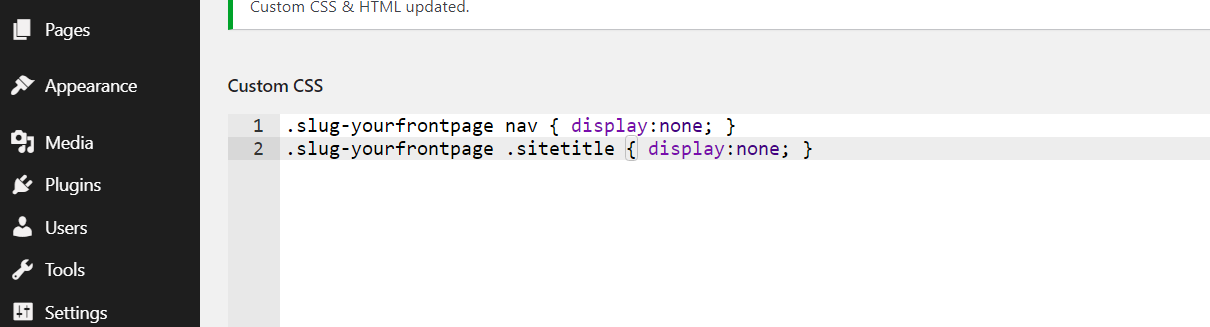
          Screenshot 2021-07-19 230817.png

          Secondly, I want to make sure if I was correctly understood.

          How will I keep working on the homepage if the 'Front Page' is set to 'Coming Soon'[page] ?

          Thank you,
          :)

          1 Reply Last reply
          0
          • F
            F
            funeral.studio
            wrote on last edited by
            #5

            gotta change "yourfrontpage" to the slug name of the page

            1 Reply Last reply
            1
            • RichardR
              RichardR
              Richard
              Global Moderator
              wrote on last edited by
              #6

              Thanks @funeral-studio ! 🌝


              @pandeli

              The code: slug-yourfrontpage Must be altered to the name of your page.

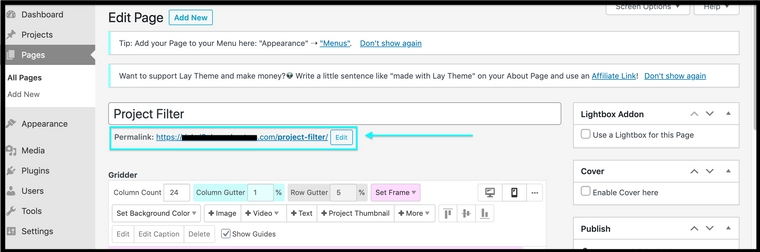
              If you are not comfortable with 'Developer Tools' you can find this 'slug' via a Project or Page's Permalink. In the Image below you can see the page has a permalink with /project-filter/ this will very likely be your 'slug' also. This means my code would be .slug-project-filter : Screen Shot 2021-07-21 at 1.24.03 PM.png


              Good luck @pandeli remember the Documentation page if you are unsure as well as Google! 🌝

              Sincerely

              Richard

              panteleyP 1 Reply Last reply
              1
              • RichardR Richard

                Thanks @funeral-studio ! 🌝


                @pandeli

                The code: slug-yourfrontpage Must be altered to the name of your page.

                If you are not comfortable with 'Developer Tools' you can find this 'slug' via a Project or Page's Permalink. In the Image below you can see the page has a permalink with /project-filter/ this will very likely be your 'slug' also. This means my code would be .slug-project-filter : Screen Shot 2021-07-21 at 1.24.03 PM.png


                Good luck @pandeli remember the Documentation page if you are unsure as well as Google! 🌝

                Sincerely

                Richard

                panteleyP
                panteleyP
                panteley
                wrote on last edited by
                #7

                @Richard

                Thank you very much! Sorry my coding knowledge isnt that good xx

                Well, I was curious as well, on how do I proceed with designing the 'Home'[page] in costumizer while the Front Page is set to 'Coming Soon'[page]?

                1 Reply Last reply
                0
                • RichardR
                  RichardR
                  Richard
                  Global Moderator
                  wrote on last edited by Richard
                  #8

                  Dear @pandeli

                  I think i see the dilemma there. You could open two Customizer tabs in your browser. Firstly go to your desired page to work upon (customize) then in another tab go and set your homepage to the "Coming soon page" then hit publish. Now you can exit this tab. You can continue working on your desired page like this i believe yes? 🌝

                  Best wishes & have a great day 🏖
                  Richard
                  panteleyP 1 Reply Last reply
                  0
                  • F
                    F
                    felix_rabe
                    wrote on last edited by felix_rabe
                    #9

                    @Richard yet he has to change the front-page every time he saves the changes in the customizer. MAYBE armin can incorporate a "show page XYZ" feature in the customizer, so you can directly choose the page to display from a list. I would love this because the customizer is not really meant/made for navigation. for example, when you use the browser back button you don't navigate back in the website but you get back to your Wordpress dashboard.

                    panteleyP 1 Reply Last reply
                    1
                    • RichardR Richard

                      Dear @pandeli

                      I think i see the dilemma there. You could open two Customizer tabs in your browser. Firstly go to your desired page to work upon (customize) then in another tab go and set your homepage to the "Coming soon page" then hit publish. Now you can exit this tab. You can continue working on your desired page like this i believe yes? 🌝

                      Best wishes & have a great day 🏖
                      Richard
                      panteleyP
                      panteleyP
                      panteley
                      wrote on last edited by
                      #10

                      @Richard was looking for something more practical but thank you again. Hope this kind of topic will help on improving future updates; :)

                      1 Reply Last reply
                      0
                      • F felix_rabe

                        @Richard yet he has to change the front-page every time he saves the changes in the customizer. MAYBE armin can incorporate a "show page XYZ" feature in the customizer, so you can directly choose the page to display from a list. I would love this because the customizer is not really meant/made for navigation. for example, when you use the browser back button you don't navigate back in the website but you get back to your Wordpress dashboard.

                        panteleyP
                        panteleyP
                        panteley
                        wrote on last edited by
                        #11

                        @felix_rabe insert michael scott's thank you gif

                        1 Reply Last reply
                        0
                        • RichardR
                          RichardR
                          Richard
                          Global Moderator
                          wrote on last edited by
                          #12

                          Dear @felix_rabe @pandeli

                          Thank you for the Valid input, I agree the Customizer has some UI issues with Navigation. I personally have always found ways around this, but that doesn't mean there isn't room for improvement.

                          This has been added to the Development notes & forwarded to Armin ✅


                          Have a great day both of you, & thank you for supporting Lay Theme ✨
                          Richard
                          1 Reply Last reply
                          2
                          • arminunruhA
                            arminunruhA
                            arminunruh
                            Global Moderator
                            wrote on last edited by
                            #13

                            Hm i think there are "coming soon" plugins for wordpress you could use.

                            Also if you'd create a coming soon page and set it as a frontpage, you could still create a new page that will be your future frontpage. Just for now it wouldn't be set as the frontpage in the customizer.

                            You could create a link in your menu in appearance -> menus to access that page that is going to be your frontpage.

                            the customizer controls aren't really meant for navigating the website

                            1 Reply Last reply
                            0
                            • StarcS
                              StarcS
                              Starc
                              wrote on last edited by Starc
                              #14

                              HI @arminunruh !

                              I set my custom "coming soon page" page as a frontpage via "customize".
                              Then i put this css in "custom CSS" in lay option:
                              .slug-coming-soon-page nav { display:none; }
                              .slug-coming-soon-page .sitetitle { display:none; }

                              Sitetitle and menu have disappeared but the navbar remain. How can I hide this header (the green bar in the screenshot) - only for this coming soon page?

                              ![alt text](f78016d0-101f-4166-a2af-cbe2b8474d1a-image.png image url)

                              ⭐️SOLVED⭐️
                              With
                              .slug-coming-soon-page div.navbar {display:none;}

                              StarcS 1 Reply Last reply
                              1
                              • StarcS Starc

                                HI @arminunruh !

                                I set my custom "coming soon page" page as a frontpage via "customize".
                                Then i put this css in "custom CSS" in lay option:
                                .slug-coming-soon-page nav { display:none; }
                                .slug-coming-soon-page .sitetitle { display:none; }

                                Sitetitle and menu have disappeared but the navbar remain. How can I hide this header (the green bar in the screenshot) - only for this coming soon page?

                                ![alt text](f78016d0-101f-4166-a2af-cbe2b8474d1a-image.png image url)

                                ⭐️SOLVED⭐️
                                With
                                .slug-coming-soon-page div.navbar {display:none;}

                                StarcS
                                StarcS
                                Starc
                                wrote on last edited by
                                #15
                                This post is deleted!
                                1 Reply Last reply
                                0

                                Hello! It looks like you're interested in this conversation, but you don't have an account yet.

                                Getting fed up of having to scroll through the same posts each visit? When you register for an account, you'll always come back to exactly where you were before, and choose to be notified of new replies (either via email, or push notification). You'll also be able to save bookmarks and upvote posts to show your appreciation to other community members.

                                With your input, this post could be even better 💗

                                Register Login
                                Reply
                                • Reply as topic
                                Log in to reply
                                • Oldest to Newest
                                • Newest to Oldest
                                • Most Votes


                                Online Users
                                Forgot your key, lost your files, need a previous Lay Theme or Addon version? Go to www.laykeymanager.com
                                laytheme.com
                                • Login

                                • Don't have an account? Register

                                • Login or register to search.
                                • First post
                                  Last post
                                0
                                • Recent
                                • Tags
                                • Popular
                                • Users
                                • Search