The shop : cart icon, footer & privacy policy.
-
Hi Armin & Richard !
I have a question about the shop...-
Do you know where we can find a good text for privacy policy and terms & conditions ?
-
For the cart, there is the word "cart" to access of the orders. Is it possible to change the word by an icon of a cart ?
-
For the footer, I have created a page for the footer but it doesn't appear in all pages. I see also the possibility to add a footer per page but it doesn't work for the article pages : https://keight.shop/
Thanks for your help !
Karim. -
-
Dear Karim
@karimus1888
Let's answer these questions! 🌝
Do you know where we can find a good text for privacy policy and terms & conditions ?
On the "shop setup" page within the Lay Theme website - Armin provides some info as well as the suggested plugin "wp legal pages" https://laytheme.com/shop.html#privacy-pages
For the cart, there is the word "cart" to access of the orders. Is it possible to change the word by an icon of a cart ?
For an icon within the Cart, you can choose settings within "flying side cart plugin > settings " The plugin is also mentioned here: https://laytheme.com/shop.html#sidecart-plugin
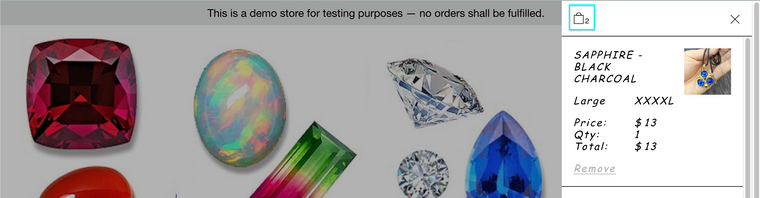
If you mean the "cart" as part of the main menu:

This is not as easily changed but you still have options - if you add some custom code. "Screen Options" can be found at the top of the > appearance > menu page:
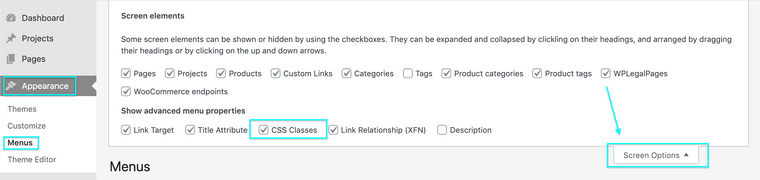
With this you can now add a 'custom class' to this menu-item e.g
my-custom-menu-itemWith this class you can then target it with some custom code and change it into an image (note this customisation will be up to you and image size/padding etc will need to be tested by you as well, however i can send you in the right direction.
https://onelittledesigner.com/2013/02/28/replacing-text-with-an-image-using-jquery/
Code may look similar to this:
jQuery().ready(function () {
    jQuery('.my-custom-menu-item').each(function () {
        string = jQuery(this).text('CART');
        jQuery(this).html('<img src="https://www.asaworld.online/wp-content/uploads/2021/09/cart-icon-e1632184362536.png" alt="' + string + '" />');
    });
});
You can get the source for your image (img src) from a URL. This could be another website or link online, but even easier:
in > Media > Media Library >
any image in your media library will have its own URL when clicking on it (file-url):

Copy and paste this into the
img src="insert-new-img-src-here"in the above code.
For the footer, I have created a page for the footer but it doesn't appear in all pages. I see also the possibility to add a footer per page but it doesn't work for the article pages : https://keight.shop/
Currently standard footers aren't available for the shop page unfortunately - This should be worked out in the next updates ( is your Lay Theme fully updated? ) For now a special shop-related footer has been created by Armin:
Hope this helps Karim 🌝Best wishes, good luck and have a wonderful day!!!
Richard

Hello! It looks like you're interested in this conversation, but you don't have an account yet.
Getting fed up of having to scroll through the same posts each visit? When you register for an account, you'll always come back to exactly where you were before, and choose to be notified of new replies (either via email, or push notification). You'll also be able to save bookmarks and upvote posts to show your appreciation to other community members.
With your input, this post could be even better 💗
Register Login