Skip to content
  • Recent
  • Tags
  • Popular
  • Users
  • Search
Skins
  • Light
  • Brite
  • Cerulean
  • Cosmo
  • Flatly
  • Journal
  • Litera
  • Lumen
  • Lux
  • Materia
  • Minty
  • Morph
  • Pulse
  • Sandstone
  • Simplex
  • Sketchy
  • Spacelab
  • United
  • Yeti
  • Zephyr
  • Dark
  • Cyborg
  • Darkly
  • Quartz
  • Slate
  • Solar
  • Superhero
  • Vapor

  • Default (No Skin)
  • No Skin
Collapse

Lay Theme Forum

  1. Home
  2. General Discussion
  3. active category filter: color instead of opacity?

active category filter: color instead of opacity?

Scheduled Pinned Locked Moved General Discussion
6 Posts 2 Posters 323 Views
  • Oldest to Newest
  • Newest to Oldest
  • Most Votes
Reply
  • Reply as topic
Log in to reply
This topic has been deleted. Only users with topic management privileges can see it.
  • G Offline
    G Offline
    GregorGregor
    wrote on last edited by
    #1

    hi there.

    any possibility to choose a specific color instead of just an opacity percentage for active filter categories?

    to target this via CSS seems crazy complicated?!

    some info on this would be great.
    THX and best!

    gregor

    1 Reply Last reply
    0
    • RichardR Offline
      RichardR Offline
      Richard
      Global Moderator
      wrote on last edited by Richard
      #2

      Dear Gregor

      @GregorGregor

      The following code is defining the 'active opacity'

      .lay-thumbnailgrid-filter-anchor.lay-filter-active {
          opacity: 1;
      }
      

      So you can add anything you wish to be applied to the 'Active' category filter e.g

      .lay-thumbnailgrid-filter-anchor.lay-filter-active {
          opacity: 1;
          background-color:red;
          color:yellow;
          border-radius:50px;
          width:50px
      }
      

      Result:
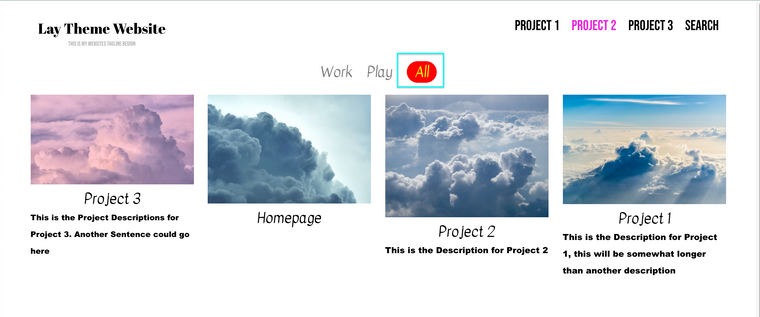
      Screen Shot 2021-10-27 at 8.56.56 AM.png

      https://laytheme.com/documentation.html#custom-css-styling


      Hope this helps Gregor & have a wonderful day πŸŒ…
      Richard
      1 Reply Last reply
      0
      • G Offline
        G Offline
        GregorGregor
        wrote on last edited by
        #3

        THANKS!

        works and helps.
        i call this easy.

        have a nice day too!

        XG!

        1 Reply Last reply
        0
        • G Offline
          G Offline
          GregorGregor
          wrote on last edited by
          #4

          mh β€” and the mouseover color i can also change?
          … donβ€˜t get how to target those.

          1 Reply Last reply
          0
          • G Offline
            G Offline
            GregorGregor
            wrote on last edited by
            #5

            just found it β€” thanks!
            … impatient Β»meΒ«

            .lay-thumbnailgrid-filter-anchor:hover {
            opacity: 0.5;
            color: #5e8c8a;
            }.

            1 Reply Last reply
            0
            • RichardR Offline
              RichardR Offline
              Richard
              Global Moderator
              wrote on last edited by
              #6

              Thanks Gregor! have a wonderful day & thank you for supporting Lay Theme! 🌝

              @GregorGregor

              1 Reply Last reply
              0
              Reply
              • Reply as topic
              Log in to reply
              • Oldest to Newest
              • Newest to Oldest
              • Most Votes


              We also code custom websites or bespoke Lay features. Drop me a line at info@laytheme.com or check out my work at arminunruh.com.

              Want to support my work? paypal.me/arminunruh

              For paid 1-on-1 Lay Theme Coaching, contact Audrey (audrey@cyberslayers.work) or me (info@laytheme.com).

              Before you post:
              1. When using a WordPress Cache plugin, disable it or clear your cache.
              2. Update Lay Theme and all Lay Theme Addons
              3. Disable all Plugins
              4. Go to Lay Options β†’ Custom CSS & HTML, click "Turn Off All Custom Code", click "Save Changes"

              This often solves issues you might run into

              When you post:
              1. Post a link to where the problem is
              2. Does the problem happen on Chrome, Firefox, Safari or iPhone or Android?
              3. If the problem is difficult to explain, post screenshots / link to a video to explain it
              Online Users
              Forgot your key, lost your files, need a previous Lay Theme or Addon version? Go to www.laykeymanager.com
              laytheme.com
              • Login

              • Don't have an account? Register

              • Login or register to search.
              • First post
                Last post
              0
              • Recent
              • Tags
              • Popular
              • Users
              • Search