Cover Bug with lost Row Background Color
-
Hey there, I wanted to start using a cover for my landing page, but somehow it doesn`t work as ecpected:
This is the normal page with cover disabled. A background-row-image in the first row and several rows with background color and content:
https://studio-komplementaer.de/landing-03-2022-cover-disabled/
The problem is: When a enable the cover option, the background-color disapears and becomes transparent. BUT the page i choose as footer does work normal …
Have a look:
https://studio-komplementaer.de/landing-03-2022-cover-enabled/Any tipps, why this happens?
Thanks!Micha
-
Dear @Micha
Firstly what a lovely website ⭐️
I made a similar setup (albeit crude..) and do not experience this issue:I notice you are using version 3.8.5, are you able to update or possibly you are keeping this version for reasons with SEO?
Would it be too difficult to do a test with the following environment?
Any custom CSS or JS that may interfere is temporarily removed.
Any third-party plugins are de-activated to see if this resolves the issue.
If you wish to update please do 🌝
I see it's related to the
z-indexof cover and content, does this relate to anything for you?Version 4.2.1:
.cover-region-placeholder {
    width: 100%;
    pointer-events: none;
    position: relative;
    z-index: -2;
}
Version 3.8.5:
.cover-region-placeholder {
    width: 100%;
    height: 100vh;
    pointer-events: none;
    position: relative;
    z-index: -1;
}
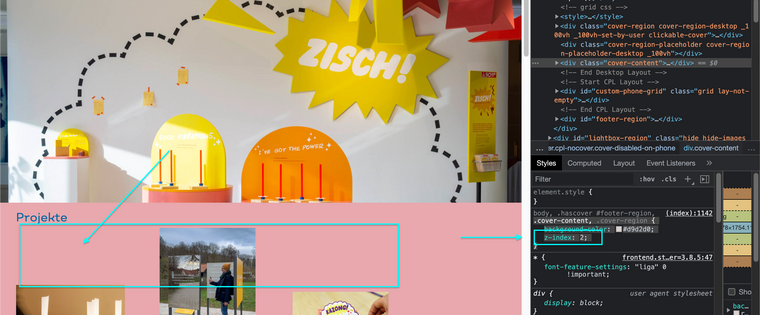
If we give "cover-content" a z-index of 2 the we get the desired result:
.cover-content {
    z-index: 2;
}
Talk soon & have a wonderful day
Richard
-
Dear @Micha
Firstly what a lovely website ⭐️
I made a similar setup (albeit crude..) and do not experience this issue:I notice you are using version 3.8.5, are you able to update or possibly you are keeping this version for reasons with SEO?
Would it be too difficult to do a test with the following environment?
Any custom CSS or JS that may interfere is temporarily removed.
Any third-party plugins are de-activated to see if this resolves the issue.
If you wish to update please do 🌝
I see it's related to the
z-indexof cover and content, does this relate to anything for you?Version 4.2.1:
.cover-region-placeholder {
    width: 100%;
    pointer-events: none;
    position: relative;
    z-index: -2;
}
Version 3.8.5:
.cover-region-placeholder {
    width: 100%;
    height: 100vh;
    pointer-events: none;
    position: relative;
    z-index: -1;
}
If we give "cover-content" a z-index of 2 the we get the desired result:
.cover-content {
    z-index: 2;
}
Talk soon & have a wonderful day
Richard
@Richard said in Cover Bug with lost Row Background Color:
If we give "cover-content" a z-index of 2 the we get the desired result:
Richard, you made my day! Thanks a lot, the z-index-thing worked.
As CSS and code is not my language at all, i just copied your CSS in the custom CSS field and it worked well. I have to check the update anyway, but for now its great.And thanks for your lovely "lovely website" words.
Again, vielen Dank!
Micha
-
-
P prazzo101 referenced this topic on

Hello! It looks like you're interested in this conversation, but you don't have an account yet.
Getting fed up of having to scroll through the same posts each visit? When you register for an account, you'll always come back to exactly where you were before, and choose to be notified of new replies (either via email, or push notification). You'll also be able to save bookmarks and upvote posts to show your appreciation to other community members.
With your input, this post could be even better 💗
Register Login