Full Screen Slider / Caption Over Image
-
Hello! Recently installed my Lay Theme with Full Screen Slider. After years of Squarespace and its limitations, I am very, very excited to be starting fresh with Lay Theme. So far, so good! (Just one day in as of this posting, lol.)
My website is here: http://vrlaine.com
I would like captions to overlay my images, just like this portfolio page.
I will note I am using the slider on a single project, with one image per row.
I've looked at previous forum posts regarding similar issues, but I wondered if some recent updates to Lay Theme, or my beginner's ignorance, are preventing me from understanding how to implement those suggestions.
Many thanks!
-
Dear Amanda
@vrlaine (yoko-ono) 🌝
Within your Gridder:
- Fullscreen Slider Activated
- Row background image set
- Text placed in row (bottom aligned)
- Set browser height for row height
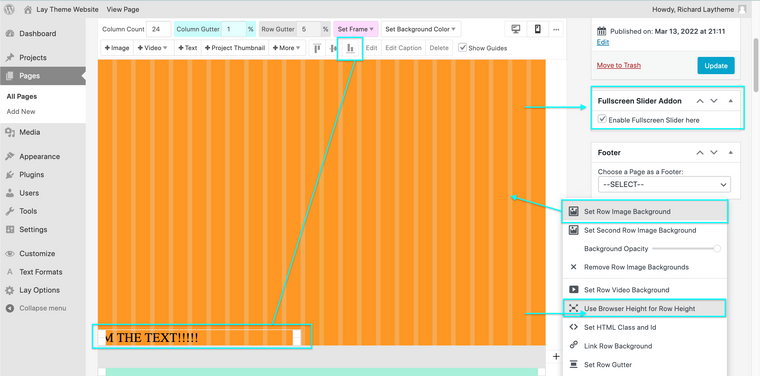
Right Clicking on the Gridder frame will show the extra options.
Best wishes 🌝
Richard


Hello! It looks like you're interested in this conversation, but you don't have an account yet.
Getting fed up of having to scroll through the same posts each visit? When you register for an account, you'll always come back to exactly where you were before, and choose to be notified of new replies (either via email, or push notification). You'll also be able to save bookmarks and upvote posts to show your appreciation to other community members.
With your input, this post could be even better 💗
Register Login