Skip to content
  • Recent
  • Tags
  • Popular
  • Users
  • Search
Skins
  • Light
  • Brite
  • Cerulean
  • Cosmo
  • Flatly
  • Journal
  • Litera
  • Lumen
  • Lux
  • Materia
  • Minty
  • Morph
  • Pulse
  • Sandstone
  • Simplex
  • Sketchy
  • Spacelab
  • United
  • Yeti
  • Zephyr
  • Dark
  • Cyborg
  • Darkly
  • Quartz
  • Slate
  • Solar
  • Superhero
  • Vapor

  • Default (No Skin)
  • No Skin
Collapse

Lay Theme Forum

  1. Home
  2. Bug Reports
  3. Different elements not working

Different elements not working

Scheduled Pinned Locked Moved Bug Reports
6 Posts 2 Posters 353 Views
  • Oldest to Newest
  • Newest to Oldest
  • Most Votes
Reply
  • Reply as topic
Log in to reply
This topic has been deleted. Only users with topic management privileges can see it.
  • alvarodozeA
    alvarodozeA
    alvarodoze
    wrote on last edited by
    #1

    Hi Laytheme team,
    Website: https://georginanorris.com/
    Link problem: https://drive.google.com/file/d/1WZ1e3k7CM-AjB2-AvRyjKK2YBihLxBj2/view?usp=sharing

    I was working on a custom cursor - it all was working fine - until suddenly the website crashed.

    1- Arrows in the carrousel not showing correctly (glitching)
    2- When scroll to the project index it crash and send you to the carrrousel.
    3 - The 2 first projects cannot be selected nor image is shown...
    4- The custom icon for the Full screen slider addon are not working...
    5-Why is the last project higlight it in grey..?

    Any ideas - thoughts...?

    Super Thanks

    1 Reply Last reply
    0
    • RichardR
      RichardR
      Richard
      Global Moderator
      wrote on last edited by
      #2

      Dear @alvarodoze

      Is there anyway to see the page in question? currently its the "see you soon" landing page.

      The behaviour in the video was very glitchy as you say - can we make sure that this is not caused by:

      Wordpress, Lay Theme & Laytheme's Addons are all up to date ?


      Any custom CSS or JS that may interfere is temporarily removed.


      Any third-party plugins are de-activated to see if this resolves the issue.


      Talk soon & best wishes
      Richard
      1 Reply Last reply
      0
      • alvarodozeA
        alvarodozeA
        alvarodoze
        wrote on last edited by alvarodoze
        #3

        Hi Richard. Thank you for your answer.
        Yes sorry, I hide it. You can find the website here.
        https://georginanorris.com/category/home/
        It seems to work now, I delete all the cookies form the browser and works.

        -What I can still see is that the custom cursor of Full Screen Slider is not showing
        -The last project is grey is the Project Index

        Thank you.

        1 Reply Last reply
        0
        • RichardR
          RichardR
          Richard
          Global Moderator
          wrote on last edited by
          #4

          Dear @alvarodoze

          Great to hear some issues were solved with the Cookies 🌻

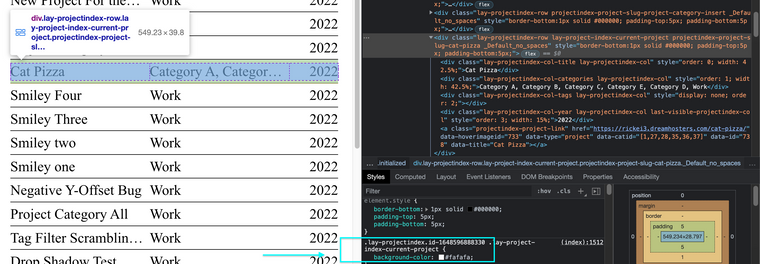
          The last project being grey indicates its the "current project"
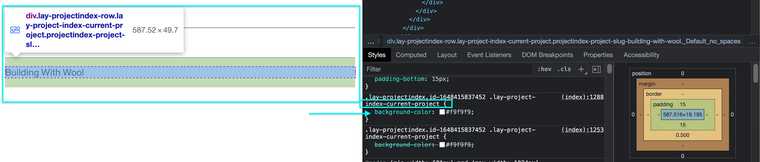
          Screen Shot 2022-03-30 at 12.31.19 PM.png

          I also have it:
          Screen Shot 2022-03-30 at 12.36.21 PM.png

          With the fullscreen slider is the custom cursor the yellow spray dot?


          Talk soon
          Richard
          alvarodozeA 1 Reply Last reply
          0
          • RichardR Richard

            Dear @alvarodoze

            Great to hear some issues were solved with the Cookies 🌻

            The last project being grey indicates its the "current project"
            Screen Shot 2022-03-30 at 12.31.19 PM.png

            I also have it:
            Screen Shot 2022-03-30 at 12.36.21 PM.png

            With the fullscreen slider is the custom cursor the yellow spray dot?


            Talk soon
            Richard
            alvarodozeA
            alvarodozeA
            alvarodoze
            wrote on last edited by
            #5

            Hi @Richard,

            • And is there any way you can uncheck the grey box and make it the same as the other one?
            • With the fullscreen slider I would like to have some custom arrows. That indicate you can scroll up or down and the spray dot when you hover each project.

            Thank you

            1 Reply Last reply
            0
            • RichardR
              RichardR
              Richard
              Global Moderator
              wrote on last edited by
              #6

              Dear @alvarodoze

              " is there any way you can uncheck the grey box and make it the same as the other one?"

              This is defined by the Active Background Color setting when editing a Project index:

              Settings:
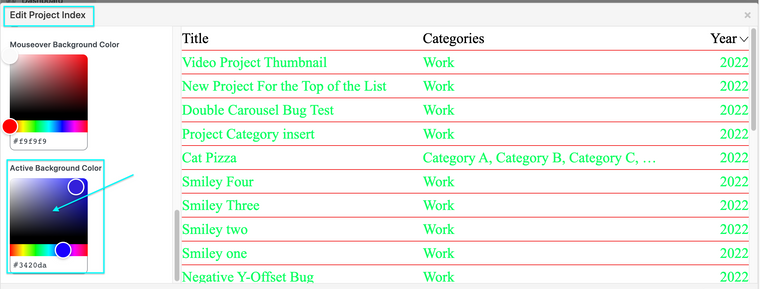
              Screen Shot 2022-04-03 at 6.49.15 PM.png

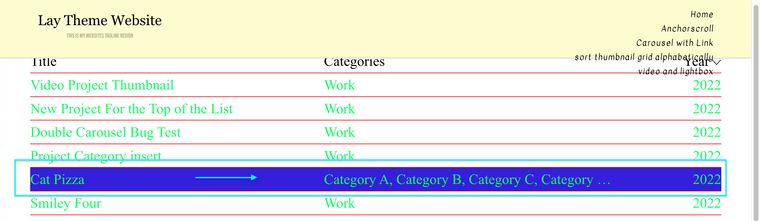
              Result:
              Screen Shot 2022-04-03 at 6.48.49 PM.png

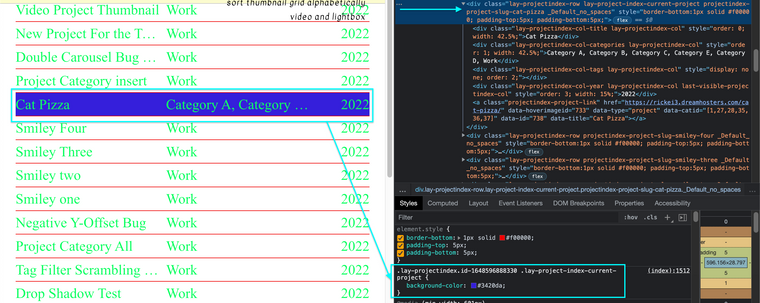
              Code:
              Screen Shot 2022-04-03 at 6.50.23 PM.png

              .lay-project-index-current-project {
                 background-color: #3420da;
              }
              

              "With the fullscreen slider I would like to have some custom arrows" ... "That indicate you can scroll up or down"

              Do the following settings help you?
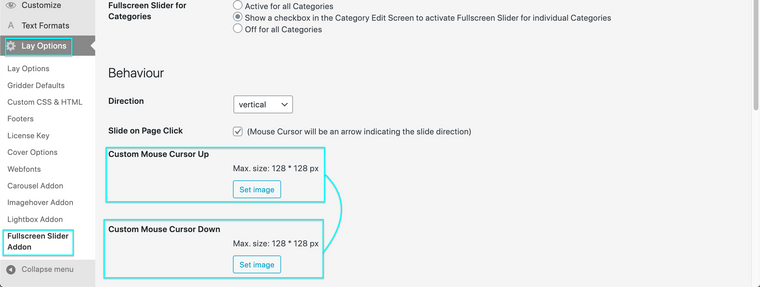
              Screen Shot 2022-04-03 at 6.57.01 PM.png

              http://laythemeforum.com/topic/5190/svg-cursors-fix/2


              "the spray dot when you hover each project."

              A custom cursor on hover, do any of these links help?

              • http://laythemeforum.com/topic/5169/custom-cursor-issues
              • http://laythemeforum.com/topic/5121/css-custom-cursor-issue
              • http://laythemeforum.com/topic/824/custom-cursor-pointer/8

              Best wishes ✨
              Richard

              1 Reply Last reply
              0

              Hello! It looks like you're interested in this conversation, but you don't have an account yet.

              Getting fed up of having to scroll through the same posts each visit? When you register for an account, you'll always come back to exactly where you were before, and choose to be notified of new replies (either via email, or push notification). You'll also be able to save bookmarks and upvote posts to show your appreciation to other community members.

              With your input, this post could be even better 💗

              Register Login
              Reply
              • Reply as topic
              Log in to reply
              • Oldest to Newest
              • Newest to Oldest
              • Most Votes


              Online Users
              Forgot your key, lost your files, need a previous Lay Theme or Addon version? Go to www.laykeymanager.com
              laytheme.com
              • Login

              • Don't have an account? Register

              • Login or register to search.
              • First post
                Last post
              0
              • Recent
              • Tags
              • Popular
              • Users
              • Search