Skip to content
  • Recent
  • Tags
  • Popular
  • Users
  • Search
Skins
  • Light
  • Brite
  • Cerulean
  • Cosmo
  • Flatly
  • Journal
  • Litera
  • Lumen
  • Lux
  • Materia
  • Minty
  • Morph
  • Pulse
  • Sandstone
  • Simplex
  • Sketchy
  • Spacelab
  • United
  • Yeti
  • Zephyr
  • Dark
  • Cyborg
  • Darkly
  • Quartz
  • Slate
  • Solar
  • Superhero
  • Vapor

  • Default (No Skin)
  • No Skin
Collapse

Lay Theme Forum

  1. Home
  2. General Discussion
  3. Laytheme crops my 16:9 videos

Laytheme crops my 16:9 videos

Scheduled Pinned Locked Moved General Discussion
11 Posts 3 Posters 1.5k Views 1 Watching
  • Oldest to Newest
  • Newest to Oldest
  • Most Votes
Reply
  • Reply as topic
Log in to reply
This topic has been deleted. Only users with topic management privileges can see it.
  • C
    C
    caromo
    wrote on last edited by
    #1

    I'm working on a new page and I noticed that my 16:9 videos were cropped automatically by Lay. I did a page with a screenshot of the video at the left i the video cropped by lay on the right to prove.

    https://carlesrodrigo.es/videos/

    Thank you

    1 Reply Last reply
    0
    • RichardR
      RichardR
      Richard
      Global Moderator
      wrote on last edited by
      #2

      Dear @caromo

      Thank you for the clear testing 👍
      I recreated your video on my test site:

      https://rickei3.dreamhosters.com/video-crop-test/

      You can see that if the video has enough room it will be the correct ratio but if needed it will crop to fit it's spacing within a Gridder Layout. I will forward to Armin to make sure this if this intended or not ✅


      Best wishes & thank you for supporting Lay Theme @caromo ✨
      Richard
      1 Reply Last reply
      0
      • C
        C
        caromo
        wrote on last edited by
        #3

        Hey Richard, thank you for your quick reply.

        In your test site I see both cases are cropped too.

        I think this should be based on heigh not wide. If your put on a carrousel the same problem happens. And vertical videos too.

        Thanks,
        Carles

        1 Reply Last reply
        0
        • RichardR
          RichardR
          Richard
          Global Moderator
          wrote on last edited by Richard
          #4
          @caromo

          Thanks for the update Carles & for your patience with the cropped videos 🌝

          1 Reply Last reply
          0
          • C
            C
            caromo
            wrote on last edited by
            #5

            Hey @Richard still not conclusion with this?

            Thank you so much,
            Carles

            1 Reply Last reply
            0
            • RichardR
              RichardR
              Richard
              Global Moderator
              wrote on last edited by
              #6

              Dear Carles

              @caromo

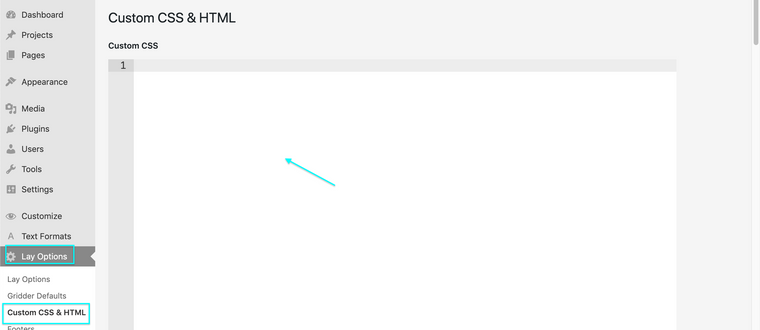
              Please insert this code into:
              Screen Shot 2021-11-10 at 2.05.24 PM.png

              Lay Options > Custom CSS & HTML > Custom CSS >

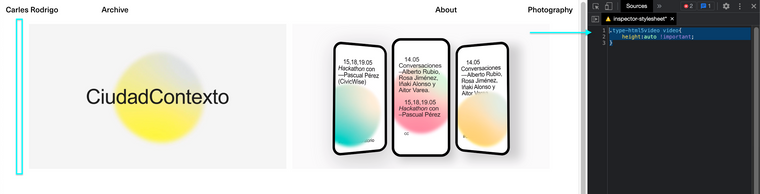
              .type-html5video video{
                  height:auto !important;
              }
              

              Result:
              Screen Shot 2022-04-16 at 4.33.10 PM.png

              Let me know if this works for you Carles as a temporary fix 🌝


              Best
              Richard
              1 Reply Last reply
              0
              • C
                C
                caromo
                wrote on last edited by
                #7

                @Richard, thank you for your answer!

                Well it works, but the space of the video is the same as before, so you can see under the video a blank space and the sound control is when it was placed without this code...

                Is a bit weird...

                https://carlesrodrigo.es/videos/

                1 Reply Last reply
                0
                • arminunruhA
                  arminunruhA
                  arminunruh
                  Global Moderator
                  wrote on last edited by
                  #8

                  hey!

                  so it seems that wordpress gets the wrong sizes for videos sometimes.

                  is there any way you can export that video again and use a different size, like the aspect ratio can stay the same but try and export the video with a different width, maybe a standard one like 1280px.
                  or try and convert the video somehow.

                  i think the issue is with the video file itself.

                  1 Reply Last reply
                  0
                  • C
                    C
                    caromo
                    wrote on last edited by
                    #9

                    Yes, something is happening with videos! I cropped with 1920x1080 and something happened! But a video from stock works well!

                    Don't understand at all... will search more info!

                    1 Reply Last reply
                    0
                    • C
                      C
                      caromo
                      wrote on last edited by
                      #10

                      Hey,

                      First of all, thank you for your help... but yes the video was not correctly exported, so was our fault!

                      Sorry for the inconvenience.

                      Best!

                      1 Reply Last reply
                      0
                      • RichardR
                        RichardR
                        Richard
                        Global Moderator
                        wrote on last edited by
                        #11

                        Thank you for coming back and updating @caromo have a wonderful day 🌻


                        Best
                        Richard
                        1 Reply Last reply
                        0

                        Hello! It looks like you're interested in this conversation, but you don't have an account yet.

                        Getting fed up of having to scroll through the same posts each visit? When you register for an account, you'll always come back to exactly where you were before, and choose to be notified of new replies (either via email, or push notification). You'll also be able to save bookmarks and upvote posts to show your appreciation to other community members.

                        With your input, this post could be even better 💗

                        Register Login
                        Reply
                        • Reply as topic
                        Log in to reply
                        • Oldest to Newest
                        • Newest to Oldest
                        • Most Votes


                        Online Users
                        M
                        michael_vvc
                        C
                        craigfeldspar
                        Forgot your key, lost your files, need a previous Lay Theme or Addon version? Go to www.laykeymanager.com
                        laytheme.com
                        • Login

                        • Don't have an account? Register

                        • Login or register to search.
                        • First post
                          Last post
                        0
                        • Recent
                        • Tags
                        • Popular
                        • Users
                        • Search