Menu Display
-
 Hi !
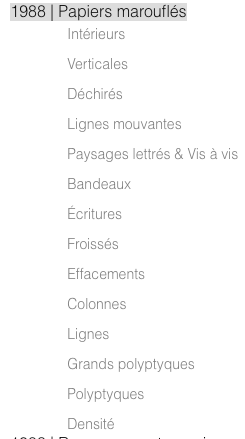
Hi !My client has built a second navigation menu appearing on the page called "Oeuvres" but she wants it to appear all the time and not when hovering on "1988 | Papiers marouflés". It used to appear all the time without the hover effect, but since we updated to the latest version of laytheme, it seems to have changed.
I can see in the CSS that I could remove the hover effect but I can't find the access to the CSS files in appearance > CSS files as nothing shows. Do you have any idea how to fix that issue or help me find the CSS files ? It is not showing in the custom CSS section in the laytheme module.
Cheers !
-
actually there is no option to always have the submenu displayed
you must have used custom css to display it
u can use the custom css:
.sub-menu{
display: block!important;
}
in lay options → custom css & html
you can also try this setting "show submenu on" → click
maybe u like that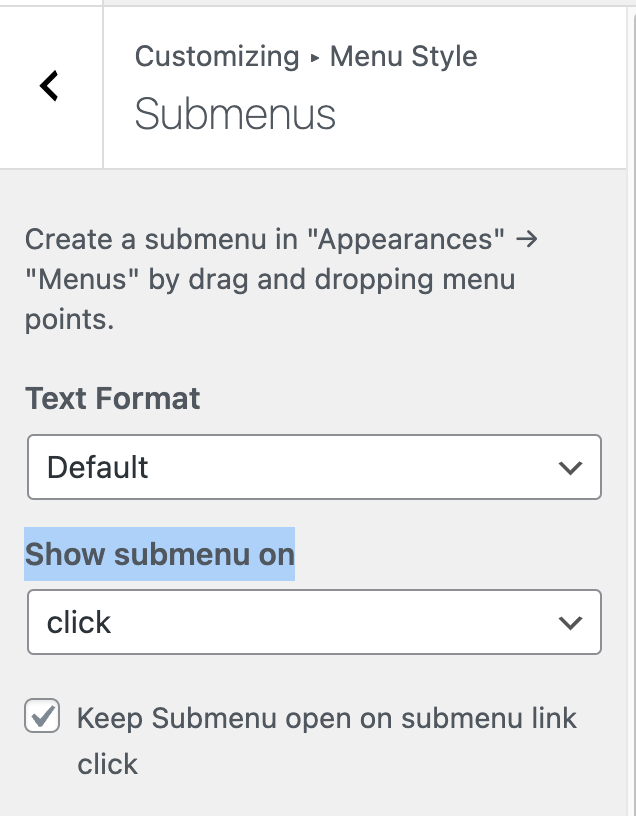
-
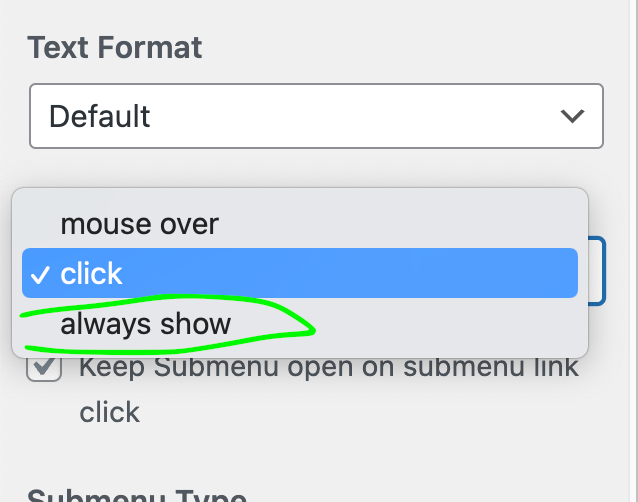
but also i will include this option for the next update and you should use that so the spacing works correctly:

Hello! It looks like you're interested in this conversation, but you don't have an account yet.
Getting fed up of having to scroll through the same posts each visit? When you register for an account, you'll always come back to exactly where you were before, and choose to be notified of new replies (either via email, or push notification). You'll also be able to save bookmarks and upvote posts to show your appreciation to other community members.
With your input, this post could be even better 💗
Register Login