Index: how to disable links yet keep image hover?
-
Hello!
I'm looking for a way (or CSS line) to be able to deactivate index project clicks, yet keep the img hover functionnality.
The "pointer-events: none;" unfortunately disables the image hover and only shows the list.
Rather than having specific projects that are not clickable for reasons of confidentiality, I will have normal visible images hovering on public projects and blurred images on private projects, but would still like to have the project names displayed, as it includes important clients.
Would anybody have the trick or CSS I'm looking for?
-
javascript.
in lay options → custom head content
<script>
jQuery(document).on('.projectindex-project-slug-elementgrid-3 a', 'click', function(e)){
e.preventDefault();
e.stopPropagation();
return;
});
</script>
css
.projectindex-project-slug-elementgrid-3 a{
cursor: default;
}
replace "projectindex-project-slug-elementgrid-3" with your correct slug
in chrome, right click the project index link, choose inspect element.
find the correct slug for the link:
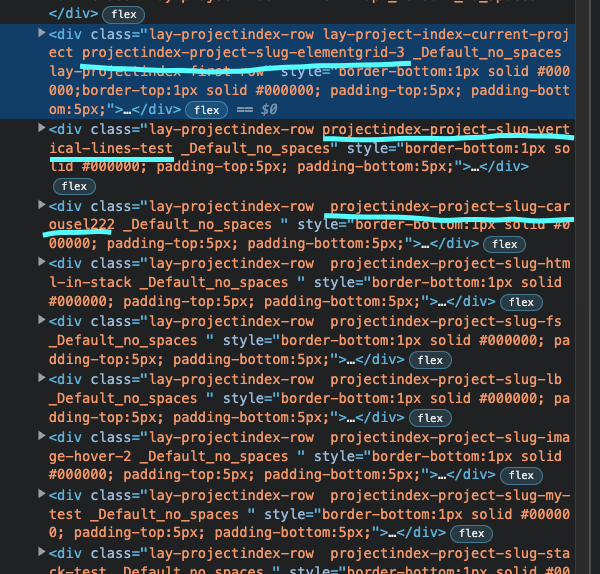
-
javascript.
in lay options → custom head content
<script>
jQuery(document).on('.projectindex-project-slug-elementgrid-3 a', 'click', function(e)){
e.preventDefault();
e.stopPropagation();
return;
});
</script>
css
.projectindex-project-slug-elementgrid-3 a{
cursor: default;
}
replace "projectindex-project-slug-elementgrid-3" with your correct slug
in chrome, right click the project index link, choose inspect element.
find the correct slug for the link:
This post is deleted! -
 A arminunruh referenced this topic on
-
@arminunruh said in Index: how to disable links yet keep image hover?:
<script>
jQuery(document).on('.projectindex-project-slug-elementgrid-3 a', 'click', function(e)){
e.preventDefault();
e.stopPropagation();
return;
});
</script>Hey! Unfortunately this doesn't seem to work anymore :'( the image hover works, but the stopPropagation doesn't seem to trigger down, as the chosen project is still clickable. Any workaround (I'm not javascript proficient enough...)?
-
@arminunruh said in Index: how to disable links yet keep image hover?:
<script>
jQuery(document).on('.projectindex-project-slug-elementgrid-3 a', 'click', function(e)){
e.preventDefault();
e.stopPropagation();
return;
});
</script>Hey! Unfortunately this doesn't seem to work anymore :'( the image hover works, but the stopPropagation doesn't seem to trigger down, as the chosen project is still clickable. Any workaround (I'm not javascript proficient enough...)?
I've added the following:
.projectindex-project-slug-example a:active {
cursor: default;
}.projectindex-project-slug-example a:hover {
cursor: default;
pointer-events:none;
}It kinda works, but the hovering images now flicker in an unusable way, unless your mouse pointer doesn't move. I think things are overlapping (z-index) and causes the flicker, but I don't know what exactly.
Maybe you'd be able to see why better than me :)
-
well, i should probably just add a feature for this one day
maybe sth in your code is wrong and thats why it doesn't work. do u have a link
always post a link to where the problem is
-
well, i should probably just add a feature for this one day
maybe sth in your code is wrong and thats why it doesn't work. do u have a link
always post a link to where the problem is
@arminunruh just a quick update to announce I've finally been able to de-activate pointer events while keeping the hover image feature.
Basically, there was an obvious conflict (the glitch part) between:
.projectindex-project-slug-example a:active {
cursor: default;
}and
.projectindex-project-slug-example a:hover {
cursor: default;
pointer-events:none;
}So I just moved the pointer-events:none; to the active state of the project slug link class while keeping the default uploaded cursor design. And now it works!
-
ok nice!!

Hello! It looks like you're interested in this conversation, but you don't have an account yet.
Getting fed up of having to scroll through the same posts each visit? When you register for an account, you'll always come back to exactly where you were before, and choose to be notified of new replies (either via email, or push notification). You'll also be able to save bookmarks and upvote posts to show your appreciation to other community members.
With your input, this post could be even better 💗
Register Login