How to put an image, video or carousel, under a paragraph of text
-
Hello, everyone. I have a query, to see if someone can help me. I would like to know how to put a text on an image, carousel or video, of the size that I decide, without the need to use the "use browser height for row height" tool. Thank you very much in advance.
An example:

-
you can right click a row and choose "use custom row height"
and then in that row you can put things on top of each other too
-
you can right click a row and choose "use custom row height"
and then in that row you can put things on top of each other too
@arminunruh said in How to put an image, video or carousel, under a paragraph of text:
you can right click a row and choose "use custom row height"
and then in that row you can put things on top of each other tooHi again.
When I right click I see this: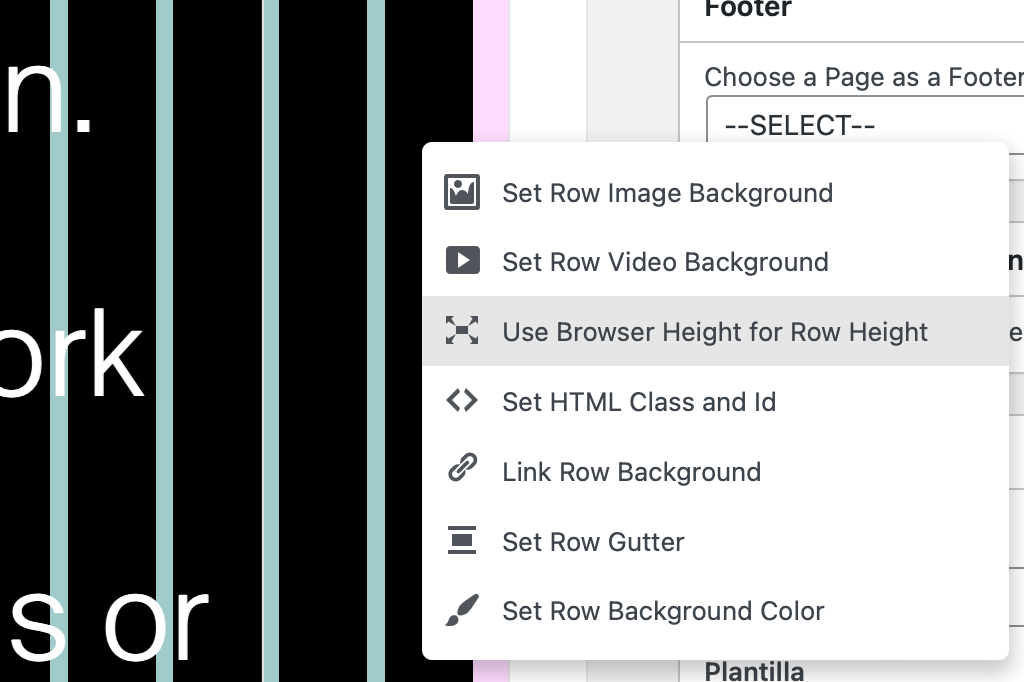
I don't see the option "use custom row height"
-
@arminunruh said in How to put an image, video or carousel, under a paragraph of text:
you can right click a row and choose "use custom row height"
and then in that row you can put things on top of each other tooHi again.
When I right click I see this:I don't see the option "use custom row height"
@fredyatb said in How to put an image, video or carousel, under a paragraph of text:
@arminunruh said in How to put an image, video or carousel, under a paragraph of text:
you can right click a row and choose "use custom row height"and then in that row you can put things on top of each other too
Hi again.
When I right click I see this:I don't see the option "use custom row height"
where can i customize height row?
-
you need to update lay theme to see it
-
you need to update lay theme to see it
@arminunruh Good morning. I have already updated the template. Now I can click on a row and choose "use custom row height", but the image is in front of the text. I want it to stay behind the text.

-
ah yea
you need to give the text a css class like
"foreground"
(right click element and choose "set html class and id")
then in your css:
.foreground{
z-index: 10;
} -
ah yea
you need to give the text a css class like
"foreground"
(right click element and choose "set html class and id")
then in your css:
.foreground{
z-index: 10;
}@arminunruh said in How to put an image, video or carousel, under a paragraph of text:
ah yea
you need to give the text a css class like
"foreground"
(right click element and choose "set html class and id")
then in your css:
.foreground{
z-index: 10;
}Okey, i'll try it.
Thanks:)

Hello! It looks like you're interested in this conversation, but you don't have an account yet.
Getting fed up of having to scroll through the same posts each visit? When you register for an account, you'll always come back to exactly where you were before, and choose to be notified of new replies (either via email, or push notification). You'll also be able to save bookmarks and upvote posts to show your appreciation to other community members.
With your input, this post could be even better 💗
Register Login