Skip to content
  • Recent
  • Tags
  • Popular
  • Users
  • Search
Skins
  • Light
  • Brite
  • Cerulean
  • Cosmo
  • Flatly
  • Journal
  • Litera
  • Lumen
  • Lux
  • Materia
  • Minty
  • Morph
  • Pulse
  • Sandstone
  • Simplex
  • Sketchy
  • Spacelab
  • United
  • Yeti
  • Zephyr
  • Dark
  • Cyborg
  • Darkly
  • Quartz
  • Slate
  • Solar
  • Superhero
  • Vapor

  • Default (No Skin)
  • No Skin
Collapse

Lay Theme Forum

  1. Home
  2. Bug Reports
  3. Problem adding .woff Fonts

Problem adding .woff Fonts

Scheduled Pinned Locked Moved Bug Reports
7 Posts 3 Posters 1.1k Views 1 Watching
  • Oldest to Newest
  • Newest to Oldest
  • Most Votes
Reply
  • Reply as topic
Log in to reply
This topic has been deleted. Only users with topic management privileges can see it.
  • M
    M
    monoflop
    wrote on last edited by
    #1

    I have a problem adding .woff Fonts to Laytheme Webfonts. I can upload TTF, WOFF and WOFF2 files into the media library, without any problems, but when it comes to adding webfonts via Lay Options it doesn't recognise WOFF files, but it recognises the TTF and WOFF2 files. I tried this with different fonts too and the same issue occurred. It doesn't seem to be the typical Wordpress MIME upload problem.

    T 1 Reply Last reply
    0
    • M monoflop

      I have a problem adding .woff Fonts to Laytheme Webfonts. I can upload TTF, WOFF and WOFF2 files into the media library, without any problems, but when it comes to adding webfonts via Lay Options it doesn't recognise WOFF files, but it recognises the TTF and WOFF2 files. I tried this with different fonts too and the same issue occurred. It doesn't seem to be the typical Wordpress MIME upload problem.

      T
      T
      thomasmaier
      wrote on last edited by
      #2

      @monoflop You should add the webfonts not via the Media library directly but via the Lay Options > Webfonts menu to also be able to choose a nice name.

      But I also have found out that the woff/woff2 support is buggy at best (not totally cross-browser compatible for unknown reasons) and ttf is the only way. So my usual way is to convert any kind of font format to ttf before uploading it. I have no idea why otf is restricted which would be my first choice usually.

      1 Reply Last reply
      0
      • M
        M
        monoflop
        wrote on last edited by
        #3

        I added the fonts via Lay Options > Webfonts, but this also opens the Media Library uploader. The media library also recognizes the file type as a font, but there is no way to add the font to Lay Options or use it in a text format.

        1 Reply Last reply
        0
        • arminunruhA
          arminunruhA
          arminunruh
          Global Moderator
          wrote on last edited by
          #4

          can you send your website address, /wp-admin/ username and password and a link to this topic to info@laytheme.com?

          1 Reply Last reply
          0
          • M
            M
            monoflop
            wrote on last edited by
            #5

            Hi @arminunruh
            At the moment I'm developing the website offline with Local WP, so I can't really send you a link. Anything also that I could try to make LayTheme recognize Woff fonts? The Media Library recognizes them as fonts btw, file format (MIME Tyep) is font/woff
            Thanks

            1 Reply Last reply
            0
            • M
              M
              monoflop
              wrote on last edited by
              #6

              I did a little more testing and debugging for this WOFF Font problem and I really hope someone can help me to figure it out.
              The upload and Wordpress MIME Type recognition is not the problem and works with TTF, WOFF and WOFF2 Fonts.
              But the Laytheme fontsmanager just recognizes the Type correctly for TTF and WOFF2 Fonts = "attachment/truetype" for TTF or "attachment/woff2" for WOFF2.
              For WOFF Fonts it just says "attachment/"
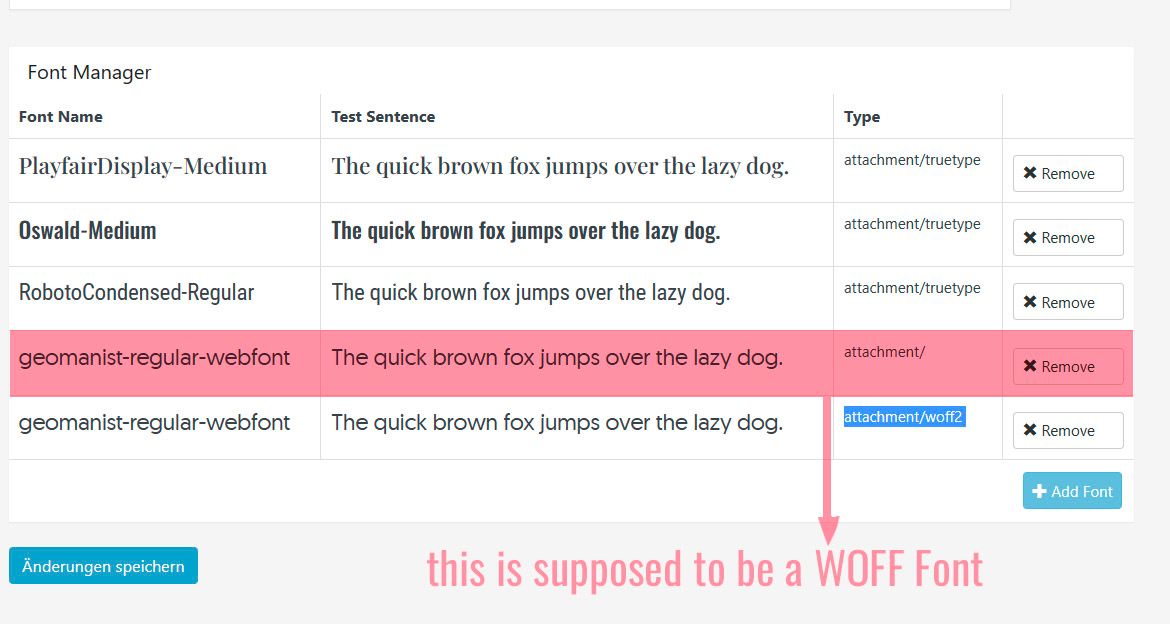
              Font_Problem.jpg

              1 Reply Last reply
              0
              • arminunruhA
                arminunruhA
                arminunruh
                Global Moderator
                wrote on last edited by
                #7

                when u upload ur website to a webhost i can help you if you send your /wp-admin/ login data

                for now you can google "woff to woff2" or "woff to ttf" to find file conversion websites

                1 Reply Last reply
                0

                Hello! It looks like you're interested in this conversation, but you don't have an account yet.

                Getting fed up of having to scroll through the same posts each visit? When you register for an account, you'll always come back to exactly where you were before, and choose to be notified of new replies (either via email, or push notification). You'll also be able to save bookmarks and upvote posts to show your appreciation to other community members.

                With your input, this post could be even better 💗

                Register Login
                Reply
                • Reply as topic
                Log in to reply
                • Oldest to Newest
                • Newest to Oldest
                • Most Votes


                Online Users
                A
                Anna_S
                Forgot your key, lost your files, need a previous Lay Theme or Addon version? Go to www.laykeymanager.com
                laytheme.com
                • Login

                • Don't have an account? Register

                • Login or register to search.
                • First post
                  Last post
                0
                • Recent
                • Tags
                • Popular
                • Users
                • Search