Site title and menu position next to each other at top left

-
Dear Laytheme team,
Is there a way to elegantly position the Site Title and Menu next to each other at the top left and control spacing between the two elements? Something like this:

Playing around with positioning in "Customize", I seem to be unable to figure it out or find a simple and elegant solution that nicely scales across different screen sizes.
Thanks so much in advance!
-
Dear Laytheme team,
Is there a way to elegantly position the Site Title and Menu next to each other at the top left and control spacing between the two elements? Something like this:
Playing around with positioning in "Customize", I seem to be unable to figure it out or find a simple and elegant solution that nicely scales across different screen sizes.
Thanks so much in advance!
@PTD hey, if you position your menu to 'top left' and then use, 'space left' to move it to the right.
-
@PTD hey, if you position your menu to 'top left' and then use, 'space left' to move it to the right.
@alasdair17 Thank you so much!
Yes, I've been adjusting the "space left" value, however, I was hoping to have a bit more control to havev consistent spacing between the two elements across different screen sizes.
Do you happen to know of an elegant solution to achieve this? -
hey man maybe dont use a site title, but in your menu just put your site title in there as a menu item
in appearance -> menus
go to screen options and enable "css classes"
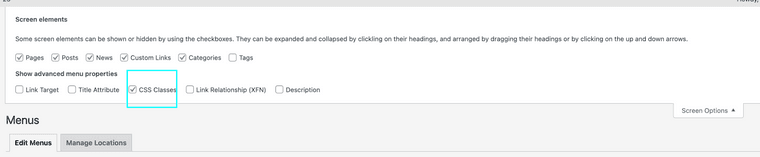
then add a css class to that menupoint and use css to control the spacing
you need to know some css in order to do this
-
hey man maybe dont use a site title, but in your menu just put your site title in there as a menu item
in appearance -> menus
go to screen options and enable "css classes"
then add a css class to that menupoint and use css to control the spacing
you need to know some css in order to do this
@arminunruh Thank you so much for the advice Armin!
Trying CSS for the past week, unfortunately I've been unable to achieve the desired result.Would you be willing to share what the code should look like to control the spacing between two menupoints horizontally?
Many thanks in advance!

Hello! It looks like you're interested in this conversation, but you don't have an account yet.
Getting fed up of having to scroll through the same posts each visit? When you register for an account, you'll always come back to exactly where you were before, and choose to be notified of new replies (either via email, or push notification). You'll also be able to save bookmarks and upvote posts to show your appreciation to other community members.
With your input, this post could be even better 💗
Register Login