Skip to content
  • Recent
  • Tags
  • Popular
  • Users
  • Search
Skins
  • Light
  • Brite
  • Cerulean
  • Cosmo
  • Flatly
  • Journal
  • Litera
  • Lumen
  • Lux
  • Materia
  • Minty
  • Morph
  • Pulse
  • Sandstone
  • Simplex
  • Sketchy
  • Spacelab
  • United
  • Yeti
  • Zephyr
  • Dark
  • Cyborg
  • Darkly
  • Quartz
  • Slate
  • Solar
  • Superhero
  • Vapor

  • Default (No Skin)
  • No Skin
Collapse

Lay Theme Forum

  1. Home
  2. Addons
  3. carousel with different width slides

carousel with different width slides

Scheduled Pinned Locked Moved Addons
15 Posts 2 Posters 2.3k Views 1 Watching
  • Oldest to Newest
  • Newest to Oldest
  • Most Votes
Reply
  • Reply as topic
Log in to reply
This topic has been deleted. Only users with topic management privileges can see it.
  • E
    E
    Elli 0
    wrote on last edited by
    #5

    here's is the current state.. with the problems described above..

    https://www.elena-gutierrez.de/

    1 Reply Last reply
    0
    • arminunruhA
      arminunruhA
      arminunruh
      Global Moderator
      wrote on last edited by
      #6

      can you send your website address, /wp-admin/ username and password and a link to this topic to info@laytheme.com?

      1 Reply Last reply
      0
      • E
        E
        Elli 0
        wrote on last edited by
        #7

        I figured out, it has something to do with the 'Do less sizing by JavaScript'.
        When I turn it off, the carousel works, but the pictures are stretched to the same width..

        1 Reply Last reply
        0
        • arminunruhA
          arminunruhA
          arminunruh
          Global Moderator
          wrote on last edited by arminunruh
          #8

          :)

          only one row!
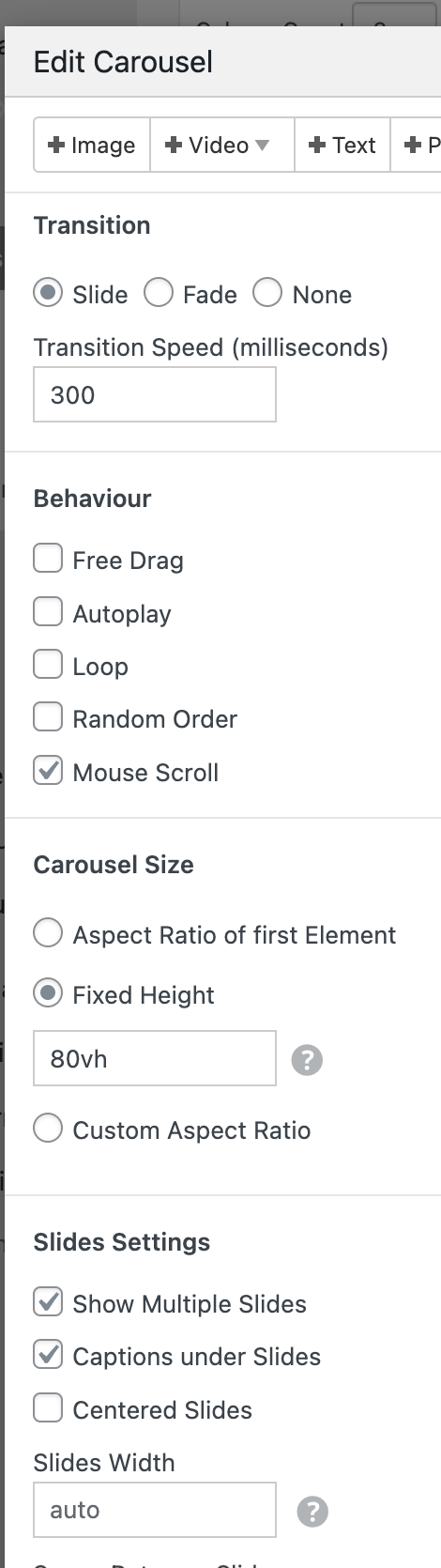
          right click → browser height row:
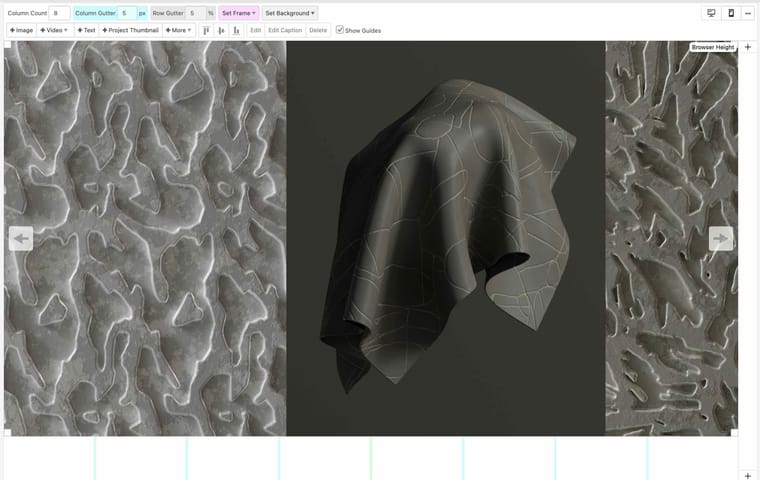
          Screenshot 2023-03-17 at 10.52.16.jpg

          settings:
          Screenshot 2023-03-17 at 10.53.27.png

          css:

          .lay-carousel-slide img{
              width: 100%!important;
              height: auto!important;
          }
          
          .lay-carousel-slide:nth-child(0){
              width: 30vw!important;
          }
          
          .lay-carousel-slide:nth-child(1){
              width: 40vw!important;
          }
          
          .lay-carousel-slide:nth-child(2){
              width: 30vw!important;
          }
          
          .lay-carousel-slide:nth-child(3){
              width: 35vw!important;
          }
          
          .lay-carousel-slide:nth-child(4){
              width: 30vw!important;
          }
          
          .lay-carousel-slide, .lay-carousel-slide a{
              display: flex;
              flex-direction: column;
          }
          .slide-inner{
              order: 2;
          }
          

          and go to lay options → carousel addon
          and enable "do less sizing by javascript"

          1 Reply Last reply
          0
          • E
            E
            Elli 0
            wrote on last edited by
            #9

            Hi! Now the first picture ist stretched out, the captions are on top and not on the button and the loop doesn't work..

            1 Reply Last reply
            0
            • arminunruhA
              arminunruhA
              arminunruh
              Global Moderator
              wrote on last edited by
              #10

              yea i needed to disable loop

              u wanted the captions on top

              remove this css if you dont want that:
              .lay-carousel-slide, .lay-carousel-slide a{
              display: flex;
              flex-direction: column;
              }
              .slide-inner{
              order: 2;
              }

              oh yea,
              add:

              .lay-carousel-slide:nth-child(0){
                  width: 40vw!important;
              }
              
              1 Reply Last reply
              0
              • E
                E
                Elli 0
                wrote on last edited by
                #11

                Hi!

                Now the captions are only on some pics visible and the first slide is cut off and does not scale..

                Is it possible to put the captions underneath the picture like before, make the pictures different hight (80vh etc.) and loop them? :D

                1 Reply Last reply
                0
                • arminunruhA
                  arminunruhA
                  arminunruh
                  Global Moderator
                  wrote on last edited by arminunruh
                  #12

                  turn on loop

                  delete all of the css

                  insert this css:

                  [data-swiper-slide-index="0"]{
                  width: 35vw!important;
                  }
                  
                  [data-swiper-slide-index="1"]{
                  width: 35vw!important;
                  }
                  
                  [data-swiper-slide-index="2"]{
                  width: 40vw!important;
                  }
                  
                  [data-swiper-slide-index="3"]{
                  width: 30vw!important;
                  }
                  
                  [data-swiper-slide-index="4"]{
                  width: 40vw!important;
                  }
                  
                  [data-swiper-slide-index="5"]{
                  width: 30vw!important;
                  }
                  
                  [data-swiper-slide-index="6"]{
                  width: 35vw!important;
                  }
                  
                  
                  .lay-carousel-slide img{
                      width: 100%!important;
                      height: auto!important;
                  }
                  

                  is it possible to put the captions underneath the picture like before

                  please read my answers more carefully

                  no we cant make them different heights
                  we can only make them different widths, which will change the heights

                  if you have more than 6 slides, add more css.

                  for example if u have 8 slides, add more css like this:

                  [data-swiper-slide-index="7"]{
                  width: 30vw!important;
                  }
                  
                  [data-swiper-slide-index="8"]{
                  width: 35vw!important;
                  }
                  
                  1 Reply Last reply
                  0
                  • E
                    E
                    Elli 0
                    wrote on last edited by
                    #13

                    sorry it's not working

                    1 Reply Last reply
                    0
                    • arminunruhA
                      arminunruhA
                      arminunruh
                      Global Moderator
                      wrote on last edited by
                      #14

                      sorry elena, im in a rush so i made 2 mistakes.

                      also you forgot to activate the "loop" feature, please read my instructions more carefully.

                      this is the correct css. i put the css into your website and now it works.

                      [data-swiper-slide-index="0"]{
                      width: 35vw!important;
                      }
                      
                      [data-swiper-slide-index="1"]{
                      width: 35vw!important;
                      }
                      
                      [data-swiper-slide-index="2"]{
                      width: 40vw!important;
                      }
                      
                      [data-swiper-slide-index="3"]{
                      width: 30vw!important;
                      }
                      
                      [data-swiper-slide-index="4"]{
                      width: 40vw!important;
                      }
                      
                      [data-swiper-slide-index="5"]{
                      width: 30vw!important;
                      }
                      
                      [data-swiper-slide-index="6"]{
                      width: 35vw!important;
                      }
                      
                      .slide-inner{
                          height: auto!important;
                      }
                      
                      .lay-carousel-slide img{
                          width: 100%!important;
                          height: auto!important;
                      }
                      
                      .lay-carousel-slide{
                          display: flex;
                          flex-direction: column;
                      }
                      
                      1 Reply Last reply
                      0
                      • E
                        E
                        Elli 0
                        wrote on last edited by
                        #15

                        thank you so much!

                        1 Reply Last reply
                        0

                        Hello! It looks like you're interested in this conversation, but you don't have an account yet.

                        Getting fed up of having to scroll through the same posts each visit? When you register for an account, you'll always come back to exactly where you were before, and choose to be notified of new replies (either via email, or push notification). You'll also be able to save bookmarks and upvote posts to show your appreciation to other community members.

                        With your input, this post could be even better 💗

                        Register Login
                        Reply
                        • Reply as topic
                        Log in to reply
                        • Oldest to Newest
                        • Newest to Oldest
                        • Most Votes


                        Online Users
                        Forgot your key, lost your files, need a previous Lay Theme or Addon version? Go to www.laykeymanager.com
                        laytheme.com
                        • Login

                        • Don't have an account? Register

                        • Login or register to search.
                        • First post
                          Last post
                        0
                        • Recent
                        • Tags
                        • Popular
                        • Users
                        • Search