adding Extra columns in project index
-
Re: Project Index – adding extra header and columns?
Hi Armin,
Thank you for the project index feature, which is working great!
I have the same issue that joehales was talking about in the topic I quote above:
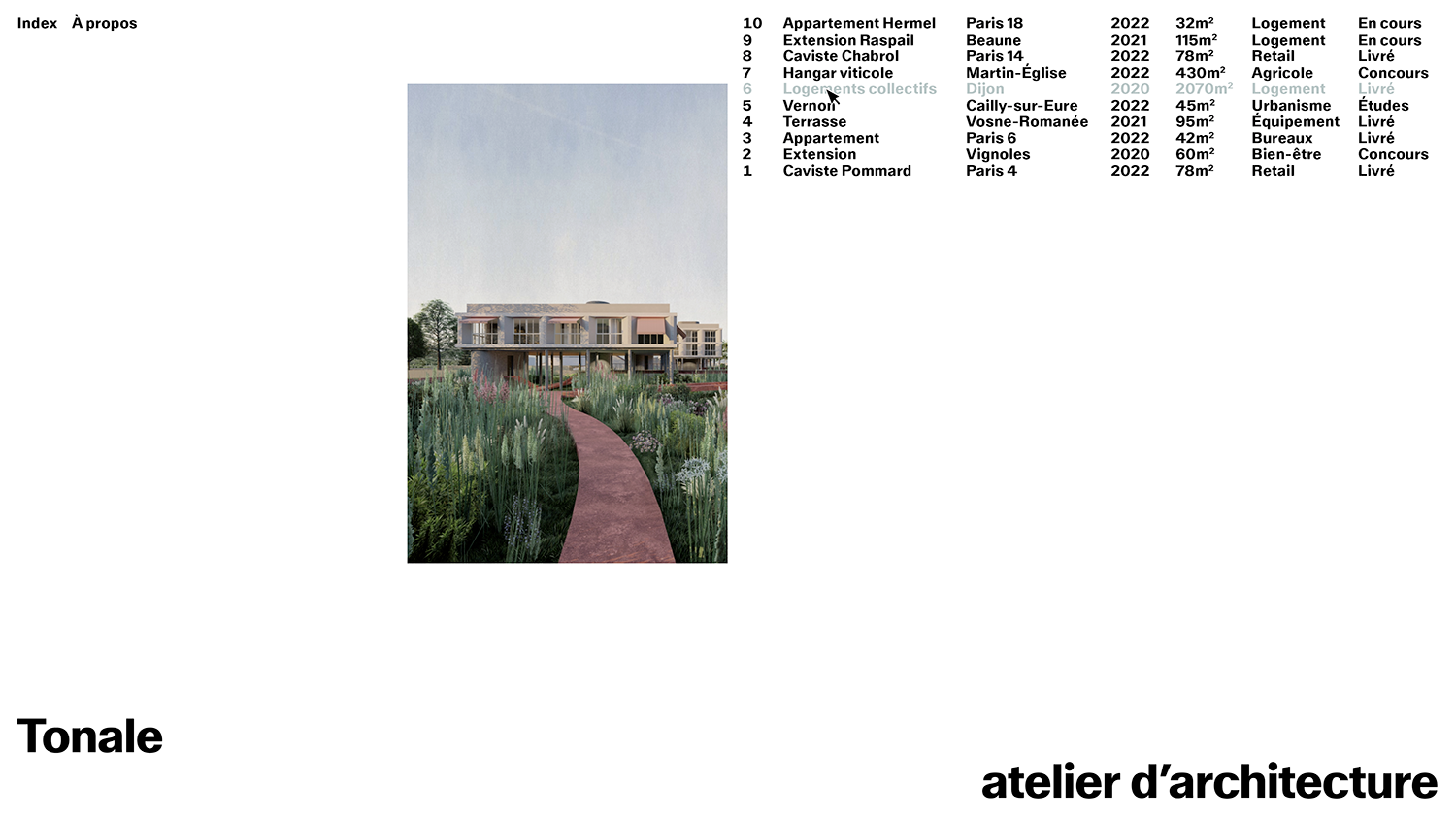
I would like to add more categories to the project index, like in the example below.Is there a way to achieve this?
Here is the website I'm working on (in progress) if you want to have a look: https://tonale-architecture.fr/index/
For the moment the "Tags" column contains the columns I would like to add.Thanks!
-
so you're saying you want another column added to the projext index element right?
like another form of category or tagsmmh yea i should code that feature one day
for now i need to work on other things :/ -
so you're saying you want another column added to the projext index element right?
like another form of category or tagsmmh yea i should code that feature one day
for now i need to work on other things :/@arminunruh
Yes, that's exactly it!
In theory, this would mean being able to assign other kinds of 'tags' to a project and being able to display the corresponding columns in the project index element.
Great that you're interested in coding this feature :)
For now, I'll try to find another way :)
Thanks! -
As I said in my last post, I'm building a project index line by line, using the Imagehover feature in each HTML block.
I managed to get the design I wanted on Chrome, but the image appears on the wrong side on Safari : it's inside the list, when I want it outside (on the left), aligned on the middle of the page.
Is there a way to fix this bug?
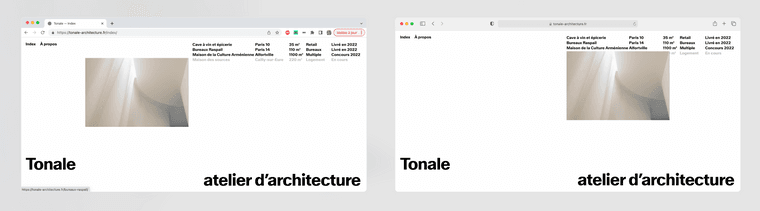
Here is the link to the page : https://tonale-architecture.fr/index/
The Image Position in Imagehover addon settings is set on "Stick to Link" and "Left outside".
Here is the HTML for one of the lines of the index :
<a  href="https://tonale-architecture.fr/cave-a-vin-et-epicerie/"
    data-id="148"
    data-title="Cave à vin et épicerie"
    data-catid="[31]"
    data-type="project"
    data-hoverimageid="144"
    data-hoverimagesmallsrc="http://tonale-architecture.fr/wp-content/uploads/2023/04/ANIMA_PKA_JBT-7-Web_2500p-265x397.jpg"
>
    <div class="tonaleindexline" width="100%">
                    <div id="tonaleindex-1">
                    Cave à vin et épicerie
                    </div>
                    <div id="tonaleindex-2">
                     Paris 10
                    </div>
                    <div id="tonaleindex-3">
                    35 m²
                    </div>
                    <div id="tonaleindex-4">
                    Retail
                    </div>
                    <div id="tonaleindex-5">
                    Livré en 2022
                    </div>
    </div>
</a>
And here is the custom CSS I added :
.navbar { z-index:0; } .lay-imagehover-region img { position: fixed; top: auto; right: auto; bottom: auto; left: auto; margin-top: 3px; margin-right: auto; margin-bottom: auto; margin-left: auto; padding-top:auto; padding-right: 50%; padding-bottom:auto; padding-left:auto; } #tonaleindex-1 { display: inline; float: left; width: 37%; font-size: 15px; text-align: left; } #tonaleindex-2 { display: inline; float: left; width: 20%; font-size: 15px; text-align: left; } #tonaleindex-3 { display: inline; float: left; width: 10%; font-size: 15px; text-align: left; } #tonaleindex-4 { display: inline; float: left; width: 15%; font-size: 15px; text-align: left; } #tonaleindex-5 { display: inline; float: left; width: 18%; font-size: 15px; text-align: left; } .tonaleindexline { display: inline; float: left; width: 100%; font-family: ABCWalterNeue-Fett; font-size: 15px; text-align: left; color: #000000; } .tonaleindexline:hover { color: #b1bebe; background-color: none; text-decoration: none; z-index: 50; } -
hey man its hard to get this untangled when ur custom css is active
can you send your website address, /wp-admin/ username and password and a link to this topic to info@laytheme.com?
-
hey man its hard to get this untangled when ur custom css is active
can you send your website address, /wp-admin/ username and password and a link to this topic to info@laytheme.com?
@arminunruh I just sent you a mail with all the informations. Thank you!!
-
@arminunruh I just sent you a mail with all the informations. Thank you!!
@victor789 How did you fix/manage your issue in the end? would be nice to know :)

Hello! It looks like you're interested in this conversation, but you don't have an account yet.
Getting fed up of having to scroll through the same posts each visit? When you register for an account, you'll always come back to exactly where you were before, and choose to be notified of new replies (either via email, or push notification). You'll also be able to save bookmarks and upvote posts to show your appreciation to other community members.
With your input, this post could be even better 💗
Register Login