Skip to content
  • Recent
  • Tags
  • Popular
  • Users
  • Search
Skins
  • Light
  • Brite
  • Cerulean
  • Cosmo
  • Flatly
  • Journal
  • Litera
  • Lumen
  • Lux
  • Materia
  • Minty
  • Morph
  • Pulse
  • Sandstone
  • Simplex
  • Sketchy
  • Spacelab
  • United
  • Yeti
  • Zephyr
  • Dark
  • Cyborg
  • Darkly
  • Quartz
  • Slate
  • Solar
  • Superhero
  • Vapor

  • Default (No Skin)
  • No Skin
Collapse

Lay Theme Forum

  1. Home
  2. General Discussion
  3. display categories & tags as text on project page

display categories & tags as text on project page

Scheduled Pinned Locked Moved General Discussion
10 Posts 3 Posters 544 Views 2 Watching
  • Oldest to Newest
  • Newest to Oldest
  • Most Votes
Reply
  • Reply as topic
Log in to reply
This topic has been deleted. Only users with topic management privileges can see it.
  • O Offline
    O Offline
    officear
    wrote on last edited by
    #1

    Hi Lay Theme Forum :)

    I tried to search the forum, but I couldn’t find any solution so far:

    I am looking for a way to display all assigned categories and tags (that have been set through the Wordpress CMS) of a project in form of a text box on the project’s page itself.

    See quick layout here:
    (I’m working locally, so I don’t have a link sorry!)

    layout.png
    Like an overview or little „legend“, in which fields I contributed to the projects.

    In other words: I would like to „grab“ the assigned categories and tags somehow, and display them as text.

    In the gridder elements „Project Index" and „Thumbnail Grid“ assigned tags and categories appear for example. I would need this kind of functionality, but just for the project that is currently shown and without any extras (no thumbnail images, no title, no other projects, no filter function, etc.)

    How can I achieve something like that? Custom code? Any workaround? Or am I missing something super obvious? haha

    I really hope someone can help me <3
    Thanks a lot and all the best
    oar

    1 Reply Last reply
    0
    • arminunruhA Offline
      arminunruhA Offline
      arminunruh
      Global Moderator
      wrote on last edited by
      #2

      i see

      can you try and find if there is a plugin for this that provides a shortcode for this

      then you can add a shortcode in +more → +shortcode

      maybe there's sth like that out there

      im writing this down, maybe this is a good feature for lay theme

      1 Reply Last reply
      0
      • O Offline
        O Offline
        officear
        wrote on last edited by
        #3

        @arminunruh

        thanks for your answer
        i will check the plugins out, and thanks for writing down the idea <3

        1 Reply Last reply
        1
        • mr_avinM Offline
          mr_avinM Offline
          mr_avin
          wrote on last edited by
          #4

          @officear did you find a tag-shortcode plugin? maybe you'd want to share the valuable info. thanks in advance!

          1 Reply Last reply
          0
          • arminunruhA Offline
            arminunruhA Offline
            arminunruh
            Global Moderator
            wrote on last edited by
            #5

            hello!

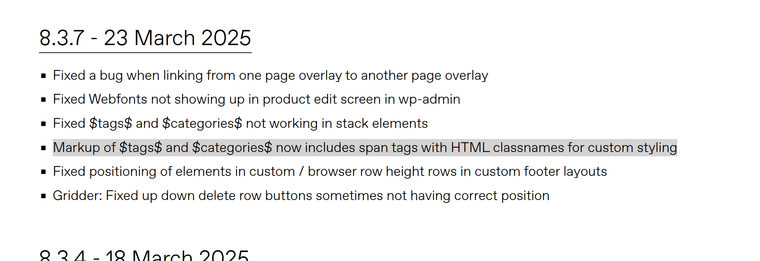
            image.png

            you can just write

            $tags$

            or

            $categories$

            into a text element, and on the frontend it will replace it with the actual tags and categories of the project <3

            1 Reply Last reply
            1
            • O Offline
              O Offline
              officear
              wrote on last edited by
              #6

              @arminunruh
              first a belated but huuuuuge thank you!
              so so cool that you really coded it into the theme <3 <3 <3

              i was wondering, if it’s possible to change the separator for the tags/categories in text from a comma to anything else? like you can in the project index style settings for example.

              I found the classes .lay-categories-in-text and .lay-category-in-text for styling, but i can’t influence the separator sign through the css, right?

              thanks in advance <3

              1 Reply Last reply
              0
              • arminunruhA Offline
                arminunruhA Offline
                arminunruh
                Global Moderator
                wrote on last edited by
                #7

                <span class="lay-tags-in-text"><span class="lay-tag-in-text">mynewtag!</span><span class="lay-tag-in-text-delimiter">, </span><span class="lay-tag-in-text">Orange</span><span class="lay-tag-in-text-delimiter">, </span><span class="lay-tag-in-text">110</span><span class="lay-tag-in-text-delimiter">, </span><span class="lay-tag-in-text">Pink</span><span class="lay-tag-in-text-delimiter">, </span><span class="lay-tag-in-text">Black</span><span class="lay-tag-in-text-delimiter">, </span><span class="lay-tag-in-text">Cyan</span><span class="lay-tag-in-text-delimiter">, </span><span class="lay-tag-in-text">Yellow</span></span>

                image.png

                if you look at the code, the , are in their own span with .lay-tag-in-text-delimiter

                so you can maybe write some custom css for it

                1 Reply Last reply
                0
                • arminunruhA Offline
                  arminunruhA Offline
                  arminunruh
                  Global Moderator
                  wrote on last edited by
                  #8

                  same for categories:

                  image.png

                  1 Reply Last reply
                  0
                  • arminunruhA Offline
                    arminunruhA Offline
                    arminunruh
                    Global Moderator
                    wrote on last edited by
                    #9

                    image.png

                    if u wanted it to look like that

                    u could for example use css like this

                    .lay-category-in-text-delimiter{
                        font-size: 0;
                    }
                    .lay-category-in-text-delimiter::before{
                        content: '';
                        width: 10px;
                        height: 10px;
                        background-color: black;
                        margin-left: 10px;
                        margin-right: 10px;
                        border-radius: 100%;
                        display: inline-block;
                        position: relative;
                        top: -2px;
                    }
                    
                    1 Reply Last reply
                    0
                    • O Offline
                      O Offline
                      officear
                      wrote on last edited by
                      #10

                      @arminunruh works perfectly – thank you so so much <3 <3 <3

                      1 Reply Last reply
                      0
                      Reply
                      • Reply as topic
                      Log in to reply
                      • Oldest to Newest
                      • Newest to Oldest
                      • Most Votes


                      I also code custom websites or custom Lay features.
                      💿 Email me here: 💿
                      info@laytheme.com

                      Our Web Development company: 100k.studio

                      Want to tip me? https://www.paypal.com/paypalme/arminunruh

                      Before you post:
                      1. When using a WordPress Cache plugin, disable it or clear your cache.
                      2. Update Lay Theme and all Lay Theme Addons
                      3. Disable all Plugins
                      4. Go to Lay Options → Custom CSS & HTML, click "Turn Off All Custom Code", click "Save Changes"

                      This often solves issues you might run into

                      When you post:
                      1. Post a link to where the problem is
                      2. Does the problem happen on Chrome, Firefox, Safari or iPhone or Android?
                      3. If the problem is difficult to explain, post screenshots / link to a video to explain it
                      Online Users
                      Forgot your key, lost your files, need a previous Lay Theme or Addon version? Go to www.laykeymanager.com
                      laytheme.com
                      • Login

                      • Don't have an account? Register

                      • Login or register to search.
                      • First post
                        Last post
                      0
                      • Recent
                      • Tags
                      • Popular
                      • Users
                      • Search