Web description/preview in google
-
hi @arminunruh hope all is great on your side!
I was wondering if you could help me with the following. I have looked at different descriptions within Laytheme Options but don't seem to find the right ones.
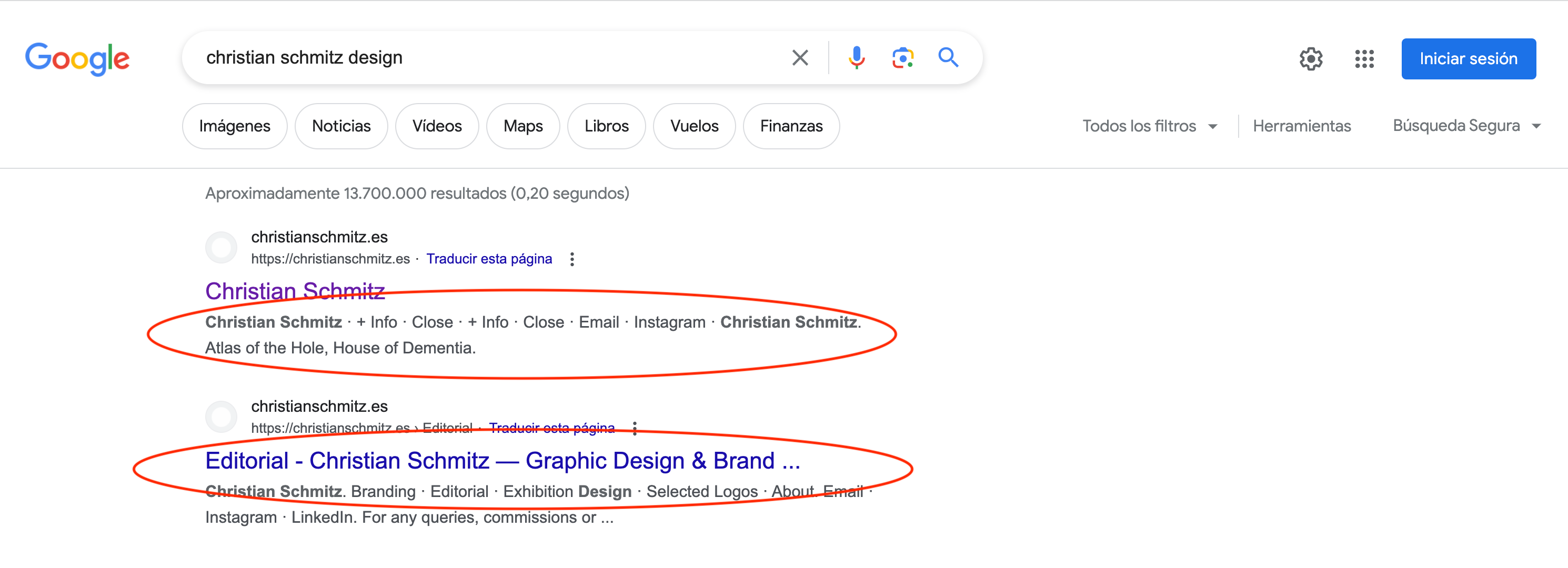
On the one hand, as you can see in the screenshot below, my website description on google seems to be all these separated words taken from my website, rather than the description/tagline I have indicated in laytheme. Is there a way of changing this?
On the other hand, also in the screenshot below, you can see another site appearing below with some other info: 'Editorial -Christian....'. Do you know how I can get rid of it so that there's only one link accessible and have a cleaner google presence?
Thanks so much for your help!

-
@cschm-tz said in Web description/preview in google:
On the other hand, also in the screenshot below, you can see another site appearing below with some other info: 'Editorial -Christian....'. Do you know how I can get rid of it so that there's only one link accessible and have a cleaner google presence?
not sure if you can remove one specific site, you can google this!
the description you enter in lay options →

it should show up there, unless its too short. it could take a few days to show up.
you could also use the plugin "yoast seo" and see if it works with that plugin
afaik the code for the website description of lay theme works correctly. i just looked at it and it works correctly
if you have the yoast seo plugin already installed, it will take the description of that plugin, it will overwrite lay theme's website description

Hello! It looks like you're interested in this conversation, but you don't have an account yet.
Getting fed up of having to scroll through the same posts each visit? When you register for an account, you'll always come back to exactly where you were before, and choose to be notified of new replies (either via email, or push notification). You'll also be able to save bookmarks and upvote posts to show your appreciation to other community members.
With your input, this post could be even better 💗
Register Login